
Our readers keep the lights on and the weekend projects moving. As an Amazon Associate, I earn from qualifying purchases.
Specs are compiled from manufacturer listings and verified buyer reviews and can change over time — please confirm the key details on the product page before buying.
A cramped desk is the real enemy of a home office. A full-size printer eats your workspace, and a cheap inkjet bleeds you dry on cartridges that dry out if you blink. A compact laser printer tucks into a corner, wakes instantly, and prints crisp black text without the cartridge-drying costs of an inkjet. The best compact lasers here pair a small footprint with automatic duplexing, reliable wireless, and per-page costs far below any inkjet.
I’m Rikta — the founder and writer behind FitlyFast. This guide is built by comparing the manufacturers’ published specifications and the patterns across verified customer reviews, so you get each pick’s real strengths and trade-offs instead of marketing spin.
Here’s the honest truth about your next desk upgrade: the compact laser printer you pick should fit your shelf, connect without a fight, and keep per-page costs low for years.
Our Picks at a Glance



How To Choose The Best Compact Laser Printer
Before you buy, understand what matters: laser printers use toner powder, not liquid ink, so they don’t dry out between uses. That makes them ideal for the home office that prints sporadically — you can leave a laser printer idle for months and it will still produce crisp pages.
Match the speed to your workflow
Speed is measured in pages per minute (ppm) for black-and-white printing. A 30 ppm machine handles a 30-page document in roughly a minute. If you print occasional forms and letters, anything above 27 ppm is plenty. If you’re printing full reports or client packets weekly, aim for 36 ppm or higher to avoid waiting at the machine.
Decide between print-only and all-in-one
A print-only laser keeps the footprint smallest and the price lowest. An all-in-one adds a flatbed scanner and copier in roughly the same footprint, which is worth it if you regularly scan or copy documents. The trade-off: more moving parts means slightly more that can go wrong, and a scan bed takes up depth on your desk.
Check the paper handling before you commit
The input tray capacity tells you how often you reload. A 150-sheet tray is fine for light home use; a 250-sheet tray suits a small office that prints in bursts. Also check for a manual feed slot, which lets you print on envelopes and specialty paper without swapping out your main stack.
Quick Comparison
| Model | Best For | Print Speed | Connectivity | Functions | Amazon |
|---|---|---|---|---|---|
| Brother HL-L2480DW★ Best Overall | Small offices (3-in-1) | 36 ppm | Dual-band Wi-Fi, Ethernet, USB | Print, Scan, Copy | Amazon |
| HP LaserJet M209dBest Value | USB-only simplicity | 30 ppm | USB only | Print Only | Amazon |
| Xerox B230Sleek Pick | Basic wireless home use | 36 ppm | Wi-Fi, Ethernet | Print Only | Amazon |
| Canon imageCLASS LBP172dw | Chromebook classrooms | 35 ppm | Wi-Fi, USB | Print Only | Amazon |
| HP LaserJet Pro 3001dw | Small teams (up to 7) | 35 ppm | Wi-Fi, Ethernet, Bluetooth | Print Only | Amazon |
| HP LaserJet Pro MFP 3101sdw | Small teams needing scan/copy | 40 ppm | Wi-Fi, Ethernet, USB | Print, Scan, Copy | Amazon |
| Brother MFC-L2820DW | Full office with fax | 34 ppm | Dual-band Wi-Fi, Ethernet, USB | Print, Scan, Copy, Fax | Amazon |
| Lexmark MS431dw | High-volume durability | 42 ppm | Wi-Fi, Ethernet, USB | Print Only | Amazon |
In-Depth Reviews
1. Brother HL-L2480DW
Our pick — 4.5★ from 600+ verified ratings; the strongest balance of quality and price.
The three-in-one that combines a laser printer, scanner, and copier in one compact footprint.
You get print, scan, and copy in one desk-friendly box because this Brother fits a flatbed scan glass into the same small footprint as a print-only model. It prints at 36 ppm (pages per minute) and auto-duplexes (flips the paper to print both sides automatically), so you cut paper waste on every two-sided job. Buyers call it “a little gem” that works from the start and delivers crisp, clear text; over 170 owners specifically praise its build quality and clean output.
The built-in 2.7-inch touchscreen makes navigation easy, and you can print from and scan to cloud apps like Google Drive, Dropbox, Evernote, and OneNote. Setup on Apple devices is easy, and the machine runs quietly while it works. Buyers report it’s still going strong after a year of use and nearing only its first cartridge end, which tells you the starter toner lasts.
The honest trade-off is wireless connectivity: some owners love it, others report the Wi-Fi dropping or being hard to establish. It also works with Amazon Alexa if you want voice-triggered printing jobs. Unlike the HP models that block third-party toner, this Brother accepts TN830 or TN830XL cartridges, and the Refresh subscription promises savings of up to 50% on genuine toner.
What wins owners over
- Fast 36 ppm engine plus automatic duplex saves paper
- Print, scan, and copy in one compact machine
- 2.7″ touchscreen for cloud printing and scanning
- Quiet operation and easy Apple device setup
- Works with Alexa for voice commands
The realistic caveats
- Wireless connectivity gets mixed reports — some struggle
- Starter cartridge won’t last as long as a standard TN830XL
Best for: home offices and small teams that want print, scan, and copy in one tidy unit without sacrificing speed.
Think twice if: you’re the type who needs rock-solid Wi-Fi the first try and hates troubleshooting a network.
2. HP LaserJet M209d
The wired-only speedster that skips Wi-Fi headaches entirely and keeps per-page costs at pennies.
This HP is a print-only machine that connects straight to your computer over USB — the USB cable comes in the box. That wired-only design is exactly why owners love it: no wireless setup, no dropped connections, just instant printing at 30 ppm with automatic two-sided output. Owners mention it works right away, and the speed is the headline — it prints two-sided quickly and handles multi-page projects without waiting.
At 13.98″D x 8.07″W x 11″H, it’s the shallowest footprint in this lineup, which makes it a natural fit for a narrow shelf or a corner nook. The smart-guided buttons and LCD display keep control simple. Owners say cartridges work out to pennies per page, which is the real cost story for anyone churning out documents.
The catch is operating-system compatibility: it works well on Windows 11 and on Unix/Linux/Mac via the hplip driver, but some Mac OS 12 or later users hit driver issues that HP support couldn’t resolve. It’s also strictly wired, so anyone printing from a phone or tablet across the room will need to look elsewhere. This printer is intended to work with HP cartridges only, and a firmware update will block third-party chips.
Why owners pick it
- Fast 30 ppm with the quickest two-sided speed in its class
- USB cable included — no network setup required
- Compact 13.98-inch depth fits tight shelves
- Low running cost at pennies per page
Know before you buy
- No wireless at all — phone printing isn’t possible
- Mac OS 12 or later users report driver headaches
- Blocks non-HP toner cartridges
Reach for this if: you want a dead-simple, USB-only workhorse on a Windows machine and don’t care about mobile printing.
Look elsewhere if: your household prints from phones or you’re on a newer Mac and want zero driver drama.
3. Xerox B230
Compact monochrome output with a white-and-blue design that stays out of a tight space.
Xerox brings its small-business pedigree to a 13.1-inch-deep body that prints 36 ppm and auto-duplexes to save paper. The headline is print quality — it’s the thing owners praise most, producing crisp black text without any ink subscription required. Setup is mobile-first: built-in Wi-Fi supports Apple AirPrint, Mopria Print Service, and Chromebook printing, with guided network pairing that gets you going without local IT support.
You can cut paper use with automatic two-sided printing and N-up printing (multiple pages per sheet), and the Green World Alliance program offers low-maintenance toner cartridge recycling. For a small business that needs dependable monochrome output in tight quarters, the B230 delivers a simple, compact package.
The recurring gripe is wireless reliability: some owners connect easily, while others report failed Wi-Fi and say the help desk told them a cable is needed. The fix is to hardwire it to your router via Ethernet, which installs cleanly on multiple PCs in minutes. If you need wireless that just works every single time, plan on running the cable.
Sharp output, soft wireless: print quality is what buyers rave about, and the Ethernet path is rock-solid — plan your network accordingly.
Grab it for: a basic home office that values crisp text and can run a cable to the router.
skip it if: wireless-only printing from across the house is your one and only setup option.
4. Canon imageCLASS LBP172dw

A Chromebook-friendly monochrome laser that breezes through 35 ppm with auto two-sided printing.
Canon targets this one squarely at home offices and classrooms: it’s Chromebook compatible so schoolwork prints without a fuss, and it prints on the go through the Canon PRINT app, Apple AirPrint, and Mopria Print Service. The engine runs at 35 ppm (pages per minute) and auto-duplexes to save paper on every double-sided job. Owners who got it running describe setup that took less than four minutes once the toner was in.
The 250-sheet standard cassette means you reload less often than with a 150-sheet tray, and it uses Canon Genuine Toner 072 in standard or high-capacity versions. The value pitch is the long game: owners note toner lasts far longer than inkjet cartridges and that a monochrome laser eliminates the constant ink-buying cycle entirely. It’s ENERGY STAR and EPEAT Silver rated, so it sips power when idle.
The honest warning: reliability is mixed in the review data, with some units failing after a few days and others working flawlessly. Setup gets mixed feedback too — the USB cable isn’t included, and the rear-port instructions are unclear, though the Canon setup tool for Windows 11 drivers works flawlessly once you find it. Auto-duplex printing itself draws consistent praise from owners.
A strong value, a mixed track record: when it works, owners love the speed and the toner economics; a few units show early failures, so buy where returns are easy.
Perfect for: families with Chromebooks that want low-cost black-and-white printing and don’t need scan or copy.
Not for: offices where the printer must never be down — reliability reports are too split to guarantee uptime.
5. HP LaserJet Pro 3001dw

A 35 ppm wireless workhorse sized for small teams of up to seven people.
HP built the 3001dw for small teams: it’s rated for up to seven people and prints professional-quality black-and-white documents at up to 35 ppm single-sided, with auto two-sided printing as standard. The first page lands in about 6.6 seconds, which owners notice immediately — they describe quick first-page response and sharp output. Intelligent Wi-Fi looks for the best connection to stay online, and it supports Microsoft, Mac, AirPrint, Android, and Chromebook devices.
Connectivity is generous: wireless plus Ethernet and Bluetooth, so a team can share it across the office without a dedicated server. HP Wolf Pro Security with customizable settings protects your data, which is a real concern for small businesses handling client documents. The 15.7″ x 14.4″ footprint is bigger than the true minis here but still compact enough for a shared desk.
The weak spot is Wi-Fi: customers note it’s almost impossible to connect reliably, with connections dropping after about two days and failing to reconnect. The workaround is Ethernet or USB, especially on Mac Silicon machines, and then print quality is excellent. Also note it works only with cartridges using original HP chips, and firmware updates will block third-party toner.
What the team gets
- Fast 35 ppm with a quick ~6.6 second first page
- Ethernet, Bluetooth, and Wi-Fi for shared teams
- HP Wolf Pro Security for data protection
- Auto duplex saves paper on every job
Where it stumbles
- Wi-Fi reliability is the most common complaint — hardwire it
- Blocks third-party toner cartridges
Best suited for: a small office that can wire it to the network and wants fast, secure, shared printing.
Not the one if: you demand flawless wireless and refuse to run a cable to the router.
6. HP LaserJet Pro MFP 3101sdw

The fastest all-in-one here, hitting 40 ppm with a 50-sheet auto document feeder.
For a small team that prints, scans, and copies, this MFP (multi-function printer) is the fastest engine in the lineup at 40 ppm black. It pairs that speed with a 250-sheet input tray and a 50-sheet auto document feeder (ADF), which feeds multi-page stacks for copy and scan jobs hands-free. Reviewers point out crisp copies that match the originals and a machine that’s quiet for its speed, with one owner noting it prints checks from QuickBooks reliably.
Wireless setup earns consistent praise here — everything on the connect path just works, reconnects after power outages, and pulls prints from a second floor without drama. The intuitive touchscreen and plug-and-play install have owners up and running fast, and aftermarket toner works without the firmware-block headaches some HP models cause, as long as you decline firmware updates.
The trade-off is paper handling at the margins: the auto feeder jams if you load more than about 25 sheets, and Wi-Fi drops occasionally even on this model — both fixable but worth knowing. The introductory toner yields around 1,000 pages, so plan a cartridge replacement sooner than you’d like. It’s built for small teams, so the footprint is bigger than the true compact machines here.
The strengths
- Fastest print speed in the list at 40 ppm
- 50-sheet auto document feeder for hands-free scanning
- Reliable wireless that reconnects after outages
- Sharp scans and copies that match originals
The trade-offs
- Auto feeder jams above ~25 sheets
- Starter toner only yields ~1,000 pages
Choose it for: a small office that prints, scans, and copies daily and wants the fastest engine on the list.
Pass on it if: you rarely scan or copy — you’d be paying for a document feeder you won’t use.
7. Brother MFC-L2820DW

The four-in-one that adds fax to print, scan, and copy in a space-saving shell.
This Brother is the most complete machine here: print, copy, scan, and fax in one compact footprint. It prints up to 36 ppm and scans at up to 23.6/7.9 ipm (images per minute) in black/color, with a 50-page auto document feeder for multi-page jobs. Owners describe setup that took about 20 minutes over Wi-Fi, USB, or Ethernet, and they praise the print and scan quality for text work.
The 2.7-inch touchscreen mirrors the L2480DW’s cloud capabilities, printing from and scanning to Google Drive, Dropbox, Evernote, and OneNote. Dual-band wireless (2.4GHz and 5GHz), Ethernet, and USB give you flexibility across devices. Owners coming from HP love that there’s no app to fight with — it just doesn’t get glitchy or seize up, and it supports Linux, Windows 10/11, and Android devices wirelessly.
A few owners note the scan function is single-page only without an ADF, and the fax feature often goes unused in a modern office. Wireless connectivity gets mixed reviews, with some reporting issues, though the Ethernet path is bulletproof. The MFC-L2820DW uses the same TN830 or TN830XL toner as the L2480DW, and the Refresh subscription promises up to 50% savings on genuine toner.
Why it stands out
- Print, copy, scan, and fax in one compact unit
- 50-page auto document feeder for stacks
- Fast 36 ppm output with auto duplex
- 2.7″ touchscreen with cloud app support
Keep in mind
- Scanning is single-page without the ADF
- Wireless reports are split — Ethernet is steadier
Ideal for: a traditional office that still faxes and wants every function in one tidy machine.
Overkill for: anyone who hasn’t sent a fax in years — a print-and-scan model costs less.
8. Lexmark MS431dw
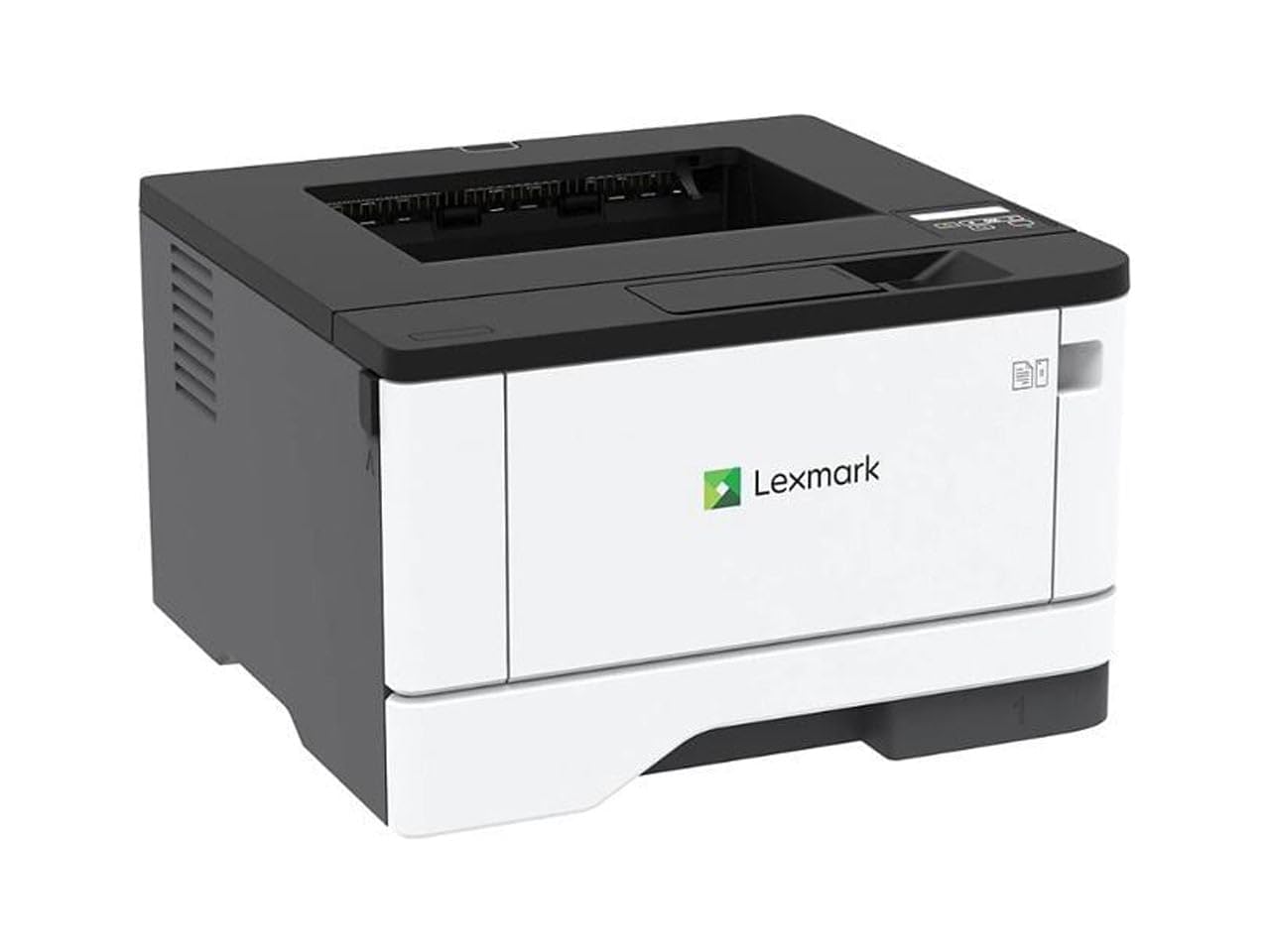
A steel-framed speed demon at 42 ppm, built for high-volume durability.
Lexmark builds this one for the heavy lifter: a steel frame and long-life imaging components mean it’s rated for a recommended monthly volume of 800 to 8,000 pages. It’s the fastest printer in this list at 42 ppm, with a first-page time of just 5.9 seconds — owners describe it as a workhorse that’s roughly twice as fast as a comparable Brother. Two-sided printing is standard, and built-in energy-saving modes earn it EPEAT Silver and ENERGY STAR certifications.
The 8.7 x 14.5 x 14.3-inch footprint stays compact despite the heavy-duty build. Wireless, Ethernet, and USB connections cover every setup, and the two-line display lets you configure and monitor vital system info. Owners praise easy setup and note it works with third-party toner without the firmware blocks that HP and Canon use — a genuine cost saver over the machine’s life.
The catch: one open-box unit arrived with a persistent false paper jam error that no reset could clear, so buy new, not used. The two-line display is functional but basic compared to the touchscreens on Brother models, and value for money draws mixed reviews even though print quality and functionality are strengths. For a small office that prints thousands of pages a month, the speed and build justify the price.
The heavy-duty upside
- Fastest engine here at 42 ppm, first page in 5.9 seconds
- Steel frame rated for up to 8,000 pages a month
- Accepts third-party toner without firmware blocks
- Wi-Fi, Ethernet, and USB all included
The honest downsides
- Basic two-line display, not a touchscreen
- An occasional open-box unit arrives defective
Built for: offices with serious monthly volume that want a printer that will still be running years from now.
Too much for: light home printing where 35 ppm is already overkill.
Understanding the Specs
Pages Per Minute (ppm)
This is the engine’s speed rating — how many single-sided black pages it can print in one minute. A 36 ppm machine finishes a 36-page document in about a minute. For a home office printing forms and letters, 27 ppm is plenty. For a small team churning out reports, aim for 36 ppm or higher so you’re not waiting at the machine.
Automatic Duplex
Auto-duplexing means the printer flips the paper itself to print on both sides, so you don’t manually reload the tray. It cuts paper waste roughly in half on two-sided jobs, and every printer in this guide includes it—now standard for a compact laser.
Dual-Band Wireless
A dual-band radio supports both 2.4GHz and 5GHz Wi-Fi networks. The 5GHz band is faster and less congested, while 2.4GHz reaches farther through walls. A dual-band printer auto-selects the best connection, which reduces the dropouts that single-band models suffer. If your router is across the house, this spec matters.
Toner vs. Ink
Laser printers use toner powder fused onto the page with heat, not liquid ink sprayed through nozzles. Toner doesn’t dry out in the cartridge, so a laser sits idle for months and still prints perfectly. You pay more upfront for the printer but far less per page over time, which is why owners call inkjets the scam.
FAQ
Will a compact laser printer fit on my small desk?
Should I choose Wi-Fi or a wired USB connection for a compact printer?
What is the difference between a print-only and an all-in-one laser printer?
How long does toner last in a compact laser printer?
Is a compact laser printer better than an inkjet for a home office?
Can I print from my phone to a compact laser printer?
What does 36 ppm mean for how fast I get my documents?
Will a compact laser printer work with a Chromebook?
What is auto duplex and why does it matter?
What is the Amazon rating reputation of these printers?
Final Thoughts: The Verdict
Across the board, the compact laser printer winner is the Brother HL-L2480DW because it combines print, scan, and copy with fast 36 ppm output and the strongest quality reputation in this list. If you want the speed of a four-in-one with fax, grab the Brother MFC-L2820DW. And for color documents on a budget, the Brother HL-L3280CDW is the one to reach for. Given the 4.5-star standing of the top pick against alternatives near 4.0, the L2480DW offers the most dependable, well-rounded experience you can buy in this category today.
How We Picked
We do not accept paid placement. Every pick is matched to a real buyer and a real use-case; we do not hands-on test units.
Sources & Methodology
Specifications: manufacturer listings and product documentation. Review insights: verified customer reviews, as of August 2026. Pricing: not shown on this page (it changes often); check the current price via the retailer link.
As an Amazon Associate, FitlyFast earns from qualifying purchases. This does not affect which products we feature.