
Our readers keep the lights on and the weekend projects moving. As an Amazon Associate, I earn from qualifying purchases.
A 3D pen puts the power of creation directly into a child’s hands, letting them draw objects that lift off the page. But for a 10-year-old, the wrong pen can mean burned fingers, constant clogs, and a pile of frustration instead of a dinosaur or a butterfly. You need a device with a low-temperature nozzle, simple controls, and durable construction that survives drops on the floor.
I’m Rikta — the co-founder and writer behind FitlyFast. I’ve spent dozens of hours researching 3D pens designed specifically for children, analyzing nozzle safety, filament compatibility, battery life, and real-user durability reports to separate safe creative tools from frustrating toys. This guide focuses exclusively on the best options for a 10-year-old user.
After reviewing dozens of models against child-safety standards and real-world parent feedback, I’ve narrowed the field to seven strong picks. This is the definitive guide to the 3d pen for 10 year old who wants to build, design, and learn without risking burns or facing constant breakdowns.
How To Choose The Best 3D Pen For 10 Year Old
Shopping for a child’s first 3D pen is different from picking one for yourself. Safety, ease of use, and included starter materials matter more than maximum temperature range or advanced speed controls. Here’s what you need to evaluate.
Nozzle Temperature and Filament Type
Standard 3D pens run at 180–230°C and use PLA or ABS plastic — hot enough to cause second-degree burns on contact. Pens designed for children use PCL filament, which melts at roughly 70–90°C. PCL is warm but safe to touch, making it the only responsible choice for a 10-year-old. If the pen says it works with PLA or ABS, it is not a kid-safe pen. Look specifically for “low-temperature” or “PCL only” in the product description.
Anti-Clogging Design and Jam Resistance
A clogged nozzle is the number one reason kids abandon 3D pens. The best child-friendly pens use a replaceable nozzle or a ceramic-tipped extruder that minimizes jams. Also check whether the filament feed mechanism is gear-driven or spring-loaded — gear-driven feeds handle variable filament thickness better and reduce frustration for small hands.
Starter Bundle Completeness
Kids want to create immediately, not wait for additional supplies. The best kits include multiple filament colors, a silicone design mat for tracing, stencil books with ready-to-use templates, and a USB charging cable. A kit that arrives with everything a child needs to complete their first project removes the “what do I do now” barrier and keeps engagement high.
Ergonomics and Size
A 10-year-old’s hand is smaller than an adult’s. Pens with a slim, lightweight body — around 8 to 10 ounces — allow comfortable gripping for extended drawing sessions. Look for simple two-button controls (forward and reverse) rather than complex menus or digital screens that confuse young users. Battery-powered pens also eliminate the tripping hazard of a dangling cord.
Quick Comparison
On smaller screens, swipe sideways to see the full table.
| Model | Category | Best For | Key Spec | Amazon |
|---|---|---|---|---|
| 3Doodler Start+ Essentials | Premium | Overall child safety | No hot parts, 72 filament strands | Amazon |
| MYNT3D Junior 3D Pen | Mid-Range | Battery-powered freedom | Low-temp PCL, ergonomic grip | Amazon |
| SCRIB3D P1 3D Pen Bundle | Mid-Range | Maximum filament quantity | 230 ft total filament included | Amazon |
| 3Dmate Filament Kit (Accessory) | Value | Filament and mat upgrade | 360 ft, silicone mat, stencils | Amazon |
| MYNT3D Professional OLED | Premium | Older or advanced kids | OLED, 1° temp increments | Amazon |
| 3Doodler Create+ Steel Blue | Premium | High-detail projects | Dual-drive speed control | Amazon |
| MYNT3D Pro + DesignPad Kit | Premium | All-in-one pro bundle | Stepless speed, 10 PLA colors | Amazon |
In‑Depth Reviews
1. 3Doodler Start+ Essentials 3D Pen Set for Kids
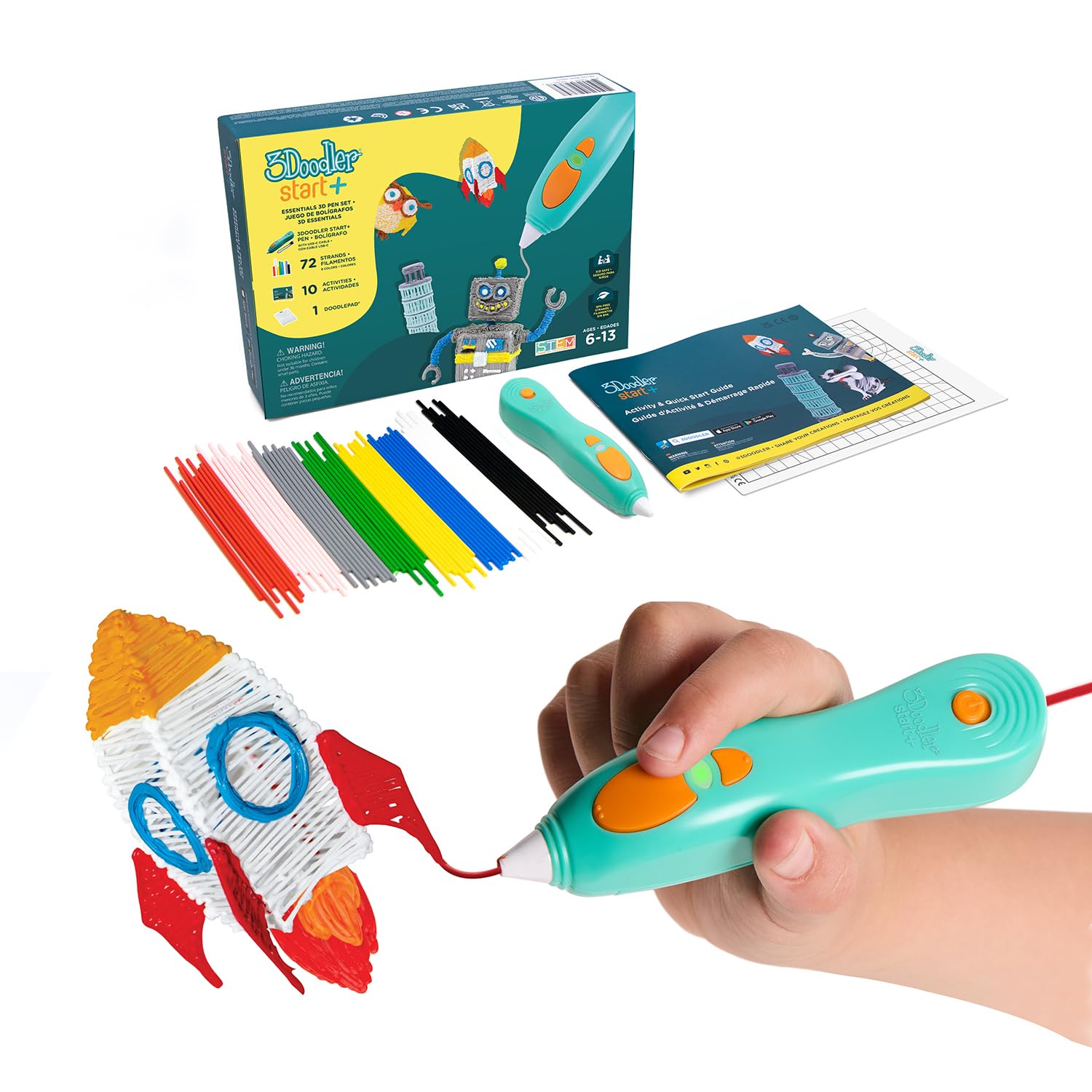
The 3Doodler Start+ is the gold standard for child-safe 3D printing pens. Its nozzle and plastic are designed to be touched without burn risk — a feature no other pen in this list offers at this level of safety engineering. The pen itself is slimmer and lighter than the previous generation, with a charging time that is 50% faster, and it includes 72 strands of mixed-color Start+ plastic plus 10 new stencils and a safety standby mode.
Parents report that children as young as four use this pen without incident, and the filament hardens quickly after extrusion, maintaining shape well for small builds. The built-in battery powers the pen wirelessly, eliminating cord tangles. The DoodlePad included in the kit provides a textured surface that helps plastic release cleanly and prevents ruined projects.
The main downside is the proprietary filament — you must buy 3Doodler Start+ plastic refills, which cost more per foot than generic PCL. Also, the battery life runs about 60 minutes per charge, so longer sessions need a charging break. But for a 10-year-old, this trade-off buys unmatched peace of mind. The 1-year warranty and responsive customer service add strong backup.
Why it’s great
- Truly no hot parts — nozzle and plastic are safe to touch
- 72 included filament strands with 10 new stencils for instant play
- USB-C charging and slimmer grip for small hands
Good to know
- Proprietary Start+ filament costs more than generic PCL
- Battery lasts about 60 minutes per charge
- Filament can stain clothing if melted onto fabric
2. MYNT3D Junior 3D Pen for Kids

The MYNT3D Junior uses PCL filament that melts at a low temperature, making the extruded plastic safe to touch immediately after drawing. The pen is battery-powered and charges via Micro USB, allowing kids to use it anywhere without a wall cord. The ergonomic body is specifically shaped for young hands, with a simple two-button interface that controls forward and reverse extrusion.
This pen comes with three rolls of MYNT3D PCL plastic and starter stencils, enough to complete several small projects right out of the box. The 1-year limited warranty covers manufacturing defects, which adds trust. Reviews from parents highlight that the pen is easy enough for a four-year-old to grasp, yet engaging enough for a 10-year-old to explore creative 3D shapes.
Two important caveats: first, some units have reported clogging within the first few days of use, and the one-piece nozzle design makes it impossible to clear a jam manually. Second, the included AC adapter is not in the box — you need a standard USB wall block or computer port. Despite these issues, the safety profile and battery freedom make it a solid mid-range choice for a child’s first pen.
Why it’s great
- Low-temperature PCL is safe enough for direct skin contact
- Battery powered with Micro USB charging — no cord tether
- Ergonomic design fits children’s hands naturally
Good to know
- Some units clog quickly due to one-piece nozzle
- AC adapter not included — must supply your own USB charger
- Only compatible with PCL filament, not PLA or ABS
3. SCRIB3D P1 3D Pen — The Ultimate Creative Bundle

The SCRIB3D P1 bundle offers the most filament per dollar of any kit on this list, with 230 feet of assorted colors included alongside the pen. The pen features a ceramic nozzle that resists clogging, a speed adjustment slider for flow control, and an anti-clogging design that parents report works well for sustained use. The bundle covers a diverse palette including blue, green, red, yellow, and more, all standard 1.75mm PLA filament.
The pen is designed for simplicity — intuitive controls and a comprehensive user manual help kids start drawing within minutes. The speed slider lets a 10-year-old slow down the extrusion rate for detail work like tiny dinosaur spikes or speed up for filling large solid areas. Ceramic nozzles also cool slightly faster than metal ones, reducing the risk of accidental drips.
The major complaint is that some units ship with less filament than advertised — a few customers reported receiving 130 feet instead of the promised 230 feet, requiring a customer service call to resolve. Additionally, the pen runs on standard PLA temperature (180–220°C), so the nozzle itself gets hot and requires supervision. This pen is best for an older or more careful 10-year-old who understands basic safety rules.
Why it’s great
- 230 feet of filament — enough for dozens of projects
- Anti-clogging ceramic nozzle resists jams
- Speed slider gives flow control for detail vs. fill work
Good to know
- Some units ship with less filament than advertised
- Standard PLA nozzle gets hot — requires adult supervision
- Not designed for ultra-fine precision work
4. 3Dmate Filament Kit with Silicone Mat and Stencils

This is not a 3D pen — it is an accessory kit that includes 360 feet of 1.75mm PLA filament in 36 colors, a heat-resistant silicone design mat (7×9 inches), a stencil book with 11 templates, and four finger protectors. It is designed to pair with an existing 3D pen, making it a perfect add-on for a pen you already own or plan to buy separately. The silicone mat has a smooth side and a grooved side, giving children control over texture and precision.
The filament is vacuum-sealed individually per color, preventing moisture absorption that leads to bubbling and clogging. The stencil book includes templates for common beginner projects like geometric shapes, animals, and simple objects, which removes the design barrier for a child who wants to create but doesn’t know where to start. The finger protectors are a thoughtful safety add-on for younger users.
The main limitation is that this kit lacks a pen — you must purchase a 3D pen separately. But as a filament and accessory bundle, it delivers excellent value. Parents report that the stencils and mat reduce wasted filament and help children produce recognizable shapes on their first try, building confidence quickly.
Why it’s great
- 360 feet across 36 colors — huge creative variety
- Silicone mat with dual surfaces for precision tracing
- Stencil book removes design guesswork for kids
Good to know
- 3D pen not included — this is a filament and accessory kit only
- PLA filament requires a standard-temperature pen (not low-temp)
- Finger protectors may feel bulky for small hands
5. MYNT3D Professional Printing 3D Pen with OLED Display
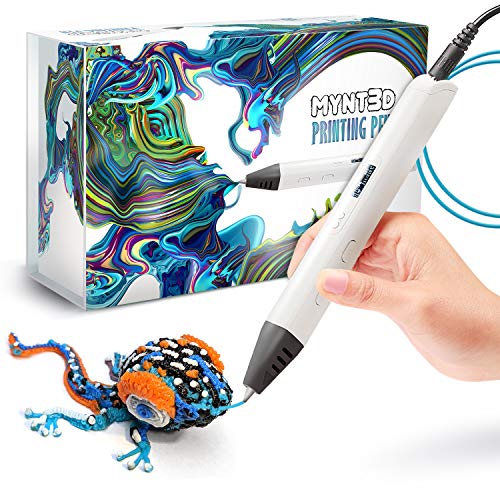
The MYNT3D Professional is an advanced pen with an OLED screen that displays real-time temperature, adjustable in 1-degree increments from 140°C to 230°C. This precision makes it compatible with PLA, ABS, and specialty filaments like wood-infused plastic. The pen has interchangeable heating elements, meaning a clogged nozzle can be replaced rather than requiring a whole new pen — a significant long-term savings.
For a 10-year-old, this pen is best suited to a child who has already used a simpler model and wants more control. The dual feed modes (hold for manual extrusion, double-click for continuous flow) give advanced control over material usage. The narrow body is easier to hold than bulkier models, and the AC adapter provides consistent power rather than battery drain.
The biggest issue is an auto-shutdown feature that kicks in after two minutes of inactivity — a child who pauses to think will have to reheat and restart frequently, which interrupts the creative flow. The included sample filament runs out quickly, and the pen requires adult supervision due to the high nozzle temperature. Not a first pen, but an excellent upgrade path for a budding 3D artist.
Why it’s great
- Replaceable heating elements and nozzle for long life
- 1° temperature increments for material flexibility
- Dual feed modes give precise control over flow
Good to know
- Auto-shutdown every 2 minutes interrupts creative work
- Short power cord limits reach from the outlet
- High nozzle temperature requires adult supervision
6. Juku 3Doodler Create+ 3D Printing Pen, Steel Blue

The 3Doodler Create+ is a premium pen aimed at older kids and adults, featuring dual-drive technology that lets you control the flow rate between fast mode (for covering large areas) and slow mode (for fine detail). It is compatible with 3Doodler’s own PLA, ABS, and FLEXY plastics, giving a 10-year-old the ability to build flexible objects like phone cases or jewelry in addition to rigid sculptures.
The pen comes with 2 packs of ABS and PLA plastic refills in 15 colors, plus an Ultimate Guide to Doodling with 5 projects to kickstart creativity. The ergonomic build is slightly larger than the Start+ but still manageable for a 10-year-old’s hand. The fast heat-up time — roughly 60 seconds — means less waiting and more drawing.
Build quality concerns are notable: some units arrive with rust on metal parts or fail to work at all out of the box. The learning curve for steady, controlled lines is steep, and several parents report that their child found it frustrating to create recognizable shapes initially. This pen is best suited for a patient, detail-oriented 10-year-old or one who has adult help during projects.
Why it’s great
- Dual-drive flow control for both fill and detail work
- Works with FLEXY plastic for bendable creations
- Included guide and 15-color plastic bundle
Good to know
- Mixed reports of rust and DOA units on arrival
- Steep learning curve for young beginners
- Requires adult supervision due to standard nozzle heat
7. MYNT3D Pro 3D Pen + 10 Color PLA + DesignPad Mat Kit
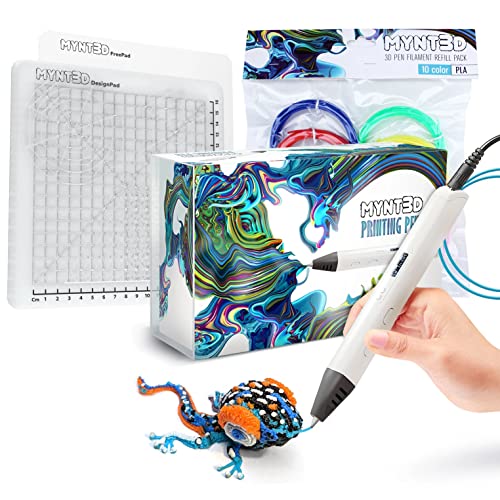
The MYNT3D Pro bundle includes everything a budding creator needs: the PRO 3D Pen with stepless speed control and replaceable sealed nozzle, 10 vacuum-sealed PLA colors (blue, green, red, yellow, orange, pink, black, tan, brown, gold), and a double-sided DesignPad silicone drawing surface with channels for geometric shapes. The FreePad transparent surface allows tracing patterns placed underneath, ideal for beginners.
The stepless speed control provides infinitely variable flow rate, giving a 10-year-old the ability to slowly trace stencils or quickly fill in solid areas. The replaceable nozzle design means a clog doesn’t end the pen’s life — you swap out the nozzle and keep going. The kit also includes a 1-year limited warranty with direct customer service access for tips and troubleshooting.
The pen draws significant power — one user report describes a melted USB port on a computer desk when the pen was plugged in via USB. This suggests the pen should be used with the included AC adapter rather than a computer’s USB port. Also, the standard PLA operating temperature means the nozzle gets hot and requires supervision. But for a complete starter kit with high-quality components, this bundle delivers strong value.
Why it’s great
- Stepless speed control for precise flow adjustment
- Replaceable sealed nozzle for easy unclogging
- Complete bundle with 10 PLA colors and DesignPad mat
Good to know
- High power draw — use supplied AC adapter, not computer USB
- Standard PLA heat requires adult supervision
- Learning curve for creating complex 3D objects
FAQ
Is a 3D pen safe for a 10-year-old to use unsupervised?
What is the difference between PCL and PLA filament for kids?
How long does a typical 3D pen battery last?
Final Thoughts: The Verdict
For most users, the 3d pen for 10 year old winner is the 3Doodler Start+ Essentials because it is the only pen with a truly safe nozzle that a child can touch without risk, and the included 72 filament strands and stencils provide everything needed for immediate creative play. If you want battery-powered freedom and a lower entry price, grab the MYNT3D Junior 3D Pen. And for maximum filament value and a ceramic anti-clog nozzle that keeps frustration low, the SCRIB3D P1 Bundle delivers the most creative material per dollar.