
Our readers keep the lights on and the weekend projects moving. As an Amazon Associate, I earn from qualifying purchases.
Specs are compiled from manufacturer listings and verified buyer reviews and can change over time — please confirm the key details on the product page before buying.
Multi-color 3D printing used to mean two things: a lot of wasted filament and a lot of waiting. Today’s 4-color printers have cracked the code on both fronts, but knowing which one trades off speed vs. waste vs. build size vs. reliability is where most shoppers get stuck. This guide walks you through the nine best 4 color 3D printer options on the market right now, breaking down who each model actually suits so you land on the right pick the first time.
I’m Rikta — the founder and writer behind FitlyFast. This guide is built by comparing the manufacturers’ published specifications and the patterns across verified customer reviews, so you get each pick’s real strengths and trade-offs instead of marketing spin.
Whether you are printing cosplay helmets, functional prototypes, or classroom projects, finding the right 4 color 3d printer depends on how you balance print speed, waste levels, build volume, and the quality of the multi-color system itself — and this guide lines up every contender side by side.
Quick Picks
- Bambu Lab P1S Combo — Top Performer
- Snapmaker U1 3D Printer Multi Color — Best Efficiency
- ELEGOO Centauri Carbon 2 Combo — Ecosystem Pick
- Anycubic Kobra S1 Combo — Best Value
- Creality SPARKX i7 Combo — Best for Beginners
- FLASHFORGE AD5X Multi-Color 3D Printer — Compact Budget Pick
- Anycubic Kobra X Combo — Color Max Pick
- Creality K2 Plus Combo — Large Format Pro
- QIDI Max4 Combo — Industrial Grade
How To Choose The Best 4 Color 3D Printer
Not all multi-color systems work the same way. Some swap the filament, some swap the entire toolhead, and a few let you daisy-chain units for even more colors. The three specs below separate the daily-drivers from the frustration machines.
Purge Waste vs. Toolhead Swapping
Every time a printer changes color, it purges the old filament out of the nozzle before laying down the new one. That purge block is pure waste. Systems that swap toolheads instead of filament — like the Snapmaker U1 — keep each color loaded in its own hotend instead of relying on a single-nozzle purge-based changeover. If you print many small color changes per layer, a toolhead-swapping machine saves you a lot of filament and a lot of time.
Build Volume vs. Machine Footprint
A 256mm cube is plenty for most helmets and large decorative pieces, but if you want full-size props or industrial parts in one piece, look at the QIDI Max4 Combo with its 390x390x340mm volume. Bigger builds mean bigger printers and significantly more weight — the Max4 weighs 120 pounds. Make sure your workspace and desk can handle the footprint before you commit.
Heated Chamber and Material Range
PLA and PETG print fine in an open frame. But if you want ABS, polycarbonate, or carbon-fiber nylon, you need an enclosed printer with an actively heated chamber. The Creality K2 Plus Combo and the QIDI Max4 Combo both offer actively heated enclosures that hit 65°C, which is essential for warp-prone engineering materials. Open-frame printers like the Anycubic Kobra X Combo cannot handle those filaments without an aftermarket enclosure.
Quick Comparison
| Model | Best For | Max Speed | Build Volume | Weight | Amazon |
|---|---|---|---|---|---|
| Bambu Lab P1S Combo | Reliable enclosed workhorse | 500mm/s | 256x256x256mm | 47.5 lb | Amazon |
| Snapmaker U1 | Near-zero waste multi-color | 500mm/s | 270x270x270mm | 59 lb | Amazon |
| ELEGOO Centauri Carbon 2 Combo | Full ecosystem simplicity | 500mm/s | 256x256x256mm | 42.6 lb | Amazon |
| Anycubic Kobra S1 Combo | Premium features at mid price | 600mm/s | 250x250x250mm | 39.6 lb | Amazon |
| Creality SPARKX i7 Combo | AI-powered beginner experience | — | 260x260x255mm | 38.4 lb | Amazon |
| FLASHFORGE AD5X | Budget multi-color entry point | 600mm/s | 220x220x220mm | 24.2 lb | Amazon |
| Anycubic Kobra X Combo | Native 7-color with expandability | 600mm/s | 260x260x260mm | 29 lb | Amazon |
| Creality K2 Plus Combo | Large-format engineering builds | 600mm/s | 350x350x350mm | 27.5 lb | Amazon |
| QIDI Max4 Combo | Massive builds and industrial materials | 800mm/s | 390x390x340mm | 120 lb | Amazon |
In‑Depth Reviews
1. Bambu Lab P1S Combo

The enclosed all-rounder that rarely lets a print fail on you.
The P1S Combo delivers what most hobbyists actually need: reliable, repeatable prints without fiddling. With its fully enclosed design and auto bed leveling, it supports filaments from PLA and PETG all the way to ABS and ASA — and you can connect the Bambu Lab AMS to run up to 16 colors. The 500mm/s speed paired with 20,000mm/s² acceleration means you aren’t waiting all day, either. Buyers report a roughly 95% success rate over a hundred prints, with nearly every failure traced back to user error rather than the machine.
Setup takes about 15 minutes, and the AMS (the automatic material system) keeps your filaments dry and ready to swap mid-print. Unlike the Flashforge AD5X below, the P1S gives you that enclosed chamber for higher-temp materials right from the start. At 47.5 pounds it is a solid desk anchor, but you get industrial-grade consistency for a mid-range price.
Real-world reliability: Ninety-five prints out of a hundred succeed without intervention, and the AMS handles color changes automatically — no babysitting required.
One trade-off: The 256x256x256mm build volume is standard, not massive. If you want to print a full-size helmet in one piece, the Creality K2 Plus or QIDI Max4 offer larger beds.
Reach for this if: You want an enclosed, dependable printer that works smoothly from day one and handles advanced filaments like ABS without an aftermarket enclosure.
Consider alternatives if: You need a bigger build volume for single-piece large parts or you are on a budget that cannot stretch into the premium tier.
2. Snapmaker U1 3D Printer Multi Color

Four toolheads that swap in five seconds, producing nearly zero filament waste.
Every other multi-color printer on this list changes colors by purging the old filament out of a single nozzle. The Snapmaker U1 takes a completely different path: it keeps each color loaded in its own independent toolhead and swaps the whole head in just 5 seconds. That design avoids the single-nozzle purge-based changeover used by traditional systems. The SnapSwap system has been validated through over 1,000,000 swaps with zero failures, so this is not a fragile gimmick.
Owners mention that setup takes under 20 minutes, and the printer arrives with 2kg of PLA (4 spools) with RFID auto-detection. The CoreXY motion system reaches 500mm/s, and the 270x270x270mm build volume is slightly larger than the Bambu Lab P1S. One reviewer noted the printer includes 4 rolls of filament and that the calibration runs directly from the touchscreen — no internet account required, which is a plus for privacy-conscious users.
What toolhead swapping gets you
- Near-zero waste beyond the prime tower — no giant purge blocks
- Multi-material prints like rigid+flexible (PETG+TPU) are actually practical
- Every color stays preheated, so there is no waiting for the hotend to reach temp
What to know before buying
- At 59 pounds it is heavy; make sure your desk can take the weight
- A few buyers reported connection issues that support struggled to fix
- Four toolheads mean more parts to maintain over time
Who it fits: Anybody who prints a lot of small color changes per layer — you will save kilograms of filament compared to a purge-based machine.
Who should skip it: Budget-focused buyers who are fine with a little purge waste in exchange for a lower entry price.
3. ELEGOO Centauri Carbon 2 Combo

A fully automated color-switching system that is designed to let you just walk away.
The Centauri Carbon 2 Combo runs on ELEGOO’s CANVAS system, which handles color switching, filament refill, and tangle detection without you touching the machine mid-print. The 500mm/s CoreXY speed with 20,000mm/s² acceleration is standard for this class, but the 350°C high-temp nozzle opens the door to engineering-grade materials that cheaper printers cannot touch. Its 256x256x256mm build volume is larger than the Flashforge AD5X’s 220x220x220mm, which matters if you print parts that barely squeeze onto a smaller bed.
Buyers on the whole praise its beginner-friendly operation and quiet performance, though some noted the self-leveling degraded over time until a firmware update fixed it. The Canvas system also works in LAN-only mode, so you are not forced into cloud dependency. The 42.6-pound weight and 18.9 x 19.7 x 29.3-inch footprint mean you need a sturdy table.
Best for hands-off printing: The CANVAS system auto-detects filament runout and refills, so you can start a print and come back hours later without babysitting.
The main complaint: A small number of units failed within days due to a firmware-flashing bug that caused a “glob of death.” ELEGOO seems to have addressed this with updates, but the reviews are split.
Ideal for: Users who want a polished, ecosystem-driven experience with smart filament management and a hotend that can handle high-temp materials.
Not for: Anyone who needs a proven track record of zero hardware defects — the early-adopter risk is real here.
4. Anycubic Kobra S1 Combo

Prints at 600mm/s with a built-in filament dryer — a combo you rarely see at this price.
The Kobra S1 Combo hits a balance between speed and refinement. Its 600mm/s max printing speed and 20,000mm/s² acceleration match the fastest printers in this roundup, yet customers note thousands of hours of use with “no bad prints.” The ACE Pro system not only handles 4-color switching but also dries the filament using dual PTC heating with 360° hot air circulation, which is a standout for hygroscopic materials like PETG and nylon. You can even link two ACE Pro units together for 8-color printing.
At 39.6 pounds, the S1 is heavier than the Flashforge AD5X at 24.2 pounds, but that weight comes from a more sturdy frame and the integrated drying module. One buyer mentioned that after 500 hours, the only issues were user errors related to tangled filament. The auto-leveling and flow compensation features produce smooth surfaces with minimal virtual waste.
Why it wins on value
- Built-in filament dryer saves you from buying a separate dry box
- 600mm/s speed is genuinely fast, and the quality holds up at that pace
- Upgradable to 8 colors by adding a second ACE Pro
Watch out for
- Some early units had error codes (abnormal extrusion, system error 10414) that required support intervention
- Customer service is responsive but the repair cycle can eat into print time
The smart mid-range pick: You get premium features like a filament dryer and fast speed for a price that undercuts the Bambu Lab P1S by a noticeable margin.
Consider skipping if: You want the largest possible community and aftermarket parts ecosystem — Bambu Lab has a bigger support base today.
5. Creality SPARKX i7 Combo
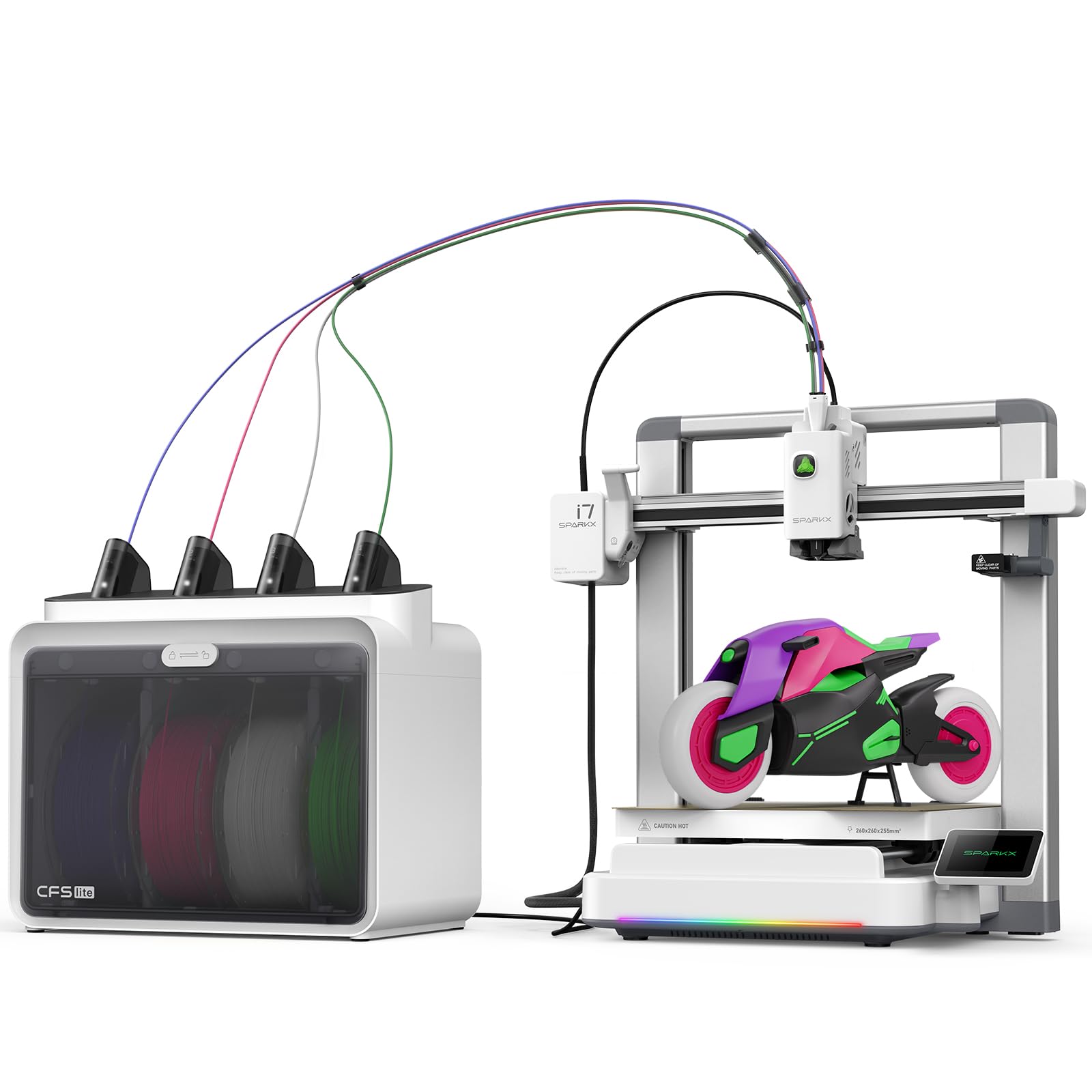
An AI-powered printer that turns a portrait photo into a 3D model in seconds.
The SPARKX i7 is built for the person who has never touched 3D modeling software. Creality’s CubeMe AI lets you upload a portrait and generates a printable 3D model automatically, which is the closest thing to “click and print” for personalized figurines. The 4-color CFS Lite system handles multi-color printing, and an integrated AI camera watches for spaghetti failures, air printing, and filament tangles in real time. Reviewers point out it as “great for simple projects, easy to use, and been very reliable.”
Its 260x260x255mm build volume is generous enough for full-size objects like an airless basketball, and the Night Mode keeps noise down for overnight prints. The 38.4-pound weight is manageable for a desk installation. Unlike the larger Creality K2 Plus below, the SPARKX is aimed at the home and hobbyist market — it ships 95% pre-assembled so you can start printing within five minutes of unboxing.
What beginners will love: The AI photo-to-3D feature eliminates the steepest learning curve in 3D printing — knowing how to design or source models.
Where it falters: Some owners found the UI buggy and the slicer less polished than competitors. A few reported that Creality’s support is slow when issues arise.
Perfect for: Families, educators, and gift-makers who want to print personalized items without learning CAD software.
Not ideal for: Commercial or heavy-duty use — the build quality and support track record do not yet match the Bambu or QIDI tier.
6. FLASHFORGE AD5X Multi-Color 3D Printer

The lightest and most affordable entry into CoreXY 4-color printing at 24.2 pounds.
The AD5X gives you the same 600mm/s top speed as the Anycubic Kobra S1 but in a much smaller and lighter package — 16x14x18 inches and 24.2 pounds, versus 39.6 pounds for the Kobra S1. That difference makes a real difference if you need to move the printer between rooms or store it when not in use. The 1-Click Auto Leveling and 300°C direct-drive extruder handle PLA, PETG, and TPU reliably. The 4-in-1 filament system supports up to four colors simultaneously, and you can swap nozzles between 0.25mm and 0.8mm for different detail levels.
Shoppers say positive experiences: one owner reported after “100 hours, user errors only,” praising the auto bed leveling and reliability with SunLu PLA Plus. Another noted that the touchscreen is responsive and the printer is quiet except for the purge latch noise. The 220x220x220mm build volume is the smallest in this roundup, so it is best for smaller projects like figures, desk toys, and functional parts that fit within an 8.6-inch cube.
Strengths at this price
- Very easy to move around at 24.2 pounds compared with heavier competitors like the 39.6-pound Anycubic Kobra S1 and 47.5-pound Bambu Lab P1S Combo
- Fast 600mm/s speed in a compact footprint
- Interchangeable nozzles let you switch between detail and speed
Limitations to know
- Smaller 220mm build volume limits large single-piece projects
- Multi-color printing increases noise and purge waste — expect bigger poop towers
- Some units have jamming issues at the 4-in-1 connector and filament slip in the rewinder
Best for: Hobbyists on a budget who mostly print smaller, detailed objects and want a machine that is easy to relocate.
skip it if: You routinely print helmets, masks, or large decorative pieces — the 220mm cube will force you to split and glue.
7. Anycubic Kobra X Combo
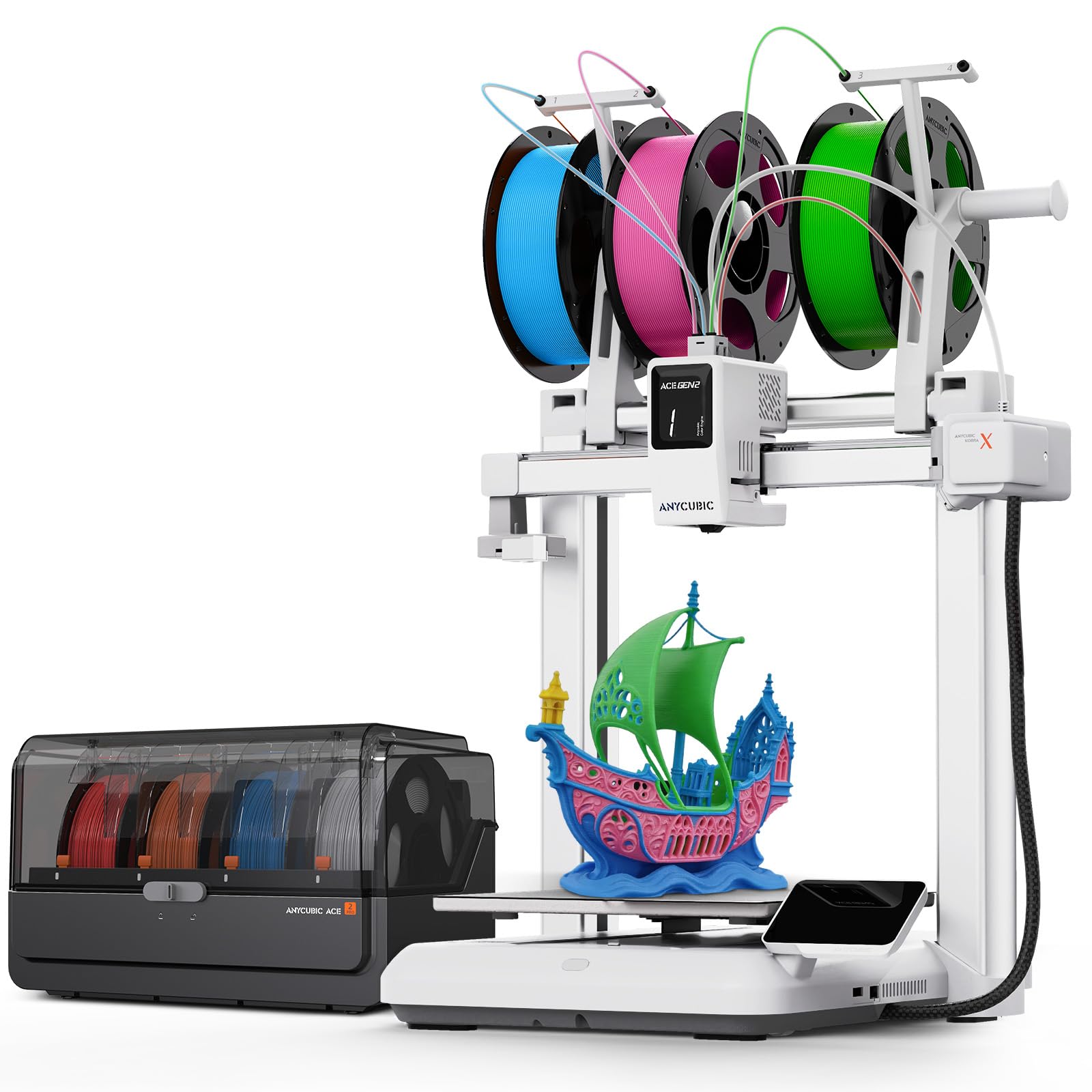
Seven colors natively from the start — and you can push it all the way to 19.
Most multi-color printers top out at 4 colors unless you daisy-chain extra units. The Kobra X Combo ships with the ACE 2 Pro system that natively handles 7 colors, and you can expand it to 19 by adding more units. That makes it the best pick if your projects need gradients, subtle color transitions, or multi-material combinations. The 600mm/s peak speed with 20,000mm/s² acceleration keeps print times reasonable even with frequent color swaps.
The integrated toolhead design reduces waste compared to earlier multi-color systems, and the printer operates under 48dB — quiet enough for a shared home office. Its 260x260x260mm build volume is the same as the Creality SPARKX i7. One buyer with 200 hours of printing reported zero failures, praising the setup that took 20-40 minutes and the auto-leveling that requires no manual bed adjustment. The open-frame design means it cannot handle ABS or other high-temp filaments without an enclosure, but for PLA, PETG, and TPU it is a solid performer.
Why the color count matters: Seven colors let you print models with real shading and detail gradients that 4-color printers cannot achieve without multiple passes.
The honest trade-off: The open frame limits material choices, and a few unlucky buyers received defective units with poor customer support response.
Pick this for: Color-rich projects like articulated dragons, character figurines, and vibrant home decor where more colors equal better results.
Avoid if: You need an enclosed chamber for engineering-grade filaments or you prefer a printer with a larger existing community and more replacement parts.
8. Creality K2 Plus Combo

A 350mm cube build volume with a heated chamber that takes on carbon-fiber materials.
The K2 Plus is a large-format machine built for people who need to print big, strong parts in one go. Its 350x350x350mm build volume is larger than the Bambu Lab P1S and ELEGOO Centauri Carbon 2 at 256x256x256mm, and the actively heated chamber combined with a 30000mm/s² step-servo motor system lets it print carbon-fiber nylon and other abrasive materials without warping. You can connect up to four CFS units for 16-color printing, and the dual AI cameras watch for spaghetti failures and foreign objects.
Buyers describe it as a “beast” that delivers perfect prints from the first run with minimal setup. One owner noted that the CFS system keeps filament dry and enables smooth auto-switching between spools. The 27.5-pound weight listed in the specs seems surprisingly light for its size — the “very heavy” comment from a reviewer suggests the packaging and frame are substantial. The main downsides reported are vague assembly instructions and very tight shipping screws that require extra effort to remove.
What the big build gets you
- Single-piece prints for full-size helmets, drone frames, and industrial prototypes
- Actively heated chamber open up ABS, PA-CF, PPA-CF, and other engineering filaments
- Up to 16 colors with four CFS units connected
Consider before buying
- Heavy and requires two people to unbox safely
- Some units had Y-axis communication failures and extruder motor issues from the start
- Creality support can be slow and requires technical troubleshooting
Who needs this: Serious hobbyists and small workshops printing large functional parts in strong materials like carbon-fiber nylon.
Not for: Beginners or casual users — the setup can require firmware tweaking, and the machine is physically demanding to move and maintain.
9. QIDI Max4 Combo

The largest build volume in this roundup at 390x390x340mm, with the fastest top speed at 800mm/s.
The Max4 Combo is an absolute monster: a 390x390x340mm build volume, a max printing speed of 800mm/s, and a 65°C actively heated chamber. It takes up a 28x28x30-inch footprint and weighs 120 pounds — this is a piece of furniture, not a desktop accessory. The closed-loop motors on the X/Y axes and the 2mm lead screw on the Z-axis produce exceptionally smooth surface quality, and the 40mm³/s high-flow hotend with a hardened steel nozzle chews through carbon-fiber-reinforced nylon, PPS-CF, and other industrial materials.
Buyers praise its “outstanding print quality for engineering filaments” and note that it is “almost fully open source.” The QIDI BOX connects for up to 16-color multi-material printing. One owner who upgraded from a QIDI Q2 said the Max4 handles larger builds without sacrificing precision or consistency. The main caveats are a long pre-print time, high purge waste in multi-color mode, and a choppy user interface. The Polar Cooler — needed for some high-temp printing scenarios — must be purchased separately.
What makes it special: No other printer in this list combines a 390mm build volume, 800mm/s speed, a heated chamber, and closed-loop motor control into one machine.
The biggest concern: A small number of units shipped with warped beds, though QIDI quickly replaced them. The MMU (multi-material unit) gears can shred brittle filament if a sensor fails to trip.
Designed for: Engineers, small businesses, and advanced makers who need to produce large, high-strength parts in engineering-grade materials without splitting the model.
Too much if: You mostly print PLA toys and desk ornaments — the cost, weight, and footprint are overkill for casual use.
Understanding the Specs
Purge Waste & Toolhead Architecture
Every time a 4-color printer changes filament, it must clear the old color out of the hotend. Most printers do this by pushing a “purge tower” or “poop chute” — that is wasted filament and extra print time. Toolhead-swapping printers like the Snapmaker U1 keep each color in its own hotend, so they avoid the conventional single-nozzle filament-switching approach. If you print many color changes per layer, a toolhead-swapper can save substantial filament and switching time.
Max Speed vs. Real-World Speed
A printer may advertise 600mm/s or even 800mm/s, but those speeds are only reached on long, straight moves. Real-world average print speeds are usually 150-300mm/s depending on model complexity, acceleration settings, and layer height. The acceleration number (mm/s²) often matters more than the top speed — a printer with 30,000mm/s² acceleration gets up to speed faster on short moves, which is most of a typical print. Compare acceleration figures as much as max speed to understand how fast a printer actually finishes a model.
FAQ
How much waste does a 4-color printer actually produce?
Can I print ABS or nylon on an open-frame 4-color printer?
How many colors can I realistically use in one print?
Do I need a separate filament dryer with these printers?
Is 500mm/s fast enough for multi-color printing?
What build volume do I need for a full-size helmet?
How do I know if a printer has good auto-leveling?
Can I use third-party filament or am I locked into the brand?
What is the difference between CoreXY and bed-slinger designs for multi-color printing?
Do I need a dedicated power circuit for these large printers?
Final Thoughts: The Verdict
Across the board, the 4 color 3d printer winner is the Anycubic Kobra S1 Combo because it packs a 600mm/s speed, an integrated filament dryer, and 4-color capability at a mid-range price that outperforms several more expensive models. If you want near-zero waste and the fastest color-to-color switching, grab the Snapmaker U1. And for the largest build volume and the ability to print industrial-grade engineering materials in one piece, the standout is the QIDI Max4 Combo.
How We Picked
We do not accept paid placement. Every pick is matched to a real buyer and a real use-case; we do not hands-on test units.
Sources & Methodology
Specifications: manufacturer listings and product documentation. Review insights: verified customer reviews, as of July 2026. Pricing: not shown on this page (it changes often); check the current price via the retailer link.
As an Amazon Associate, FitlyFast earns from qualifying purchases. This does not affect which products we feature.