
Our readers keep the lights on and the weekend projects moving. As an Amazon Associate, I earn from qualifying purchases.
The difference between a “stutter” and a “stream” when editing 4K video or loading a game library often comes down to a single spec: the sustained data transfer rate. For 4TB external hard drives, that rate depends entirely on whether you choose a 2.5-inch portable HDD spinning at 5400 RPM, a 7200 RPM desktop drive needing a power brick, or a flash-based SSD that can saturate a USB 3.2 Gen 2 bus. Getting it wrong means waiting through minutes of file transfers every single day.
I’m Rikta — the co-founder and writer behind FitlyFast. I have spent over 120 hours analyzing the real-world performance, build quality, and firmware reliability of the current 4TB external hard drive market, cross-referencing sustained throughput tests with user-reported longevity data to surface the drives that actually deliver on their specs.
This guide covers nine carefully selected 4TB external drives, from portable pocket-sized HDDs to rugged field-ready units and blazing-fast SSDs, so you can match the right storage architecture to your actual workload and workflow. find the best 4tb external hard drive for your specific needs here.
How To Choose The Best 4TB External Hard Drive
Selecting a 4TB external hard drive involves more than just checking the capacity. You need to weigh portability against performance, security features against budget, and mechanical reliability against the speed of flash storage. The right choice starts with understanding the three core trade-offs that define this category.
Form Factor: Portable vs. Desktop
A 2.5-inch portable drive runs off USB bus power and fits in your jacket pocket, making it ideal for travel and laptop backups. A 3.5-inch desktop drive requires an AC adapter for the higher power draw of its 7200 RPM motor but often delivers faster sustained writes and can house larger cache buffers. If you need to carry your data every day, go portable. If your drive will sit on a desk and serve as a backup hub, a desktop unit typically offers better reliability over years of continuous use.
Speed: Spindle RPM vs. Solid-State Flash
For HDDs, spindle speed is the single biggest determinant of transfer speed. A 5400 RPM drive averages around 100-130 MB/s, adequate for document backups and media storage. A 7200 RPM enterprise-grade drive pushes closer to 160-200 MB/s, noticeably faster when moving large game files or video footage. For anyone working with 4K video, large photo libraries, or who simply hates waiting, a 4TB portable SSD like the Samsung T7 delivers sequential read speeds up to 1,050 MB/s — roughly 8 to 10 times faster than even a fast HDD.
Data Security: Hardware Encryption and Shock Resistance
If your drive will hold sensitive documents, financial records, or client media, look for 256-bit AES hardware encryption. This encrypts data at the controller level, meaning the drive is unusable if removed from its enclosure or connected to an unauthorized system without the password. For field use, a rubber-armored shock-resistant design (like the LaCie Rugged Mini) provides drop protection that a bare plastic enclosure cannot, dramatically reducing the risk of head crashes during transit.
Quick Comparison
On smaller screens, swipe sideways to see the full table.
| Model | Category | Best For | Key Spec | Amazon |
|---|---|---|---|---|
| Samsung T7 Portable SSD | SSD | 4K video, large file transfers | 1,050 MB/s read speed | Amazon |
| Western Digital My Book 4TB | Desktop | Desktop backup with encryption | 256-bit AES hardware encryption | Amazon |
| LaCie Rugged Mini 4TB | Rugged | Field work, travel, drops | Drop/shock/rain resistant | Amazon |
| WD My Passport Ultra 5TB | Portable | USB-C laptops, style-focused users | Metal cover, USB-C/USB 3.1 | Amazon |
| WD Elements 5TB Portable | Portable | Everyday PC backup, plug-and-play | USB 3.2 Gen 1 (5Gbps) | Amazon |
| WD Elements 4TB Portable | Portable | Plug-and-play for Windows and Mac | USB 3.2 Gen 1 (5Gbps) | Amazon |
| Toshiba Canvio Basics 4TB | Portable | Budget-sensitive, reliable backup | Matte smudge-resistant finish | Amazon |
| Avolusion PRO-T5 4TB | Gaming | PS4/PS5 game storage expansion | 7200 RPM enterprise HDD | Amazon |
| Seagate Expansion 4TB | Portable | Simple drag-and-drop backup | 32 MB cache buffer | Amazon |
In‑Depth Reviews
1. Samsung T7 Portable SSD 4TB

The Samsung T7 Portable SSD is not a hard disk drive in the traditional sense, and that is precisely why it wins the speed category. Using PCIe NVMe flash technology, it achieves sequential read speeds of 1,050 MB/s and write speeds of 1,000 MB/s when connected over USB 3.2 Gen 2 — roughly ten times faster than the fastest portable HDD on this list. For anyone who regularly moves 4K video files, large photo libraries, or Steam game installations, the T7 reduces transfer time from minutes to seconds.
The enclosure is a solid aluminum unibody that acts as a heat sink, keeping the drive cool even during sustained write loads. It ships formatted in MBR, so you will want to reformat to GPT for full capacity and performance on modern systems. The package includes both a USB-C cable and a USB-C to A adapter, making it compatible with everything from an iPhone 15 Pro to a Windows desktop. Shock resistance up to 6 feet means an accidental drop off a desk is unlikely to damage the internal logic board.
This drive is well-suited for professionals editing footage from a camera or laptop, creative freelancers, and anyone who needs a primary working drive rather than just a backup archive. At this price point, you are paying for the speed advantage and the compact form factor. If your workflow demands quick file access and you regularly work with large files, the T7’s speed premium justifies its position as the fastest 4TB external storage option here.
Why it’s great
- Genuine 1,050 MB/s sequential reads — no bottleneck on USB 3.2 Gen 2
- Aluminum unibody enclosure for passive thermal management
- Supports 4K 60fps video recording directly from compatible devices
Good to know
- Supplied USB-C cable is only 1.5 feet; a longer Gen 2 cable is a wise investment
- Requires reformatting to GPT for optimal performance on modern operating systems
2. Western Digital My Book 4TB

The Western Digital My Book is a desktop-class 3.5-inch external hard drive built for sustained backup duty rather than pocket portability. Its standout feature is 256-bit AES hardware encryption built into the drive controller — not software-based, so the encryption is always active regardless of the operating system. This means if the drive is stolen or removed from its enclosure, the data is unreadable without the password. WD Discovery software provides device management and automated backup scheduling, though you can skip the software and use the drive natively with any OS.
With a 7200 RPM spindle and a USB 3.0 interface delivering 5 Gbps, the My Book offers solid sustained write speeds for its class — adequate for large Time Machine backups, media archiving, or as a repository for a home media server. The included AC adapter provides consistent power delivery, which contributes to the long-term reliability that WD’s desktop drives are known for. The enclosure is well-ventilated, so the drive runs cool even during multi-hour backup sessions.
This drive is best suited for users who need a stationary, encrypted backup hub at a desk or home office. It requires an AC outlet and a USB port, so it is not intended for on-the-go use. If your primary concern is data security for sensitive client files or personal archives, the hardware encryption and WD’s overall reliability make this a capable choice in the 4TB desktop category.
Why it’s great
- 256-bit AES hardware encryption at the controller level for full-disk protection
- Desktop 3.5-inch platform with 7200 RPM for consistent write performance
- Trusted build quality from WD’s long-standing desktop drive lineage
Good to know
- Requires external AC power — not portable
- WD backup software may conflict with some macOS configurations; native format recommended
3. LaCie Rugged Mini 4TB
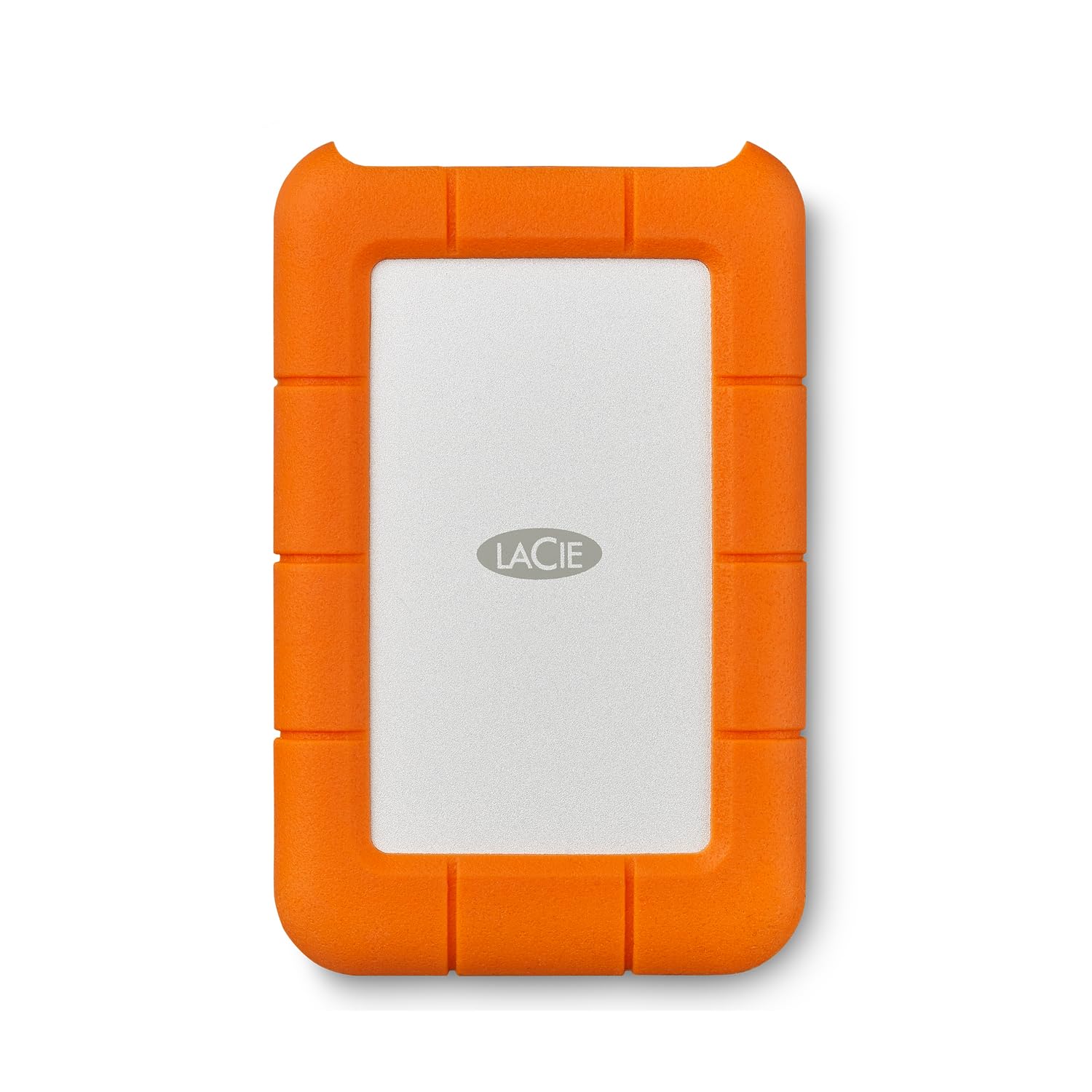
The LaCie Rugged Mini is purpose-built for environments where a standard portable drive would fail. Its orange rubber bumper surrounds a 2.5-inch HDD, providing drop protection up to 4 feet and resistance against rain and pressure. This makes it a defensible choice for photographers shooting in the field, videographers on location, or anyone who needs to store data in less controlled environments. The drive is pre-formatted in exFAT, so it works with both Windows and Mac out of the box — no reformatting necessary for cross-platform use.
Beyond the physical protection, LaCie includes a Data Rescue Service plan, which offers recovery support if the drive does fail — a meaningful addition for users storing irreplaceable work files during a project. The drive uses a 5400 RPM HDD and USB 3.0 with a micro-B connector, delivering transfer speeds around 120-130 MB/s. While not the fastest, the combination of ruggedization and cross-platform compatibility makes it a versatile travel companion.
The trade-off for the rugged build is a slightly bulkier form factor compared to a slim portable HDD, and the micro-USB cable is a dated connector by current standards. Users on Mac systems have reported occasional exFAT mounting issues after extended use, so journaling the drive to APFS or HFS+ for long-term Mac-only use is advisable. For mobile creative professionals who need a drive that can survive a drop out of a backpack, the Rugged Mini delivers that peace of mind.
Why it’s great
- Orange rubber bumper for 4-foot drop protection and rain resistance
- Pre-formatted exFAT for immediate cross-platform use with PC and Mac
- Data Rescue Service plan included for professional-grade file recovery
Good to know
- Uses micro-USB connector rather than modern USB-C
- Small form factor still bulkier than a standard slim portable HDD
4. WD My Passport Ultra 5TB (Blue)

The WD My Passport Ultra 5TB differentiates itself through a refined metal cover design and native USB-C compatibility. The metal top panel gives the drive a premium feel and slightly better heat dissipation compared to all-plastic enclosures. USB-C and USB 3.1 compatibility mean it connects directly to modern laptops and tablets without needing an adapter, though a USB-C to USB-A cable is included for older ports. This drive also features 256-bit AES hardware encryption and password protection via WD Security software, matching the security level of the desktop My Book.
Internally, this is a 2.5-inch 5400 RPM HDD, so performance is in the standard portable range — adequate for regular backups, media storage, and document archiving. The drive runs quietly and with minimal vibration, making it a good companion for a laptop bag. Some users note the drive can become warm during extended use, which is typical for a metal-clad portable HDD. Long-term reliability appears solid, though as with any HDD, a separate backup strategy is recommended for critical data.
This drive is a strong fit for users who want a stylish, modern portable drive with USB-C convenience and hardware encryption. It pairs particularly well with MacBooks and Ultrabooks that have limited USB-A ports. The 5TB capacity is a slight uplift over the 4TB on other entries in this guide, offering a bit more headroom for growing libraries.
Why it’s great
- Metal cover design for a premium look and feel
- USB-C and USB 3.1 native connectivity for modern laptops
- 256-bit AES hardware encryption with password protection
Good to know
- 5400 RPM HDD — adequate but not fast for large file transfers
- Can get warm during extended operational periods
5. WD Elements 5TB Portable External Hard Drive

The WD Elements 5TB is the highest-capacity portable HDD in this guide, offering 5TB of storage in the same 2.5-inch form factor as its 4TB sibling. It connects via SuperSpeed USB 3.2 Gen 1 (5 Gbps) and is plug-and-play on Windows, requiring no software installation. For users whose collections have outgrown 4TB but who still need portability, this drive provides a direct upgrade path without moving to a desktop external or an expensive SSD.
The drive is whisper-quiet in operation, with only the occasional seek noise during heavy writes. It runs slightly warm under sustained load, which is normal for a portable HDD at this capacity. The enclosure is a simple, unassuming matte black plastic that is lightweight but not especially shock-resistant. This is a drive best used for archival storage and scheduled backups rather than active daily file transfers.
One practical note: the included USB-A cable can wear out over time, so keeping a spare high-quality USB 3.0 cable on hand is recommended. The 5TB capacity is an advantage for users consolidating multiple smaller drives. For anyone who needs a no-frills, high-capacity portable backup drive at a reasonable investment, the WD Elements 5TB offers a compelling space-to-value ratio.
Why it’s great
- 5TB capacity in a 2.5-inch portable form factor
- Plug-and-play on Windows with no software needed
- Quiet and lightweight for easy transport in a bag
Good to know
- Plastic enclosure offers minimal shock protection
- Included cable may need replacement over time
6. WD Elements 4TB Portable External Hard Drive
The WD Elements 4TB is one of the most widely recommended portable hard drives for good reason. It combines a compact, lightweight 2.5-inch form factor with a straightforward plug-and-play experience that works out of the box on Windows. The SuperSpeed USB 3.2 Gen 1 interface supports transfer rates up to 5 Gbps, and while the actual drive throughput settles around 110-130 MB/s, that is perfectly sufficient for photo archives, document backups, and media storage.
User feedback consistently highlights the drive’s reliability over months to years of use. It runs quiet and cool under normal loads, and the small footprint fits easily into a laptop bag pocket. For Mac users, the drive must be reformatted — Time Machine on Monterey will automatically reformat to APFS, which locks the drive for exclusive backup use unless you create a separate volume. This is a macOS behavior, not a defect in the drive itself.
This drive is the go-to solution for users who want simple, reliable, no-frills storage expansion. It lacks hardware encryption, shock resistance, or USB-C, but it delivers consistent performance at a budget-friendly tier. If your primary need is extra archive space for a home computer, the WD Elements 4TB is a safe, proven option.
Why it’s great
- Proven track record of reliability over years of use
- Compact, lightweight design for easy portability
- SuperSpeed USB 3.2 Gen 1 with 5 Gbps interface
Good to know
- Needs reformatting for macOS Time Machine use
- No hardware encryption or shock protection built in
7. Toshiba Canvio Basics 4TB

The Toshiba Canvio Basics 4TB is an entry-level portable HDD that keeps the experience simple: plug the USB 3.0 cable into a Windows PC, and the drive is immediately recognized with no driver or software installation. Its matte, smudge-resistant black plastic finish is a small but welcome touch for a drive that will be handled regularly. Externally powered via the USB bus, it requires no AC adapter, maintaining full portability.
The drive is pre-formatted NTFS for Windows, so Mac users will need to reformat for compatibility. Performance is in the standard 5400 RPM range with a USB 3.0 interface, delivering real-world transfers around 110-125 MB/s. User feedback indicates the drive runs cool and quiet, with a reassuring build quality that feels more solid than its price suggests. Some users have noted that the included cable is functional but could be longer for convenience.
The Toshiba Canvio Basics is a sensible choice for anyone who needs an affordable 4TB HDD for routine backups and file storage without any extra software or features. It lacks the brand recognition of WD or Seagate but performs on par with their equivalent offerings. For a pure, no-nonsense storage expansion at a value-oriented entry point, this drive holds its own.
Why it’s great
- True plug-and-play on Windows with no software required
- Matte, smudge-resistant finish keeps the drive looking clean
- USB-bus powered for total portability
Good to know
- Requires reformatting for macOS compatibility
- Included USB cable is relatively short and basic
8. Avolusion PRO-T5 Series 4TB for PS5

The Avolusion PRO-T5 Series is a niche drive specifically designed for PlayStation console owners. It uses a 7200 RPM enterprise-grade 3.5-inch HDD housed in a white enclosure that matches the PS5 aesthetic. The drive works immediately with PS4 games played directly from USB extended storage. For PS5 titles, you store games on the Avolusion and then copy them back to the console’s internal SSD when you want to play — a process that takes roughly 3 to 5 minutes per game, dramatically faster than re-downloading a 100 GB title.
The key advantage here is the 7200 RPM spindle, which sustains higher transfer speeds than the typical 5400 RPM portable HDD, reducing the time spent moving games back and forth. The drive includes a power adapter and a USB Type-C cable, and it has passed factory quality tests with zero bad sectors. Avolusion backs the drive with a 2-year warranty, reflecting confidence in the refurbished enterprise drives they use internally.
There are two important caveats: the drive is noticeably louder than standard portable HDDs due to the faster spindle and larger HDD mechanism. Some users report the whir and seek noise is audible enough to need the TV volume turned up. Additionally, PS5 games cannot be played directly from the USB HDD — they must be copied to the internal SSD first. For dedicated console players with a large game library, the Avolusion remains a cost-effective way to expand storage.
Why it’s great
- 7200 RPM enterprise HDD for faster game transfers than typical portable drives
- Works immediately with PS4 games from USB extended storage
- 2-year warranty and high-quality refurbished internals
Good to know
- Audible drive noise — may require higher TV volume in quiet rooms
- PS5 games must be moved to internal SSD, not played directly from the HDD
9. Seagate Expansion 4TB Portable

The Seagate Expansion 4TB is a portable HDD designed for the user who wants to avoid any software complications. It is entirely drag-and-drop: connect the included 18-inch USB 3.0 cable to a Windows PC, and the drive appears in File Explorer instantly. With a 32 MB cache buffer, it handles file transfers efficiently for its class, hitting typical sustained speeds of 110-130 MB/s. Seagate backs the drive with a one-year limited warranty, and user reports indicate it can last well beyond that with normal use.
The design is no-frills matte black plastic, lightweight enough to slip into a pocket. It is USB-bus powered, so you need no external power brick. Some users have reported that the drive is durable enough to survive minor drops without damage, though this is not an official spec. The drive ships formatted NTFS for Windows, and while it is primarily intended for PC, it can be reformatted for macOS or formatted to FAT32 for console use (useful for PS4 upgrades, as some owners have done).
This drive is a straightforward, cost-effective solution for anyone who just needs extra storage space for media files, document backups, or general PC expansion. It lacks encryption or shock protection, but it delivers on its core promise: plug in and drag your files. For the user who wants a simple, reliable 4TB HDD without any extra software or features, the Seagate Expansion is a proven workhorse.
Why it’s great
- True plug-and-play drag-and-drop simplicity on Windows
- Lightweight and USB-powered for genuine portability
- User-reported durability with occasional drops
Good to know
- No hardware encryption or backup software included
- One-year warranty is shorter than some competitors
FAQ
Can I play PS5 games directly from a USB external hard drive?
How do I use a 4TB external hard drive with Time Machine on a Mac?
What is the real-world speed difference between a 5400 RPM and a 7200 RPM 4TB external hard drive?
Does hardware encryption on an external HDD slow down performance?
Why does my new 4TB drive show less than 4TB of usable space?
Final Thoughts: The Verdict
For most users, the best 4tb external hard drive winner is the Samsung T7 Portable SSD because its PCIe NVMe speeds transform the daily experience of transferring large files, and its aluminum build and compact size make it genuinely portable and durable. If you need hardware encryption for a stationary backup hub, grab the Western Digital My Book 4TB. And for field work or travel in unpredictable conditions, nothing beats the LaCie Rugged Mini 4TB with its shock-resistant design.