
Our readers keep the lights on and the weekend projects moving. As an Amazon Associate, I earn from qualifying purchases.
Staring at a stack of paperwork while manually flipping each page on a flatbed is a productivity sinkhole. An Automatic Document Feeder (ADF) scanner transforms that chore into a one-and-done operation, letting a machine chew through reams of double-sided pages in the time it takes you to grab a coffee. The right model turns a day-long filing project into a quick afternoon task.
I’m Rikta — the co-founder and writer behind FitlyFast. For this guide, I cross-referenced scanning speeds, ADF sheet capacities, duplex capabilities, and real-world reliability feedback from hundreds of verified buyers to separate the machines that just work from those that will test your patience.
Whether you are digitizing receipts for tax season or clearing out a decade of archived files, the best adf scanner is the one that matches your volume needs and connects effortlessly to your existing workflow.
How To Choose The Best ADF Scanner
Buying a document scanner with an automatic feeder comes down to volume, speed, and integration depth. A model that fits a home office may frustrate a busy law practice, and vice versa. Here is what you need to check before clicking buy.
ADF Sheet Capacity and Daily Duty Cycle
The sheet capacity tells you how many pages you can load at once without standing by to refill. A 20-page feeder is fine for occasional receipts, but a 100-page ADF is the baseline for regular office scanning. The daily duty cycle — the number of sheets the scanner is engineered to handle per day — is the unsung reliability metric. A unit rated for 7,000 pages daily will outlast a lighter model pushed to its limit every week.
Duplex Scanning and Speed Ratings
Single-pass duplex scanning captures both sides of a page in one pass with two optical sensors. Anything less requires a paper flip pass, halving your effective speed. Speed is measured in pages per minute (ppm) for simplex and images per minute (ipm) for duplex — ipm is double the ppm if both sides are scanned. Do not let a headline ppm number fool you; check the duplex speed for real-world throughput on two-sided originals.
Connectivity and Driver Support
USB connectivity is universal and reliable, but if you share a scanner across a team, look for Ethernet or Wi-Fi. Wireless models let you send scans directly to cloud storage or mobile devices without a host PC. Driver compatibility matters more than most buyers realize: TWAIN and ISIS drivers are essential for integrating with professional document management software, while WIA and SANE support covers Windows and Linux ecosystems respectively.
Quick Comparison
On smaller screens, swipe sideways to see the full table.
| Model | Category | Best For | Key Spec | Amazon |
|---|---|---|---|---|
| Canon imageFORMULA R30 | Mid-Range | High-volume plug-and-play | 60-sheet ADF, 25ppm duplex | Amazon |
| ScanSnap iX2400 | Premium | One-touch speed and simplicity | 100-sheet ADF, 45ppm duplex | Amazon |
| Brother ADS-4300N | Premium | Network-sharing and security | 80-sheet ADF, 40ppm duplex, Ethernet | Amazon |
| Epson DS-530X | Premium | High-duty cycle and TWAIN integration | 100-sheet ADF, 45ppm, 7000 pages/day | Amazon |
| ScanSnap iX2500 | Premium | Wireless touchscreen scanning | 100-sheet ADF, 45ppm, Wi-Fi 6 | Amazon |
| Epson WorkForce ES-580W | Premium | Wireless workflow with touchscreen | 100-sheet ADF, 35ppm, 4.3″ display | Amazon |
| Fujitsu fi-7160 | High-End | Enterprise-grade workgroup scanning | 80-sheet ADF, 60ppm/120ipm, CCD | Amazon |
| Doxie Pro | Mid-Range | Home office with software ecosystem | 20-sheet ADF, duplex, built-in apps | Amazon |
| Brother ADS-1300 | Budget | Ultra-portable entry-level scanning | 20-sheet ADF, 30ppm simplex | Amazon |
In‑Depth Reviews
1. Canon imageFORMULA R30

The Canon imageFORMULA R30 hits the sweet spot between capacity and simplicity. Its 60-sheet ADF handles mixed batches of invoices, contracts, and business cards without requiring a separate software install — the scanner presents itself as a USB drive and runs its scanning app directly from the internal memory. Verified buyers report scanning over 1,000 double-sided pages in about two hours, which speaks to the real-world throughput of the 25-ppm duplex engine.
The automatic blank page removal and deskew features save cleanup time, and the platen mode gives you a flatbed option for bound materials like books or passports. Users who value reliability note that the R30’s plug-and-scan behavior avoids the driver conflicts that plague some competitors. The compact footprint fits on a crowded desk without dominating the workspace.
The only significant downside reported is the lack of wireless connectivity — this is a USB-only unit. If your workflow depends on scanning directly to cloud storage or mobile devices without a PC intermediary, you will want a network-capable model. However, for a dedicated desktop unit that prioritizes uptime and ease of use, the R30 is hard to beat at its price tier.
Why it’s great
- Zero-install driverless operation from built-in memory
- 60-sheet ADF handles large batches without constant reloading
- Automatic duplex with blank page detection and deskew
- Sturdy build with consistent scan quality across mixed media
Good to know
- USB-only — no Ethernet or Wi-Fi for network sharing
- Cannot scan bound books or thick documents without the flatbed
2. ScanSnap iX2400

The ScanSnap iX2400 builds on the legacy of one of the most trusted scanner families in the market. With a single-pass duplex speed of 45 pages per minute and a 100-sheet auto feeder, this unit can clear a full ream of paper in just over 11 minutes. The one-touch scanning philosophy means you press a button, and the machine cleans up, deskews, rotates, and strips blank pages automatically before delivering the output to your specified application.
Previous ScanSnap owners report that their iX1400 units lasted well over seven years, and the iX2400 carries forward that same engineering DNA. The USB-wired connection ensures consistent transfer speed without the intermittent dropouts that can plague wireless scanners in busy RF environments. The included ScanSnap Home software provides robust organization for documents, receipts, business cards, and photos under one interface.
Where the iX2400 falls short is its lack of TWAIN and WIA driver support — this scanner is designed to work with ScanSnap’s own software ecosystem exclusively. If your office relies on third-party document management systems that require standard driver protocols, this limitation can be a dealbreaker. Additionally, the unit is USB-only; there is no Wi-Fi option for untethered operation.
Why it’s great
- Exceptional 45ppm duplex speed with one-touch operation
- 100-sheet ADF capacity reduces reload frequency
- Proven reliability with users reporting multi-year lifespans
- Automatic image correction and blank page removal
Good to know
- No TWAIN or WIA drivers for third-party software integration
- USB-only connection — no wireless option available
3. Brother ADS-4300N

The Brother ADS-4300N is designed for shared office environments where multiple users need reliable scanning without fighting over a single USB cable. Its built-in Ethernet port lets you place the scanner anywhere on the network, and the driver support spans TWAIN, WIA, ISIS, and SANE — making it one of the most versatile options for multi-platform offices. The 80-page ADF feeds at 40 pages per minute in duplex mode, and the CCD sensor delivers sharp image quality with wider depth of field compared to CIS units.
Real-world feedback from office managers highlights the scanner’s ability to handle creased and folded pages that would jam lesser machines. The triple-layer security features — including secure printing and network authentication — are rare at this tier and matter for environments handling sensitive client documents. Users also appreciate the scan-to-USB and scan-to-cloud destinations that reduce reliance on a host PC.
The browser-based management interface is functional but reported as clunky to navigate during initial setup. Once configured, most users interact with the scanner through their preferred scanning application, so this is a minor friction point. The unit also lacks a dedicated flatbed, so scanning bound materials requires a separate solution. For offices that need network sharing and broad driver compatibility, the ADS-4300N is a top contender.
Why it’s great
- Ethernet networking for team-wide access without USB tethering
- CCD sensor provides superior image quality and depth of field
- Triple-layer security features for sensitive document handling
- Broad driver support: TWAIN, WIA, ISIS, and SANE
Good to know
- Browser-based management interface is not intuitive
- No flatbed option for scanning bound documents
4. Epson DS-530X
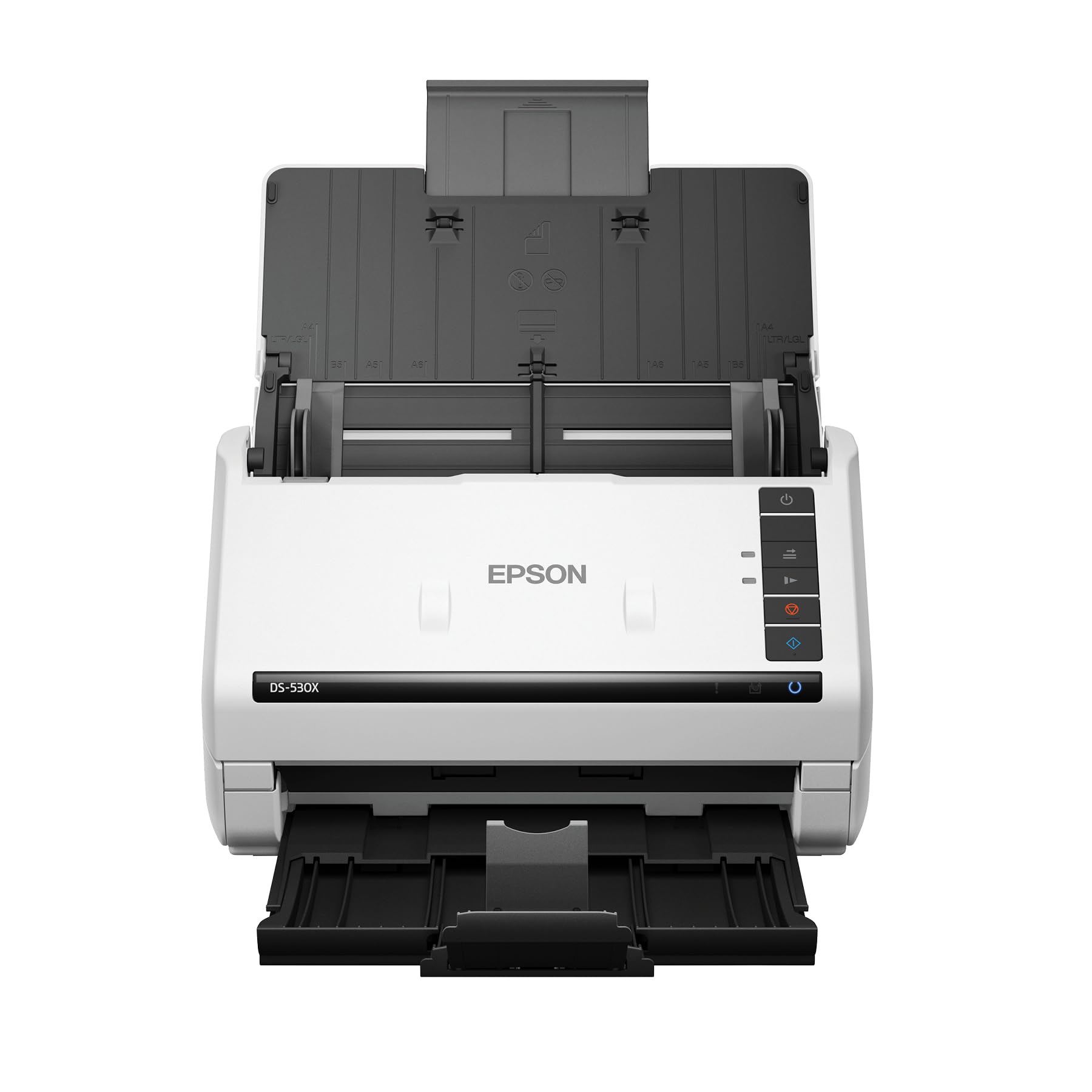
The Epson DS-530X is engineered for relentless daily scanning, with a peak duty cycle of 7,000 sheets per day. That rating places it in a class that can handle departmental volumes without premature wear. The 100-page ADF and 45-ppm duplex speed mean you can process a full inch-thick stack in under three minutes. The included TWAIN and ISIS drivers open the door to deep integration with document management platforms used in legal, medical, and accounting environments.
Ultrasonic double-feed detection is a standout feature — it alerts you immediately if two pages pass through together, preventing missed pages in critical document sets. The extra-long page support allows scanning of continuous forms up to 240 inches, which is useful for shipping manifests and architectural drawings. Verified owners who run multiple DS-530X units in their offices report consistent performance with minimal jams over extended use periods.
The scanner is USB-only; there is no Ethernet or Wi-Fi option, which limits placement flexibility in network-sharing setups. The image sensor uses CIS technology, which scans faster but produces slightly flatter colors compared to CCD units on textured paper. For a workgroup that needs a high-volume workhorse with professional driver integration, the DS-530X is a stellar choice.
Why it’s great
- Industry-leading 7,000 page daily duty cycle for heavy workloads
- Ultrasonic double-feed detection prevents missed pages
- 100-sheet ADF with 45ppm duplex scanning speed
- Full TWAIN and ISIS driver support for professional software
Good to know
- USB-only connectivity — no network or wireless options
- CIS sensor may produce less vivid color on textured paper
5. ScanSnap iX2500

The ScanSnap iX2500 is the most advanced entry in the ScanSnap lineup, adding Wi-Fi 6 and a large 5-inch touchscreen to the already proven scanning engine. You can select personalized profiles directly from the display, scan to your computer, mobile device, or cloud services without touching a keyboard. The 100-sheet ADF feeds at 45 pages per minute with duplex capture, and the brake roller system minimizes paper jams by feeding each sheet smoothly through the path.
Early adopters in high-volume nonprofit settings report running five iX2500 units simultaneously, handling around 25,000 pages per year with excellent reliability. The touchscreen makes profile switching fast for different document types — tax forms, invoices, and receipts each get their own destination and file format without reconfiguration. The wireless speed over Wi-Fi 6 is fast enough that the 10-percent throughput penalty versus wired becomes negligible in normal use.
The main drawbacks are software-related rather than hardware-related. The ScanSnap Home software is more complex than previous versions and can be slow when migrating large PDF libraries from older ScanSnap systems. The iX2500 also lacks an ADF extension tray, and the output tray is shorter than on the older iX500 model. For users who want wireless convenience and a modern touch interface, this is the ScanSnap to buy.
Why it’s great
- Wi-Fi 6 for fast, stable wireless scanning without USB tethering
- 5-inch touchscreen allows profile selection and standalone operation
- 45ppm duplex speed with 100-sheet ADF capacity
- Brake roller system reduces paper jams and protects originals
Good to know
- ScanSnap Home software is bloated and complex compared to older versions
- No ADF extension tray — shorter output tray than predecessor models
6. Epson WorkForce ES-580W

The Epson WorkForce ES-580W blends wireless convenience with a navigable 4.3-inch color touchscreen that lets you scan directly to email, cloud services like Dropbox and Google Drive, or a USB drive — all without a computer. The 100-sheet ADF feeds documents at 35 pages per minute in duplex mode, and the single-step technology captures both sides simultaneously. The scanning engine includes intelligent image adjustments: auto-crop, blank page deletion, background removal, and paper skew correction.
Notary and legal professionals report that the ES-580W handles high-volume paperwork reliably, turning hours of manual scanning into minutes. The ability to create searchable PDFs with optical character recognition and convert scans directly into editable Word or Excel files adds practical value for document-heavy workflows. Users also note that jam clearing is straightforward thanks to a hinged top that opens fully to access the paper path.
The ES-580W lacks an Ethernet port, relying solely on Wi-Fi and USB for connectivity. This can be a limitation in offices with congested wireless networks or those that prefer a wired backbone for reliability. The optical resolution is 300 dpi natively, which is sufficient for most document work but may be lower than users expect for photo scanning. For a wireless scanner with a user-friendly interface, the ES-580W is a strong pick.
Why it’s great
- Wireless scanning direct to cloud, email, or USB without a PC
- 4.3-inch color touchscreen for profile selection and standalone use
- 100-sheet ADF with 35ppm duplex and automatic image corrections
- Optical character recognition for searchable PDFs and editable formats
Good to know
- No Ethernet port — Wi-Fi and USB are the only connectivity options
- Native 300 dpi resolution is adequate for documents but limited for photos
7. Fujitsu fi-7160

The Fujitsu fi-7160 is the benchmark that other document scanners aspire to. Built for high-volume workgroup environments, this unit delivers 60 pages per minute duplex — fast enough that users report they cannot read the pages while they pass through. The CCD sensor and 600 dpi resolution produce sharp, high-fidelity images that meet the strict requirements of legal and accounting document management systems. The 80-sheet ADF is supported by PaperStream IP software that handles blank page removal, auto-crop, rotation, and color detection automatically.
Reliability is the fi-7160’s strongest claim. Verified users report scanning over 2,000 pages with only a handful of misfeeds, all attributed to user error. The superior paper handling technologies — including ultrasonic double-feed detection and a robust roller system — minimize labor costs associated with clearing jams and re-scanning batches. Fujitsu also backs this unit with strong technical support, including English-speaking specialists who can walk through configuration issues.
The investment level is high, and the software stack — PaperStream — has a steep learning curve due to its powerful but dense configuration options. The scanner is also USB-only with no built-in networking, which means a dedicated host computer or a network-connected workstation is required for shared access. For organizations that process thousands of pages weekly and need industrial-grade durability, the fi-7160 is the undisputed leader.
Why it’s great
- 60ppm duplex speed with industry-leading reliability and low jam rates
- CCD sensor delivers superior image quality for critical document capture
- PaperStream IP software with powerful profile-based automation
- Excellent technical support and serviceability with long component lifespan
Good to know
- High investment cost puts it out of range for casual home use
- PaperStream software has a steep learning curve for new administrators
- USB-only — no Ethernet or Wi-Fi for direct network sharing
8. Doxie Pro

The Doxie Pro focuses on simplicity and workflow integration for the home office user. Its collapsible 20-sheet ADF folds down for compact storage, and the direct feed slot handles single items like photos, receipts, or thick paper that a standard feeder might struggle with. The duplex scanning is crisp at 600 dpi, and the built-in optical character recognition enables searchable PDF creation without extra software purchases.
Setup takes about three minutes on M1 Macs or modern Windows PCs, and the included cables cover both USB-A and USB-C connections. Doxie’s smart software offers direct export to Dropbox, Evernote, OneNote, and iCloud without requiring complex driver installations. Users praise the auto-crop and deskew features that clean up scans of wrinkled or crooked originals, and the gamma and contrast adjustments can recover details from poorly printed documents.
The 20-sheet feeder limits batch size, making the Doxie Pro less suitable for big-digitization projects. There is no SD card slot for standalone operation, and the Linux support is absent, which narrows its compatibility. The plastic build feels sturdy but not as dense as the metal-framed office models. For a compact, software-first scanning solution that prioritizes ease of use over sheer volume, the Doxie Pro is excellent.
Why it’s great
- Collapsible design saves desk space when not in use
- Direct feed slot handles thick or delicate paper without jamming
- Plug-and-play setup with USB-A and USB-C cables included
- Smart software auto-crops, deskews, and boosts contrast
Good to know
- 20-sheet ADF is too small for high-volume batch scanning
- No Linux support and no SD card slot for standalone use
9. Brother ADS-1300

The Brother ADS-1300 is a travel-friendly document scanner that draws power directly from a USB port, eliminating the need for a separate wall adapter. Weighing just 3 pounds, it fits easily into a laptop bag for scanning on the go. Despite its size, it delivers duplex scans at 30 pages per minute through a 20-sheet ADF and includes a dedicated card slot for scanning ID badges, business cards, and plastic cards up to 197 inches long in single-page mode.
Users who need a secondary scanner for remote work or a portable companion for trade shows find the ADS-1300’s footprint ideal. The bundled software provides OCR, searchable PDF creation, and file organization tools that cover the basics well. The compact footprint — 11.3 inches wide and 3.3 inches tall — means it can slide into a shallow desk drawer when not in use. Single-pass duplex scanning means no manual page flipping for two-sided documents.
The major caveat reported by multiple buyers is that this renewed model does not include an AC power adapter in the box. The scanner is powered entirely through USB, and some users found the cable insufficient for bus-powered operation with certain older computers. The 20-sheet feeder capacity also means frequent loading for longer projects. For entry-level, portable scanning with duplex capability, the ADS-1300 is a solid budget-friendly option.
Why it’s great
- Ultra-light 3-pound design for easy portability and travel
- USB-powered operation — no separate power outlet required
- Duplex scanning at 30ppm from a compact 20-sheet ADF
- Card slot for scanning IDs, badges, and business cards
Good to know
- 20-sheet ADF limits batch size for larger projects
- Renewed model — verify power solution compatibility before purchase
FAQ
What is the difference between a 20-sheet and 100-sheet ADF for real-world use?
Can I scan thick items like ID cards or folded paper through an ADF scanner?
Why does my ADF scanner need TWAIN or ISIS driver support?
Final Thoughts: The Verdict
For most users, the best adf scanner winner is the Canon imageFORMULA R30 because it delivers driverless plug-and-scan simplicity with a generous 60-sheet feeder that handles the vast majority of office and home workloads without fuss. If you need screaming speed and batch capacity, grab the ScanSnap iX2400 for its 45ppm duplex and 100-sheet feeder. And for a networked workgroup scanner with broad driver support, nothing beats the Brother ADS-4300N for its Ethernet sharing, CCD sensor, and security features.