
Our readers keep the lights on and the weekend projects moving. As an Amazon Associate, I earn from qualifying purchases.
Finding a tablet that balances solid performance with a reasonable price tag usually means wading through slow processors, dim screens, and confusing spec sheets. The market is flooded with generics that promise everything but deliver choppy scrolling and poor battery life, leaving you frustrated with a device that collects dust after a month. This guide cuts through the noise to find the Android tablets that actually deliver a smooth experience without burning your wallet.
I’m Rikta — the co-founder and writer behind FitlyFast. I’ve spent countless hours combing through user reviews, decoding Octa-Core performance claims, and cross-referencing battery capacities, screen resolutions, and real-world usability to separate the few worthwhile options from the many that fall short.
Whether you’re a student, a parent, or someone who just needs a reliable secondary device, this roundup of the best affordable android tablet options will help you pick the right one for your needs.
How To Choose The Best Affordable Android Tablet
Before you swipe your card, know that the biggest mistake buyers make is focusing on a big number next to “RAM” or “Battery” without checking the processor or screen quality. A low-resolution screen and a weak chipset can ruin an otherwise decent spec sheet. Focus on the combination of processor speed, real-world battery life, and display sharpness. Always look past the marketing virtual RAM numbers — physical RAM and a good processor dictate how smooth your daily scrolling and app switching will feel.
Processor and RAM Balance
The processor is the engine; RAM is the fuel line. Octa-Core chips like the MediaTek Dimensity 6300 or Unisoc T7250 offer enough power for streaming, note-taking, and light gaming. Avoid tablets with unknown or legacy chips even if they offer 20GB of virtual RAM. Virtual RAM is a software trick that uses storage space — it helps but does not replace the speed of physical RAM. Aim for a minimum of 4GB physical RAM for smooth operations; 8GB is ideal for power users.
Display Resolution and Refresh Rate
A 1280×800 HD screen is acceptable for basic tasks like reading and YouTube, but a 1920×1200 or 2.5K (2560×1600) resolution makes text crisp and videos pop. The refresh rate — measured in Hz — determines how smooth scrolling feels. A 60Hz screen is standard, but 90Hz or 120Hz provides a noticeable fluidity bump that makes the tablet feel faster than its price suggests. For artists or students, a higher resolution and stylus support are non-negotiable.
Battery Capacity vs. Real-World Drain
A 7000mAh battery looks great on paper, but background apps, screen brightness, and cellular connectivity determine how long it actually lasts. Look for tablets that pair a large battery with a power-efficient processor. Real-world feedback is crucial — a tablet that drains 10-15% overnight in sleep mode will be a daily annoyance. Fast charging via USB-C (18W or higher) is a must for convenience.
Quick Comparison
On smaller screens, swipe sideways to see the full table.
| Model | Category | Best For | Key Spec | Amazon |
|---|---|---|---|---|
| Lenovo Idea Tab Pro | Premium | Gaming & Heavy Productivity | 12.7″ 3K Display / Dimensity 8300 | Amazon |
| Lenovo Idea Tab (8GB) | Premium | Multitasking & Art | 11″ 2.5K Display / 8GB RAM | Amazon |
| TCL NXTPAPER 11 Gen 2 | Mid-Range | Reading & Eye Comfort | 11″ 2K NXTPAPER Display / 8000mAh | Amazon |
| Lenovo Idea Tab (4GB) | Mid-Range | Student Note-Taking | 11″ 2.5K / 90Hz / Stylus Included | Amazon |
| TECLAST T65 | Mid-Range | Large Screen & Sheet Music | 13.4″ 1200p / 120Hz / 8000mAh | Amazon |
| EDUAITABLET K11 w/ Keyboard | Budget | Work & Study Bundle | 11″ 1200p / 90Hz / 8800mAh / Wi-Fi 6 | Amazon |
| FEONAL 11″ Android 16 | Budget | Basic Entry-Level Use | 11″ Incell HD / 7000mAh / 4G LTE | Amazon |
In‑Depth Reviews
1. Lenovo Idea Tab Pro

The Lenovo Idea Tab Pro is the clear champion for anyone who demands raw power and a stunning canvas. Its 12.7-inch 3K LCD display (2944 x 1840) offers exceptional sharpness for reading textbooks, editing documents, or watching 4K content, and the quad JBL speakers with Dolby Atmos provide deep, room-filling audio that renders external speakers unnecessary in most settings. The MediaTek Dimensity 8300 processor handles heavy multitasking with ease, from running multiple Chrome tabs to switching between demanding apps without stutter.
For students and creative users, the included Tab Pen Plus and folio case provide immediate value. The 360Hz touch sampling rate makes the pen input feel responsive and natural for note-taking or sketching. Battery life is impressive, lasting a full day of mixed use, and the 45W fast charging gets you back up and running quickly — though you will need the specific Lenovo charger for the fastest speeds. It’s PUBG certified as well, validating its gaming credentials for those who need to switch between work and play.
Downsides include its weight — at this screen size, it is not a one-handed reader. Also, it ships with Android 14 rather than 16, though the UI is clean and well-optimized. If you can handle the larger footprint, this tablet offers performance and display quality that rivals devices costing significantly more, making it the top pick for serious users.
Why it’s great
- Stunning 3K display ideal for media and reading
- Dimensity 8300 chip delivers flagship-level speed
- Premium pen and folio case included in the box
Good to know
- Large and heavy; not for one-handed use
- Requires specific 45W Lenovo charger for fast charging
- Runs Android 14, not the newest version
2. Lenovo Idea Tab (8GB RAM)
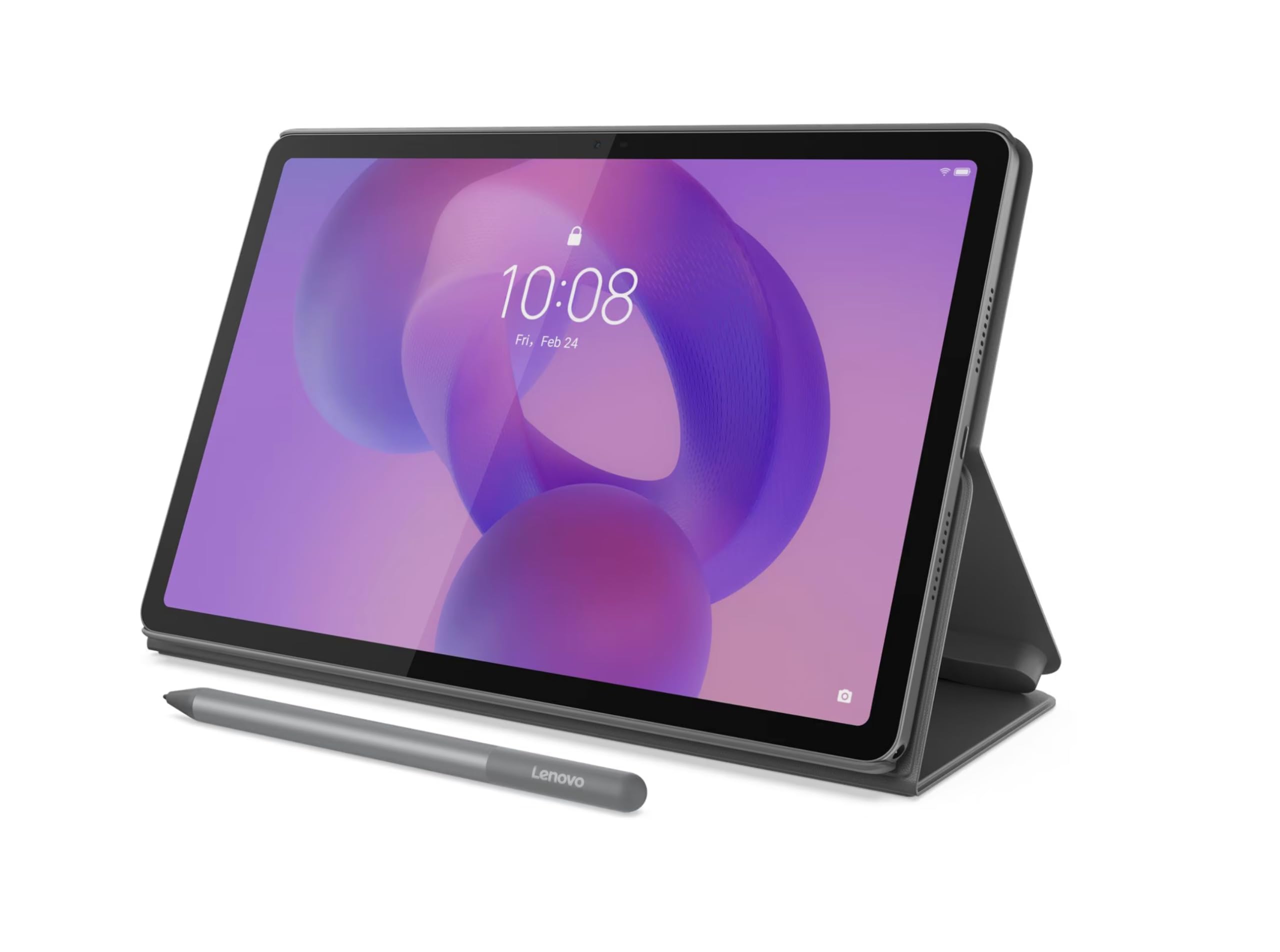
If the Pro model is too large, this 11-inch Lenovo Idea Tab with 8GB of physical RAM offers a perfect middle ground between screen quality, performance, and portability. The 2560 x 1600 2.5K IPS display at 90Hz gives you sharp text and fluid scrolling that makes reading articles, browsing, and navigating the UI feel responsive and premium. The Dimensity 6300 processor paired with 8GB RAM ensures apps stay open and switch quickly, handling a half-dozen open tabs and video streaming without breaking a sweat.
The included Lenovo Tab Pen and folio case add genuine value for note-taking and light drawing. Unlike many budget tablets that bundle a flimsy stylus, this one feels accurate and comfortable for writing and annotating PDFs. The build quality is solid, with a metal frame that feels sturdy in hand. Users report excellent battery life, often lasting through a full day of moderate usage without needing a charge.
Some minor bloatware exists during initial setup, but it is not aggressive. The lack of a headphone jack may be a dealbreaker for some, and the 4GB version (reviewed next) is a more direct value proposition. However, for those who need the extra RAM headroom for heavy multitasking or drawing, this 8GB variant is a wise investment for long-term usability.
Why it’s great
- Sharp 2.5K display with smooth 90Hz refresh rate
- 8GB physical RAM ensures lag-free multitasking
- Pen and case included at a competitive price
Good to know
- No headphone jack
- Some bloatware during initial setup
3. TCL NXTPAPER 11 Gen 2

The TCL NXTPAPER 11 Gen 2 is the tablet to buy if your eyes demand a break from standard glossy screens. Its proprietary NXTPAPER 4.0 display uses a matte, anti-glare coating and DC dimming to reduce blue light and eliminate flicker, creating a paper-like reading experience that is genuinely easier on the eyes during long study sessions or bedtime reading. The 1920 x 1200 resolution is sharp enough for crisp text and vibrant images, and the 4096-pressure-level T-PEN stylus feels natural for drawing and note-taking.
The 8000mAh battery provides excellent endurance — several users report 2-3 days of mixed use or a full day of heavy consumption. Reverse charging is a handy bonus for topping up your phone or earbuds. The AI-powered features like real-time subtitles and Circle to Search are useful for students and professionals, though the MediaTek Helio G80 processor is not designed for heavy gaming. The included flip case doubles as a stand, adding value to the bundle.
Potential downsides include a slower boot-up time and mediocre speaker quality that lacks bass. There is no headphone jack, and the ambient light sensor placement is occasionally problematic. However, for anyone who reads extensively or suffers from eye strain, the NXTPAPER display alone makes this a compelling buy in the mid-range segment.
Why it’s great
- Matte NXTPAPER screen drastically reduces eye strain
- Long-lasting 8000mAh battery with reverse charging
- Includes a high-quality 4096-level stylus and case
Good to know
- Speakers lack bass and depth
- No headphone jack
- Slow boot-up time
4. Lenovo Idea Tab (4GB RAM)

The 4GB RAM version of the Lenovo Idea Tab offers the same excellent 11-inch 2.5K IPS display with a 90Hz refresh rate and the MediaTek Dimensity 6300 processor as its higher-tier sibling, making it arguably the single best value proposition in this entire list. The screen clarity is genuinely impressive for the price — text is razor-sharp, colors are vibrant, and the 90Hz refresh rate makes scrolling through social feeds and documents feel remarkably smooth. It also includes the Lenovo Tab Pen and a folio case, which is rare at this price point.
Lenovo has pre-loaded several productivity apps — Lenovo AI Note, Squid, Nebo, and MyScript Calculator — that turn this into a capable digital notebook out of the box. The Dimensity 6300 handles note-taking, web browsing, and video streaming without lag. The quad Dolby Atmos-tuned speakers provide clear and loud audio for media consumption, making it a solid device for students and casual users alike. Battery life is rated for up to 12 hours of YouTube playback, which aligns well with real-world reports.
The main limitation is the 4GB RAM. While sufficient for basic multitasking, power users who keep dozens of browser tabs open may find it struggles occasionally. Some users reported an inability to install the Amazon shopping app from Google Play, though the web version works fine. If you prioritize screen quality and stylus support over raw multitasking capacity, this is the sweet spot for your money.
Why it’s great
- Outstanding 2.5K IPS display with fluid 90Hz motion
- Includes functional stylus and high-quality folio case
- Excellent speakers for media consumption
Good to know
- 4GB RAM limits heavy multitasking
- Minor app compatibility issues reported
5. TECLAST T65 13.4 inch

The TECLAST T65 is a niche powerhouse for those who prioritize screen real estate above all else. Its massive 13.4-inch 1920×1200 IPS display with a class-leading 120Hz refresh rate provides a premium viewing experience for movies, sheet music, or side-by-side textbook reading. The high refresh rate makes scrolling and transitions extremely fluid, noticeably smoother than standard 60Hz or even 90Hz panels. The narrow bezel design helps keep the overall footprint reasonable for the screen size.
Powered by a T7280 octa-core processor clocked at 2.2GHz, it handles streaming, browsing, and light productivity tasks very well. The 8000mAh battery lasts up to 11 hours on a charge, and 4G LTE support means you can stay connected without hunting for Wi-Fi hotspots. The Android 16 software is clean and includes thoughtful features like sidebars, gesture controls, and a global dark mode. A factory-installed tempered glass screen protector is a nice touch that saves you the hassle of applying one.
Performance is not suited for heavy gaming due to weaker GPU performance, and no case or keyboard is included in the box. Users have noted it requires a separate case for portrait mode use. The screen brightness, while adequate indoors, can be a struggle under direct sunlight. For musicians needing a large display for sheet music or students who want a portable monitor for reading, this is an outstanding choice.
Why it’s great
- Large 13.4-inch screen with ultra-smooth 120Hz refresh
- 4G LTE and dual-band Wi-Fi for reliable connectivity
- Long 11-hour battery life with 8000mAh capacity
Good to know
- Weak GPU; not for demanding games
- No included case or keyboard
- Screen brightness is average for outdoor use
6. EDUAITABLET K11 w/ Keyboard & Mouse
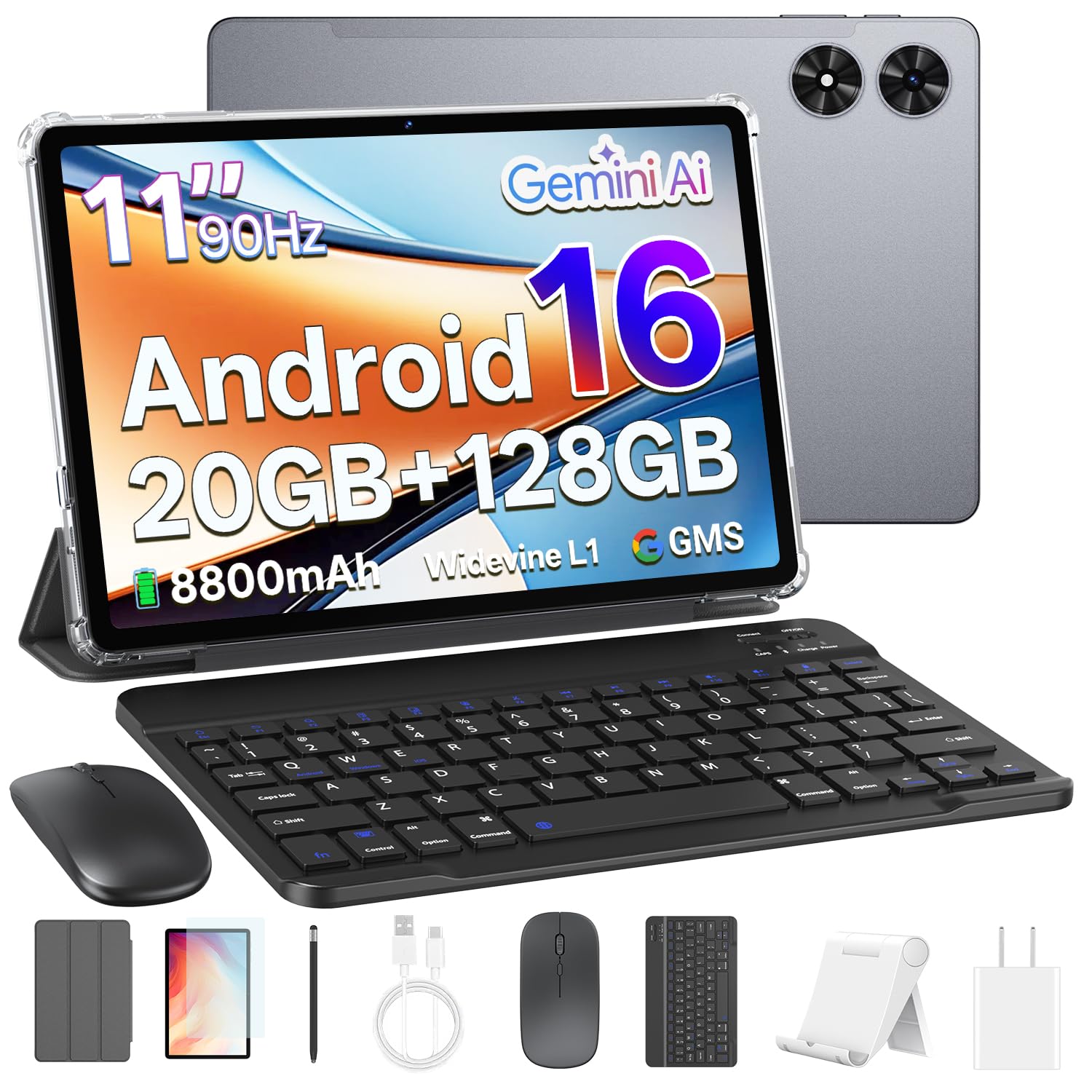
The EDUAITABLET K11 is designed for those who need a full productivity setup without a second purchase. It comes bundled with a keyboard, mouse, stylus, protective case, stand, and pre-installed screen protector — everything you need to turn the tablet into a laptop-replacement for basic work and study. The 11-inch 1280×800 HD IPS display with a 90Hz refresh rate is decent for the price, offering smooth scrolling and acceptable clarity for emails, documents, and streaming.
The Unisoc T7250 octa-core processor and 4GB physical RAM (with 16GB virtual expansion) provide enough power for light multitasking. The massive 8800mAh battery is a standout feature, offering exceptional endurance that can easily last through a full workday and then some. Dual-band Wi-Fi 6 ensures fast and stable internet connectivity, and Bluetooth 5.2 pairs well with the included keyboard and mouse. The Android 16 software includes Gemini AI features for voice assistance.
The display resolution is only HD (1280×800), so text and images are not as sharp as the 2.5K panels from Lenovo. The bundled keyboard is functional but not premium — it gets the job done for typing notes and emails. If you want a turnkey solution for work or school that includes every accessory, this bundle provides immense value.
Why it’s great
- Full accessory bundle: keyboard, mouse, stylus, case
- Massive 8800mAh battery for all-day use
- Wi-Fi 6 and Bluetooth 5.2 for fast connectivity
Good to know
- Screen is only 1280×800 resolution
- Bundled accessories are functional but not premium
7. FEONAL 11″ Android 16 Tablet

The FEONAL 11-inch Android 16 tablet is the quintessential entry-level device for users who need a large screen and cellular connectivity without spending much. It runs the latest Android 16 OS out of the box, which is a rarity at this price, and supports 4G LTE via a SIM card slot — making it a great option for seniors or anyone who needs a data connection on the go for video calls, social media, and light browsing. The MTK8786 Octa-Core processor handles basic apps without major lag.
The 7000mAh battery provides all-day usage for typical tasks, and the 1280×800 Incell display is perfectly adequate for reading e-books, watching YouTube, and browsing. The 13MP rear and 8MP front cameras are better than most in this tier, producing acceptable photos for video calls and snapshots. It includes split-screen functionality and GPS, adding usability for navigation and light multitasking.
Be aware that some units have measured screen size closer to 10 inches despite being advertised as 11, so consider that if precise dimensions matter. The camera quality is poor in low light, and cellular is data-only (no voice calling or texting). For a basic budget tablet with built-in LTE and the newest Android version, this is a solid pick.
Why it’s great
- Runs Android 16 with 4G LTE support
- Large 7000mAh battery provides all-day endurance
- Affordable entry point with decent camera setup
Good to know
- Screen may be closer to 10 inches in reality
- Cellular is data-only; no voice calling
- Low-light camera performance is poor
FAQ
Is a 120Hz display necessary on an affordable Android tablet?
Can I use an affordable Android tablet for drawing and note-taking?
How important is processor power for video streaming and browsing?
What battery capacity is ideal for all-day use on a budget tablet?
Final Thoughts: The Verdict
For most users, the best affordable android tablet winner is the Lenovo Idea Tab (4GB) because it delivers a sharp 2.5K 90Hz display, a reliable Dimensity 6300 processor, and includes a stylus and case at a fantastic value. If you want a larger screen for reading or sheet music, grab the TECLAST T65. And for the best eye-care technology and a stellar reading experience, nothing beats the TCL NXTPAPER 11 Gen 2.