
Our readers keep the lights on and the weekend projects moving. As an Amazon Associate, I earn from qualifying purchases.
Home office printing demands sharp text, fast output, and a machine that won’t bleed your wallet dry on supplies. The common inkjet trap is slow speeds, smudged documents, and constant cartridge swaps — while an all-in-one laser printer delivers crisp monochrome or color pages, duplex scanning, and reliable wireless connectivity that keeps your workflow uninterrupted.
I’m Rikta — the co-founder and writer behind FitlyFast. I’ve spent countless hours analyzing hardware specifications, print engine longevity, and real-world user feedback for monochrome and color laser all-in-one units tailored to home and small office environments.
Whether you need a compact 3-in-1 for invoices or a high-speed workhorse for team documents, this guide breaks down the essential specs to help you choose the right all in one laser printer for home office.
How To Choose The Best All In One Laser Printer For Home Office
Choosing a laser all-in-one for your home office involves more than picking the fastest model. You need to balance print speed, connectivity, paper handling, and long-term operating costs. Below are the essential factors to evaluate before buying.
Print Speed and Monthly Duty Cycle
Print speed is measured in pages per minute (PPM). For a solo home office, 30 PPM is comfortable; for a small team sharing the device, look for 35 PPM or higher. The duty cycle — the printer’s recommended monthly page volume — tells you how many pages the engine can handle without wear. A cycle of 2,000 to 4,000 pages suits a home office, while 8,000+ pages fits a busy multi-user environment.
Paper Handling: Duplex and ADF
Automatic duplex printing (two-sided output) halves paper usage and makes multi-page reports look professional. An Auto Document Feeder (ADF) on the scanner lets you copy, scan, or fax stacks of pages without standing at the glass. For a home office that processes multi-page invoices or contracts, an ADF is non-negotiable.
Connectivity and Mobile Support
A home office printer should offer dual-band Wi-Fi (2.4 GHz and 5 GHz) to avoid interference from other devices. Ethernet is valuable for a wired desktop setup. Mobile printing via AirPrint, Mopria, or the manufacturer’s app ensures you can print from tablets and phones without a computer. Some models also support cloud scanning to Google Drive or Dropbox.
Monochrome vs. Color Laser
If your workflow is text-heavy — contracts, invoices, black-and-white documents — a monochrome laser gives the lowest cost per page and the fastest speeds. If you print marketing materials, charts, or client presentations, a color laser unit is worth the higher upfront cost and toner management. Be aware that color laser toner cartridges (cyan, magenta, yellow) deplete at different rates, so consider high-yield options.
Toner Yield and Cost Per Page
The standard toner cartridge included with a new printer often yields only 700–1,000 pages. Look for high-yield (XL) or extra-high-yield (XXL) cartridges that can produce 2,500–5,000 pages to reduce your cost per page. Some brands offer subscription services that auto-ship toner and can cut supply costs by up to 50 percent. Always check whether the printer blocks third-party toner — HP models are known to do this via firmware updates.
Quick Comparison
On smaller screens, swipe sideways to see the full table.
| Model | Category | Best For | Key Spec | Amazon |
|---|---|---|---|---|
| Brother HL-L2480DW | Monochrome | Wireless 3-in-1 with touchscreen | 36 PPM / 2.7″ Touchscreen | Amazon |
| Canon imageCLASS MF465dw II | Monochrome | High-speed 4-in-1 with ADF | 42 PPM / 5″ Touchscreen | Amazon |
| HP LaserJet Pro MFP 3101sdw | Monochrome | Small team productivity | 40 PPM / 50-sheet ADF | Amazon |
| Brother MFC-L2820DW | Monochrome | Compact fax-enabled unit | 36 PPM / 50-sheet ADF | Amazon |
| Brother HL-L3220CDW | Color | Color document printing | 19 PPM Color / 250-sheet tray | Amazon |
| HP Color LaserJet Pro MFP 3301fdw | Color | Full-color office suite | 26 PPM Color / Duplex ADF | Amazon |
| HP LaserJet MFP M234sdw | Monochrome | Reliable wireless 3-in-1 | 30 PPM / Dual-band Wi-Fi | Amazon |
| Brother HL-L2480DW (Renewed) | Monochrome | Budget-friendly 3-in-1 | 36 PPM / Touchscreen | Amazon |
| HP LaserJet M209d | Monochrome | Simple print-only wired use | 30 PPM / Auto Duplex | Amazon |
In‑Depth Reviews
1. Brother HL-L2480DW

The Brother HL-L2480DW delivers the best balance of speed, features, and long-term value for a home office. With 36 PPM monochrome output, a 2.7-inch touchscreen, and dual-band wireless, it handles high-volume text documents without slowing down. The automatic duplex printing saves paper, and the 250-sheet tray keeps you running without constant refills.
Setup through the Brother Mobile Connect app is straightforward, and the printer supports cloud scanning to Google Drive, Dropbox, and Evernote. Users report reliable wireless connectivity with no dropped jobs, even when the printer is located in a separate room. The included standard toner lasts about 700 pages, but upgrading to the TN830XL high-yield cartridge drops cost per page significantly.
The flatbed scan glass makes copying books or single sheets easy, though there is no auto document feeder. For a home office that primarily prints and scans single pages or short documents, this omission won’t be a dealbreaker. The touchscreen interface is intuitive, and the printer itself is compact enough to fit on a small desk or shelf.
Why it’s great
- Fast 36 PPM prints with crisp text quality
- Intuitive 2.7-inch color touchscreen
- Reliable dual-band wireless with cloud scanning support
Good to know
- No auto document feeder
- Standard toner yields only ~700 pages
2. Canon imageCLASS MF465dw II

The Canon imageCLASS MF465dw II is a 4-in-1 monochrome laser built for speed. At 42 PPM, it’s one of the fastest printers in its class, and the 5-inch color touchscreen makes navigation effortless. It includes a duplex ADF that scans both sides of a stack of pages in a single pass — a massive time-saver for multi-page contracts or reports.
Wireless setup is simple, and the unit supports Ethernet for a wired connection. Users highlight the sharp black text output and the minimal noise during operation. The 250-sheet input tray is standard, but Canon offers an optional second tray if you need higher paper capacity. The duplex scanning is particularly well-reviewed for its speed and accuracy.
Some buyers have reported units arriving with packaging damage or initial defects, so inspect the box on delivery. The web interface for advanced settings is less intuitive than competing models, and fine-tuning print quality may require switching to PS drivers instead of AirPrint. Overall, for a home office that processes high volumes of black-and-white documents, this is a premium speed choice.
Why it’s great
- Blazing 42 PPM monochrome output
- Single-pass duplex ADF for scanning stacks
- 5-inch color touchscreen with intuitive menus
Good to know
- Web UI can be confusing
- Some units arrive with packaging damage
3. HP LaserJet Pro MFP 3101sdw

The HP LaserJet Pro MFP 3101sdw targets small teams with 40 PPM output, a 50-sheet ADF, and strong wireless reliability. Setup is quick via the HP Smart app, and the printer automatically reconnects to Wi-Fi after a power outage — a common annoyance with other models. The 250-sheet input tray handles standard workloads, and the auto-duplex printing is fast and jam-free.
Print quality is sharp for text documents, and the scanner produces clean copies. The ADF can handle up to 50 sheets, but some users recommend limiting it to about 25 to avoid occasional jams. The HP Smart app is well-designed and eliminates bloatware compared to some competitors. The unit also supports printing from USB drives directly.
HP blocks third-party toner cartridges via firmware updates, so you’re locked into HP supplies. If you want to use cheaper alternatives, you must avoid firmware upgrades. The initial toner is a starter cartridge with a lower page yield. For a small team that prioritizes easy setup and reliable wireless, this is a strong monochrome contender.
Why it’s great
- Fast 40 PPM with auto Wi-Fi reconnection
- 50-sheet ADF for multi-page scans
- Excellent HP Smart app with clean interface
Good to know
- HP blocks third-party toner
- Starter toner yields fewer pages
4. Brother MFC-L2820DW

The Brother MFC-L2820DW adds fax functionality to the excellent 3-in-1 platform, making it a full 4-in-1 for home offices that still rely on fax transmissions. It prints at 36 PPM, includes a 50-sheet ADF, and offers the same 2.7-inch touchscreen interface found on the HL-L2480DW. The compact footprint fits easily on a desk without dominating the space.
Users consistently praise Brother printers for their reliability and low total cost of ownership. The MFC-L2820DW supports dual-band wireless, Ethernet, and USB, and the Brother Mobile Connect app allows scanning directly to cloud services. The ADF handles multi-page faxing and copying with ease, and the duplex printing is fast and consistent.
Setup can be slightly confusing due to the sparse printed instructions — some users had to manually enter Wi-Fi details instead of using the app. However, once configured, the printer is rock-solid with no connectivity drops. The first toner cartridge lasted around 6 months for a moderate home office workload. Brother’s Refresh subscription can further reduce toner costs.
Why it’s great
- Full 4-in-1 with fax and 50-sheet ADF
- Reliable dual-band wireless and cloud scanning
- Low cost per page with high-yield toner
Good to know
- Setup instructions are minimal
- Fax requires telephone line cord
5. Brother HL-L3220CDW

The Brother HL-L3220CDW is a print-only color laser designed for home offices that need vibrant charts, graphics, and presentations. It prints at 19 PPM in both color and monochrome, with a 250-sheet tray and a manual feed slot for envelopes or specialty media. The automatic duplex printing saves paper, and the unit supports dual-band wireless, Ethernet, and USB.
Print quality is excellent for a color laser at this price point — crisp text and rich graphics with no banding. The initial toner cartridges are high-yield versions, giving you a head start on page volume. Users who switched from inkjets report zero dried-out ink issues and consistent output even after weeks of inactivity. The unit is compact for a color laser, measuring just 15.7 inches wide.
Setup on Mac can be finicky — some users had to create a self-signed certificate to get printing working reliably. There is no scan function, so it’s strictly a printer, not a multifunction unit. For a home office that prints color marketing materials but handles scanning elsewhere, this is the most affordable reliable color laser option.
Why it’s great
- Vibrant color output with high-yield starter toners
- Compact footprint for a color laser
- Reliable duplex printing with no ink drying
Good to know
- No scan or copy function
- Mac setup may require manual certificate steps
6. HP Color LaserJet Pro MFP 3301fdw

The HP Color LaserJet Pro MFP 3301fdw is a full-featured color all-in-one that prints, scans, copies, and faxes at up to 26 PPM in both color and black. It features a duplex ADF for single-pass two-sided scanning, a 250-sheet tray, and dual-band Wi-Fi with self-reset that automatically reconnects after outages. TerraJet toner technology delivers vivid colors that stand out in client presentations.
Setup is fast through the HP Smart app, and the printer is recognized immediately on both Windows and Mac networks. The auto-duplex printing works smoothly, and the scanner produces clean color copies. Users consistently praise the build quality and the compact design that fits smaller desks. The initial toner set provides decent starter yield, but high-yield options are available for higher volume.
HP blocks third-party toner cartridges via firmware, and some early units experienced color print defects that required toner replacement. The printer’s firmware updates can also cause connectivity conflicts, so some users disable auto-updates. For a home office that needs professional color documents and all-in-one functionality, this is a capable premium choice.
Why it’s great
- Fast 26 PPM color with vibrant TerraJet output
- Duplex ADF for two-sided scanning
- Compact design with reliable Wi-Fi self-reset
Good to know
- Blocks third-party toner cartridges
- Firmware updates can cause connectivity issues
7. HP LaserJet MFP M234sdw

The HP LaserJet MFP M234sdw is a 3-in-1 monochrome laser that balances price with solid performance for small teams of 1–5 people. It prints at 30 PPM, includes an ADF for scanning stacks, and offers dual-band Wi-Fi with a self-reset feature that automatically fixes dropped connections. The unit is Instant Ink eligible, which can reduce toner costs if you print regularly.
Users report setting up the printer via the HP Smart app in under 20 minutes, connecting multiple wireless devices without trouble. Print quality at 300 dpi is clean for text, and the duplex printing is reliable. The scanner and copier work well, and the ADF handles multi-page documents without jams. The compact footprint takes up minimal desk space.
The control panel sits on the paper tray, which some users find slightly wobbly. There is no Ethernet port, so you must rely on Wi-Fi or USB. If you want a wired connection for a stationary desktop, this is a limitation. For a wireless-first home office that needs a dependable monochrome 3-in-1, the M234sdw delivers excellent value.
Why it’s great
- Simple wireless setup with Instant Ink support
- ADF for multi-page scanning and copying
- Reliable dual-band Wi-Fi with self-reset
Good to know
- No Ethernet port
- Control panel is attached to the paper tray
8. Brother HL-L2480DW (Renewed Premium)
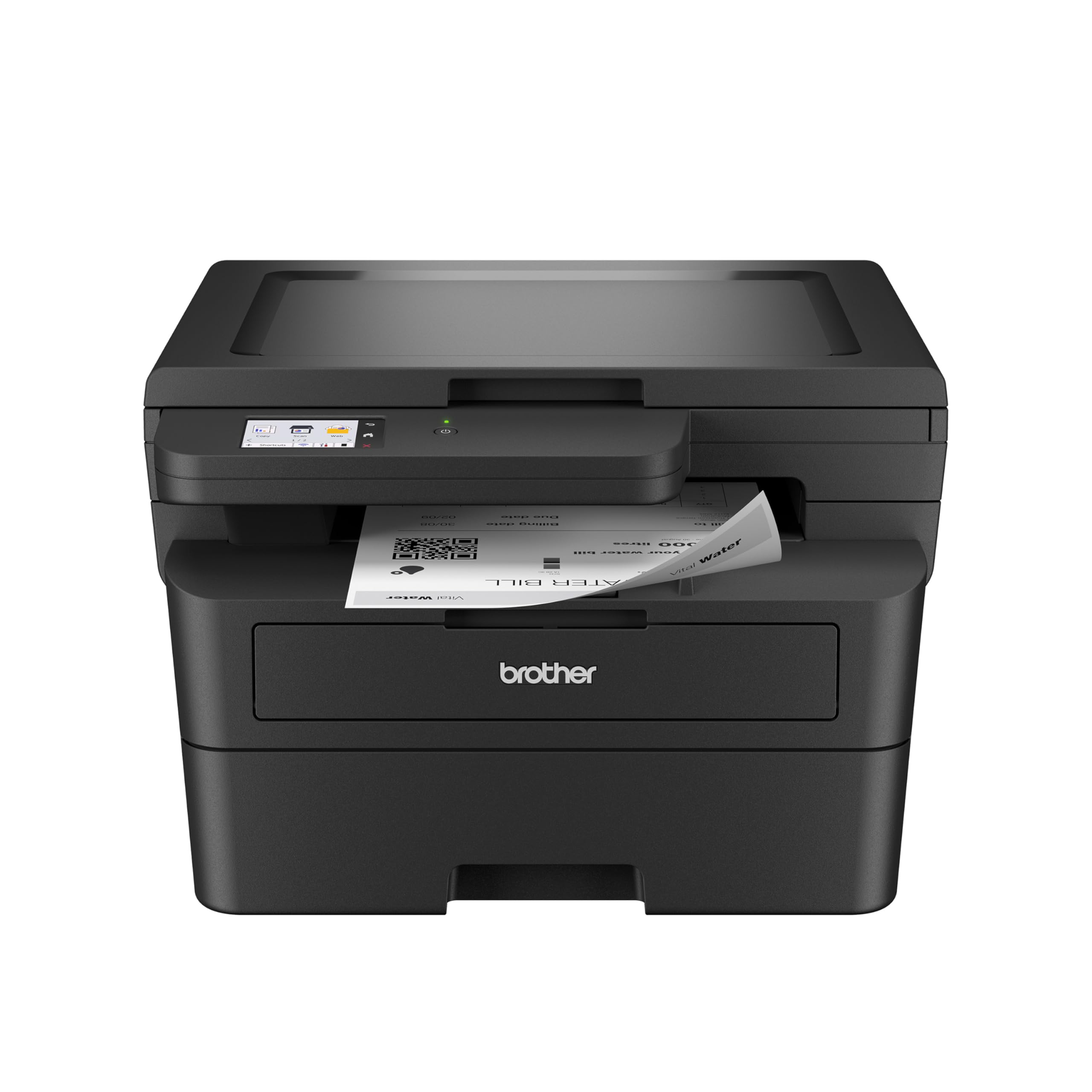
The Brother HL-L2480DW Renewed Premium offers the same 36 PPM performance, 2.7-inch touchscreen, and wireless connectivity as the brand-new unit at a lower price point. It includes the same flatbed scanner and copier, making it a genuine 3-in-1. The renewed certification means the unit has been inspected and tested to work like new.
Users who bought the renewed version report identical print quality and reliability to the new model. Setup is straightforward, and the Brother Mobile Connect app works without issues. The 250-sheet tray and duplex printing function perfectly. For budget-conscious buyers who want the best-in-class Brother experience without paying full retail, this is a smart way to save.
The standard toner cartridge included with the renewed unit may have a shorter lifespan than the new model’s starter cartridge. Some units may show minor cosmetic wear. The warranty is usually shorter than a brand-new purchase. If those trade-offs are acceptable, the renewed HL-L2480DW delivers the same core performance for less.
Why it’s great
- Same 36 PPM and touchscreen as new model
- Renewed premium saves money without sacrificing quality
- Reliable Brother wireless and mobile app support
Good to know
- Included toner may have shorter life
- Shorter warranty than new unit
9. HP LaserJet M209d

The HP LaserJet M209d is a print-only monochrome laser that connects exclusively via USB — no Wi-Fi, no Ethernet. It prints at 30 PPM with automatic duplex, and the 150-sheet input tray is adequate for light home office use. The compact design makes it one of the smallest units in this guide, ideal for a tight desk space where wireless isn’t needed.
Users who want a simple wired printer appreciate the “plug and print” experience — no app downloads, no network configuration. Print quality is sharp, and the unit is fast for its size. The included USB cable saves an extra purchase. For a home office that only needs black-and-white printing for invoices or drafts, and has a dedicated computer nearby, this is the most affordable entry point.
The M209d is not compatible with Mac OS 12.x or later as of early 2025 due to outdated drivers. If you use a modern Mac, this printer will not work. HP also blocks third-party toner via firmware. There is no scan or copy function. For users on Windows who want a no-fuss dedicated printer, this is a lean and reliable option.
Why it’s great
- Compact wired design with auto duplex
- No wireless setup — true plug and print
- Fast 30 PPM for basic text documents
Good to know
- USB-only — no Wi-Fi or Ethernet
- Not compatible with modern Mac OS
- Blocks third-party toner cartridges
FAQ
Is a monochrome laser printer enough for a home office?
What does duplex printing mean for a laser printer?
Do I need an auto document feeder for my home office?
Can I use third-party toner in an HP laser printer?
Final Thoughts: The Verdict
For most users, the all in one laser printer for home office winner is the Brother HL-L2480DW because it combines 36 PPM monochrome speed, a responsive 2.7-inch touchscreen, and the lowest long-term operating cost in the category. If you need a full 4-in-1 with fax and an ADF, grab the Brother MFC-L2820DW. And for color document printing that won’t break the bank, nothing beats the Brother HL-L3220CDW.