
Our readers keep the lights on and the weekend projects moving. As an Amazon Associate, I earn from qualifying purchases.
Navigating the crowded aisle of streaming hardware can feel like a trap — every stick promises 4K but delivers a slow, ad-riddled interface that kills the mood before a movie starts. The difference between a good binge and a frustrating one comes down to CPU power, RAM, and the version of Android TV or Google TV under the hood.
I’m Rikta — the founder and writer behind FitlyFast. I’ve spent years tracking processor benchmarks, OS update cycles, and real-world app-loading speeds across Android TV sticks and boxes to separate the genuine performers from the underpowered clones.
A device that fumbles basic playback or stutters on HDR content will sour your entire setup, which is exactly why I built this guide to the best android streaming device for a buttery-smooth, future-proof home theater.
How To Choose The Best Android Streaming Device
Android TV and Google TV platforms are not created equal. A cheap stick with a tired processor will lag the moment you open a second app, while a box built on a modern hexa-core SoC handles Dolby Vision and background downloads without a hiccup. Understanding three key specs will save you from buying a paperweight.
Processor Power and Memory
The CPU and RAM determine how snappy the interface feels. A quad-core chip running at 1.5 GHz paired with 1 GB of RAM is enough for basic apps but chokes on heavy interfaces like Google TV. Look for a hexa-core chip (like the 6nm process in newer Xiaomi devices) or the Nvidia Tegra X1+ paired with at least 2 GB of RAM. More memory means more apps stay in cache, cutting reload times.
Video and Audio Codec Support
Dolby Vision and HDR10+ are the current gold standards for picture quality. On the audio side, Dolby Atmos and DTS:X give you three-dimensional sound. The device must decode these formats natively through HDMI — many budget sticks only pass basic Dolby Digital 5.1, which leaves height channels silent. Check the spec sheet for “Dolby Vision HDR” and “Dolby Atmos” explicitly listed.
Storage and Expandability
Base storage is often 8 GB, but system files eat half of that immediately. A 32 GB device lets you install dozens of apps, games, and Kodi addons without constantly clearing cache. USB ports let you attach a flash drive or external hard drive for media files and even wired Ethernet adapters. If you plan to side-load apps or use RetroArch emulators, prioritise devices with USB 3.0.
Quick Comparison
On smaller screens, swipe sideways to see the full table.
| Model | Category | Best For | Key Spec | Amazon |
|---|---|---|---|---|
| NVIDIA Shield TV Pro | TV Box | Power user & home theater | AI upscaling 4K, Tegra X1+ | Amazon |
| Google TV Streamer 4K | TV Box | Smart home integration | 32 GB storage, 22% faster CPU | Amazon |
| Xiaomi TV Box S 3rd Gen | TV Box | Balanced 4K with Wi-Fi 6 | 2 GB RAM, Dolby Atmos, DTS:X | Amazon |
| Xiaomi TV Stick 4K 2nd Gen | TV Stick | Travel & portable streaming | Wi-Fi 6, 6nm quad-core CPU | Amazon |
| Google Chromecast with Google TV | TV Stick | Direct Google ecosystem | 4K HDR, Google Assistant remote | Amazon |
| Sidiwen KP1 TV Box | TV Box | Budget expandable storage | 32 GB ROM, Android 11, voice remote | Amazon |
| TiVo Stream 4K | TV Stick | Live TV aggregator experience | TiVo guide, Dolby Atmos, USB-C | Amazon |
In‑Depth Reviews
1. NVIDIA Shield Android TV Pro

The NVIDIA Shield TV Pro remains the undisputed king of Android streaming boxes thanks to its Tegra X1+ chip that handles AI-enhanced upscaling from HD to 4K in real time. With 3 GB of RAM and 16 GB of internal storage, this box has the headroom to juggle Kodi, Plex Media Server, and gaming emulators without stuttering. The two USB 3.0 ports let you attach a DAC for high-res audio or a flash drive for expanded media libraries.
Dolby Vision and Dolby Atmos are fully supported out of the box, and the Gigabit Ethernet port keeps 4K streams stable even on crowded Wi-Fi networks. The backlit remote includes a locator feature and a programmable button, so you never fumble in the dark. After five years on the market, Nvidia still pushes regular firmware updates, which is nearly unheard of in the streaming dongle world.
The primary downside is the premium price tag, but you are paying for a device that will remain snappy and supported for years. The remote can occasionally disconnect in mesh network environments, but a quick reboot resolves it. For anyone building a serious home theater or gaming setup, this box is the clear anchor.
Why it’s great
- AI upscaling delivers noticeably sharper picture on HD content
- Two USB 3.0 ports for storage expansion and DAC connection
- Gigabit Ethernet for lag-free 4K streaming
Good to know
- Higher price reflects its pro-grade components
- Remote may need a quick reconnect on certain Wi-Fi 6 mesh setups
2. Google TV Streamer 4K

Google’s newest streamer ditches the dongle form factor for a proper box that sits neatly on your media console. With a 22% faster processor than the previous Chromecast generation and twice the memory, the interface scrolls smoothly and apps load instantly. The generous 32 GB of storage gives you room to install dozens of games and streaming apps without micromanaging space.
The home panel is the standout feature — it lets you check a Ring camera feed or dim smart lights without interrupting your show. Dolby Vision and Dolby Atmos deliver rich visuals and immersive sound, and the redesigned remote has a customizable button plus a ring locator. Setup takes about ten minutes, and the interface organizes recommendations from Netflix, Prime Video, and YouTube in one clean feed.
It requires an HDMI 2.1 cable (sold separately) to hit full 4K HDR speed, which feels like a small oversight. The retail price sits in the mid-range, and some users note it is essentially an iterative upgrade over the Chromecast with Google TV rather than a revolutionary leap. Still, the extra storage and smart home integration make it the best choice for Google-centric households.
Why it’s great
- Large 32 GB storage capacity for heavy app users
- Smart home panel controls lights and cameras without leaving the screen
- Clean Google TV interface with personalized recommendations
Good to know
- HDMI 2.1 cable is not bundled in the box
- No USB port for local media playback or wired storage
3. Xiaomi TV Box S 3rd Gen
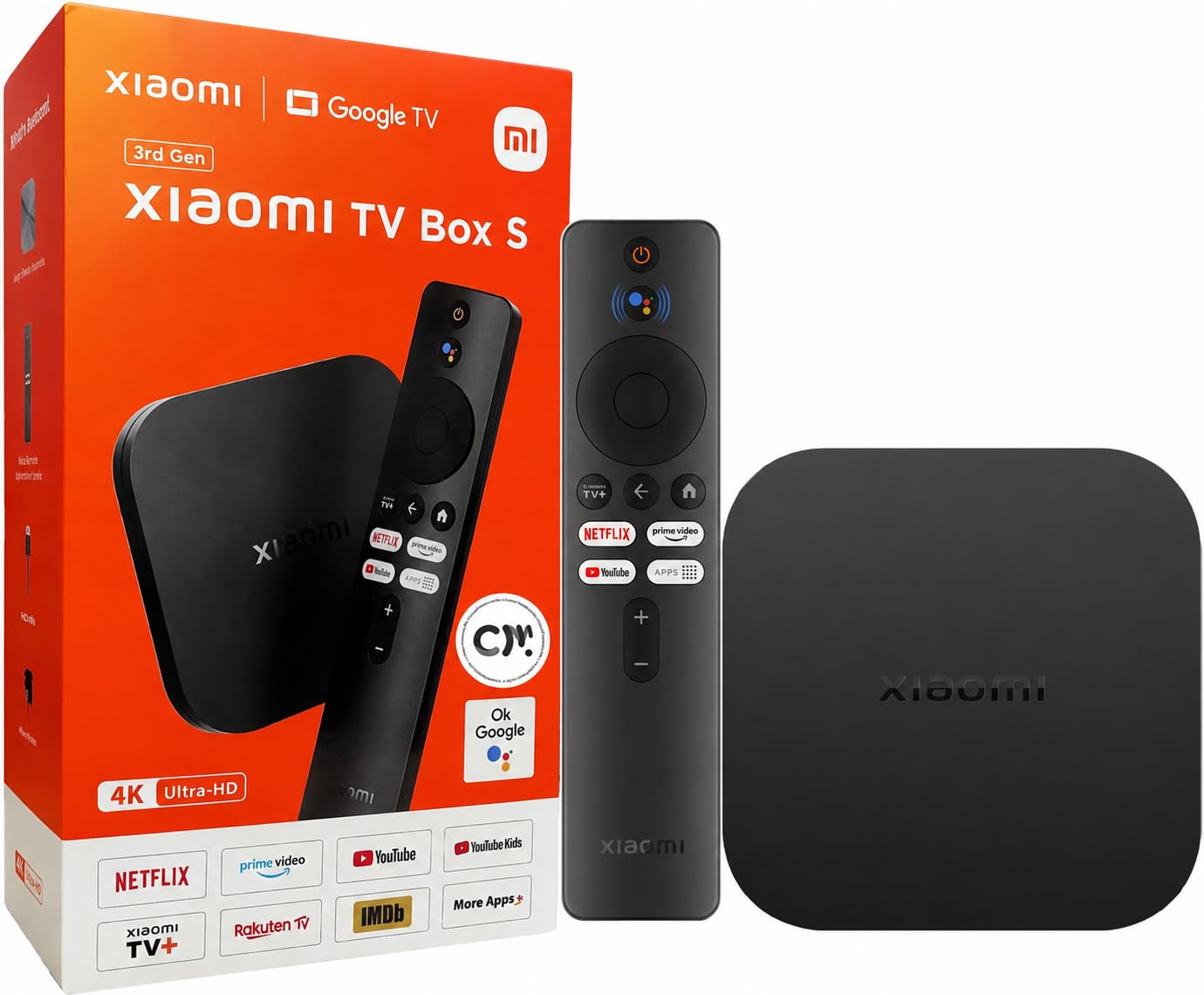
Xiaomi’s third-generation box strikes a compelling balance of power and value. It runs on a 6nm platform that keeps the UI responsive even when switching between heavy apps like Disney+ and a 4K MKV file in Kodi. The 2 GB RAM and 32 GB internal storage handle multitasking well, and the inclusion of both Dolby Atmos and DTS:X means your soundbar or receiver fires on all cylinders regardless of the source format.
Wi-Fi 6 compatibility ensures smooth 4K streaming even when multiple devices are active on your home network. Owners who use a USB drive to watch local 4K movies report that the box fixes choppy playback that older TVs and sticks struggle with, especially with MKV containers that need Kodi or VLC as a player. The 360-degree Bluetooth remote is comfortable and responsive.
The power button occasionally fails to turn the device off for some users, which seems tied to HDMI-CEC handshake behavior rather than a hardware defect. The 8 GB storage version is insufficient for heavy installers, so confirm you are buying the 32 GB variant. For a mid-range price, this box delivers flagship audio support and smooth Android TV navigation.
Why it’s great
- Dolby Atmos and DTS:X dual audio codec support
- Wi-Fi 6 ensures consistent 4K streams on crowded networks
- Handles local 4K HDR playback from USB drives smoothly
Good to know
- Power button response may vary with HDMI-CEC settings
- Base storage is 8 GB, so check for the 32 GB version
4. Xiaomi TV Stick 4K 2nd Gen

If portability is your priority, the Xiaomi TV Stick 4K 2nd Gen packs true cinema-grade video and audio into a dongle barely larger than a thumb drive. The 6nm quad-core CPU and Wi-Fi 6 deliver lag-free 4K playback without the bulk of a set-top box. Dolby Vision, HDR10+, Dolby Atmos, and DTS:X are all on board, meaning you get the same immersive specs as premium boxes in a travel-friendly package.
Google TV organizes your apps and content from across subscriptions, and the Bluetooth voice remote lets you search by mood or genre. The stick works with Google Cast, so you can fling videos from your phone instantly. Frequent travelers love using it to turn dull hotel televisions into a full smart TV experience with their own profile and apps.
The internal storage is 8 GB, which limits how many large games or Kodi builds you can keep installed. It also lacks a wired Ethernet port, so performance depends on Wi-Fi signal strength in your space. For the price, this stick outperforms many budget boxes in raw codec support and should be your first choice for a grab-and-go streamer.
Why it’s great
- Supports Dolby Vision, HDR10+, Dolby Atmos, and DTS:X in a stick form
- Wi-Fi 6 and 6nm CPU keep the interface snappy
- Ultra-portable design perfect for travel
Good to know
- 8 GB storage fills up quickly with heavy app installs
- No Ethernet port — relies entirely on Wi-Fi connection
5. Google Chromecast with Google TV

The Chromecast with Google TV remains a solid entry for anyone deeply invested in the Google ecosystem. It plugs directly into your TV’s HDMI port and delivers crisp 4K HDR playback with bright, accurate colors. The voice remote uses Google Assistant to search across apps, control volume, and even answer trivia questions without lifting a finger — the hands-free search works well for finding shows by mood rather than by title.
Your home screen aggregates content from all your subscriptions into a single feed, and the personal recommendations improve over time as the algorithm learns your habits. It supports Dolby Vision and Dolby Atmos, and the Chromecast built-in feature lets you cast from Android and iOS devices instantly. The included pouch and cleaning cloth make it a good gift option for friends upgrading from a basic smart TV.
The major trade-off is storage — at 8 GB, you will run out of space if you side-load apps or download large games. The stick can sometimes feel sluggish when switching between multiple apps compared to the newer Google TV Streamer. For a streamlined Google TV experience at a mid-range price, this stick is dependable but shows its age against competitors with Wi-Fi 6.
Why it’s great
- Deep Google Assistant integration for voice control
- Clean, personalized home screen with cross-app recommendations
- Compact design with included pouch for portability
Good to know
- 8 GB storage limits app installs and game downloads
- Lacks Wi-Fi 6 support for congested networks
6. Sidiwen KP1 TV Box
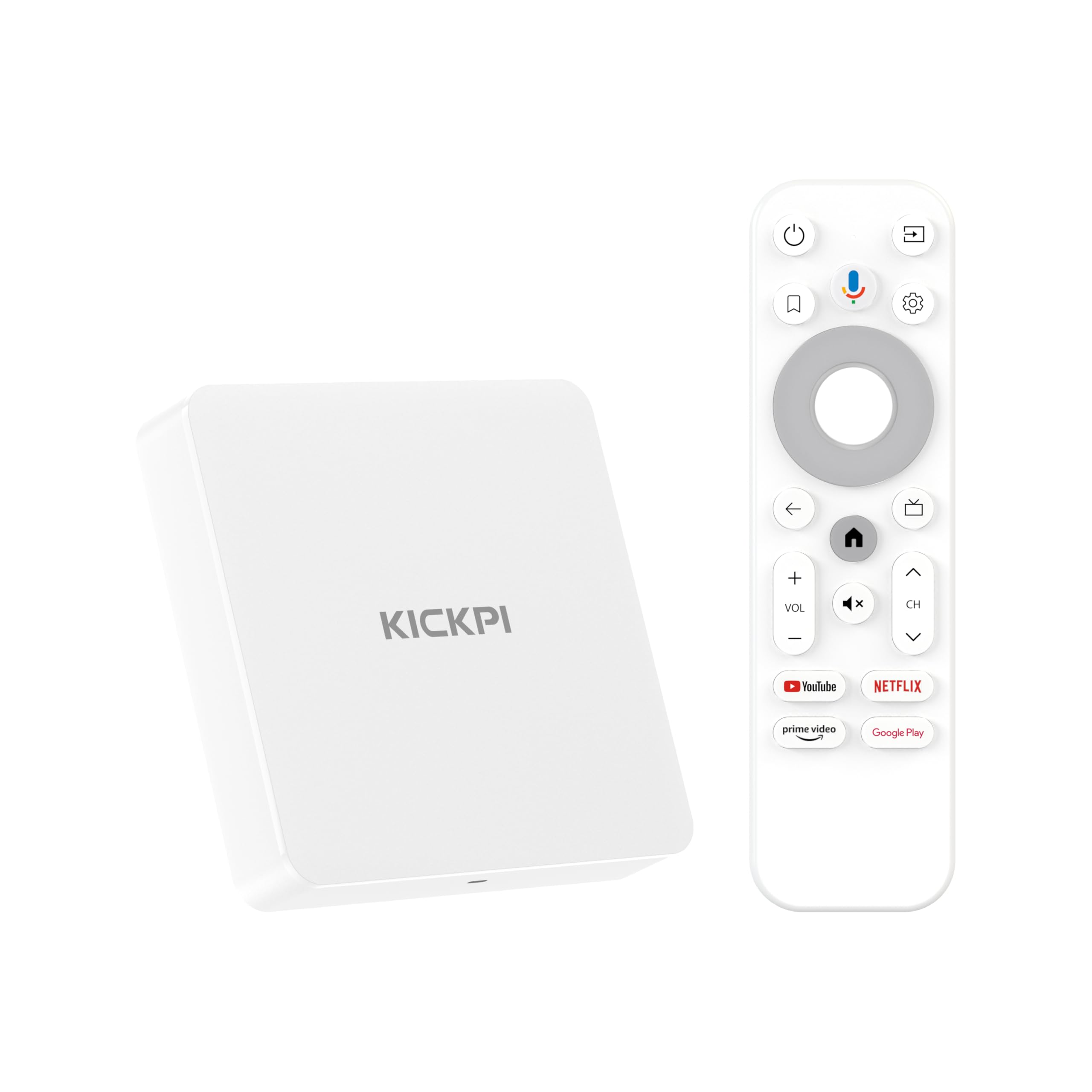
The KP1 box from Sidiwen is fully Google certified, meaning it runs Netflix, Prime Video, and Disney+ at 4K HDR without compatibility headaches. With Android 11 as the base OS and a promised upgrade path to Android 12, this box gives you modern privacy controls and app optimization. The 2 GB RAM and 32 GB ROM provide double the storage of most sticks at a similar price point, making it ideal for users who side-load productivity apps like Google Keep or use Kodi for local library management.
The voice remote includes dedicated YouTube and Prime Video buttons, which saves a click when launching those apps. The included HDMI cable is built into the remote’s packaging, streamlining the initial setup. Owners report that the box works well with Surfshark VPN for IPTV services and handles DRM correctly for major streaming platforms.
A small but persistent audio delay appears on some apps, particularly when streaming live channels, which is not present on a Fire TV Stick using the same service. The box also disables certain apps if the Google Play Store is left active without custom launcher tweaks. For the budget-minded buyer who needs more storage than a stick offers, this box delivers good raw specs if you can live with a few quirks.
Why it’s great
- Google Certified with full Netflix and Prime Video 4K support
- 32 GB storage for side-loaded apps and media management
- Dedicated YouTube and Prime Video buttons on the remote
Good to know
- Audio delay reported on certain live streaming apps
- Google Play Store may interfere with side-loaded apps
7. TiVo Stream 4K

The TiVo Stream 4K sets itself apart by merging streaming apps with live TV channels in one unified guide. Instead of jumping between individual apps to find something to watch, you get a centralized browse view that pulls from Netflix, Prime Video, Peacock, and Sling together. The USB-C power input is a welcome modern touch compared to the micro-USB still used on many competing sticks.
The remote is one of the best in the category — it controls both the TV and receiver volume, has an Info button that shows real-time video resolution and audio codec data, and includes mute controls. Dolby Vision and Dolby Atmos are both supported, and the 5.1 audio passthrough works on apps like HBO Max where Roku sticks still fail. Owners who use Stremium for live TV integration and DVR features find the TiVo interface far superior to built-in smart TV systems.
Android TV is limited to Android TV 10 with no clear upgrade path, and the 8 GB storage fills quickly. The TiVo guide does not natively integrate YouTube TV channels, which is a gap for cord-cutters using that service. For the budget range, this stick offers the best remote and live TV aggregation, but missing app support for Apple TV and the need for a Google account during setup may frustrate some users.
Why it’s great
- Unified TiVo guide browses streaming and live TV together
- Best-in-class remote with Info button, TV controls, and mute
- Dolby Vision and 5.1 audio passthrough on major apps
Good to know
- Android TV 10 has limited app availability (no Apple TV)
- YouTube TV channels do not integrate into the TiVo guide
FAQ
What is the difference between Android TV and Google TV?
Can I use a VPN with an Android streaming device?
Do all Android streaming devices support Netflix at 4K?
Will my old TV work with an Android TV stick?
Can I store movies on an Android streaming device?
Final Thoughts: The Verdict
For most users, the best android streaming device winner is the NVIDIA Shield TV Pro because it combines AI upscaling, Dolby Vision, and full codec support with unmatched longevity and updates. If you want a cleaner smart home integration with extra storage, grab the Google TV Streamer 4K. And for a budget-friendly travel companion that still delivers Dolby Atmos and HDR10+, nothing beats the Xiaomi TV Stick 4K 2nd Gen.