
Our readers keep the lights on and the weekend projects moving. As an Amazon Associate, I earn from qualifying purchases.
A hiss in the background, thin and hollow vocals, or that persistent digital chirp from your computer’s internal sound card can ruin an otherwise perfect take. When you plug a microphone directly into a standard laptop or PC, you’re fighting against noisy electronics, low gain, and no proper preamp. An audio interface is the dedicated hardware that solves all of that, giving your microphone a clean channel with sufficient amplification and high-resolution conversion so every breath, pluck, and spoken word arrives at your DAW as intended.
I’m Rikta — the co-founder and writer behind FitlyFast. I’ve spent countless hours cross-referencing preamp gain specs, dynamic range figures, driver stability across Windows and macOS, and phantom power reliability to build a curated list of interfaces that actually deliver on their promises for microphone recording.
The goal of this guide is to cut through the spec sheets and marketing claims, and deliver a clear verdict on the best audio interface for microphone across different setups and budgets.
How To Choose The Best Audio Interface For Microphone
Choosing an interface for a microphone is different from buying one for line-level synths or guitar. The microphone preamp is the star of the show — its gain range, noise floor, and impedance matching determine the final vocal quality. Here are the four specifications that matter most in this narrow category.
Preamp Gain and Noise Floor
Dynamic microphones like the Shure SM7B or Sennheiser MD 421 need a lot of clean gain — often 60 dB or more — to reach a usable level without introducing hiss. Look for an interface that provides at least 55 dB of gain for most dynamic mics. The noise floor, measured in decibels relative to full scale (dBFS) or EIN (Equivalent Input Noise), tells you how much residual hiss the preamp adds. A figure of -127 dBV or lower is considered excellent for vocal work.
Phantom Power and Input Configuration
Most condenser microphones require 48V phantom power to operate. Ensure the interface has a dedicated switch for each channel, not a global button that powers all inputs at once. Combo jacks (XLR + ¼-inch) offer the most flexibility, allowing you to plug in a microphone on one channel and an instrument on the other without adapters.
Sample Rate and Bit Depth
CD-quality audio is 16-bit/44.1 kHz, but modern interfaces support up to 24-bit/192 kHz. For podcasting and spoken word, 24-bit/48 kHz is more than enough. Higher sample rates increase file size but do not magically improve subjective quality for voice. What truly matters is the quality of the clock circuitry and converters, which determines how cleanly the analog signal is digitized.
Driver Stability and Direct Monitoring
A stable driver is essential for low-latency performance on Windows (ASIO) and macOS (Core Audio). Without good drivers, you’ll experience pops, clicks, and dropouts when monitoring through your DAW. Direct monitoring bypasses the computer entirely, sending the dry microphone signal straight to your headphones — this eliminates latency and is a must-have for vocalists who need to hear themselves in real time without delay.
Quick Comparison
On smaller screens, swipe sideways to see the full table.
| Model | Category | Best For | Key Spec | Amazon |
|---|---|---|---|---|
| Solid State Logic SSL 2 MKII | Premium | Studio-Grade Vocal Recording | Preamp gain: 62 dB, Legacy 4K enhancer | Amazon |
| Focusrite Clarett+ 4Pre | Premium | Multi-Mic Studio & Ensemble Recording | 4 preamps with Air mode, 119 dB dynamic range | Amazon |
| MOTU M4 | Mid-Range | Transparent Preamp & Low Latency | LCD metering, loopback, 32-bit floating point | Amazon |
| Universal Audio Volt 2 | Mid-Range | Vintage-Toned Vocal Warmth | UA 610 preamp emulation, 24-bit/192 kHz | Amazon |
| RØDE RØDECaster Duo | Premium | All-In-One Podcast Production | Revolution Preamps (76 dB gain), APHEX effects | Amazon |
| M-AUDIO AIR192x4 VSPro | Mid-Range | Complete Starter Bundle | Interface + condenser mic + headphones, 2.59 ms latency | Amazon |
| Shure MVX2U Gen 2 | Portable | On-The-Go XLR to USB-C Conversion | 60 dB gain, onboard DSP denoiser | Amazon |
| Focusrite Vocaster Two | Mid-Range | Two-Host Podcast Interviews | Auto Gain, Enhance presets, 70 dB gain | Amazon |
| Arturia MiniFuse 1 | Entry-Level | Compact Travel & Beginner Use | USB-C powered, 192 kHz, built-in USB hub | Amazon |
In‑Depth Reviews
1. Solid State Logic SSL 2 MKII

The SSL 2 MKII brings the legendary British console sound to a compact desktop unit. Its preamps deliver a clean 62 dB of gain, enough to drive an SM7B or similar demanding dynamic microphone without an external booster. The standout feature is the Legacy 4K button, which adds a subtle high-frequency presence curve and light harmonic distortion — it adds air and excitement to dull vocals without sounding harsh or artificial.
Build quality is excellent, with a full metal chassis, smooth potentiometers, and a clean LED metering system that includes a numeric noise gauge for fine-tuning gain staging. The headphone amplifier is powerful enough for 250-ohm studio headphones, and the 32-bit/192 kHz converters provide exceptionally low distortion. On Windows, the driver installation is straightforward, and the unit is class-compliant on Mac.
The only trade-off is size: it is noticeably larger and heavier than budget competitors. But for a vocalist who wants a preamp that genuinely colors the sound in a musical way, the SSL 2 MKII is the most compelling all-rounder on the list.
Why it’s great
- Legacy 4K switch adds studio-grade analog character to vocals
- Excellent 62 dB clean preamp gain for dynamic mics
- Rock-solid metal build and intuitive layout
Good to know
- Bulkier than entry-level competitors; takes up desk space
- Not true 32-bit float on input signal path
2. Focusrite Clarett+ 4Pre
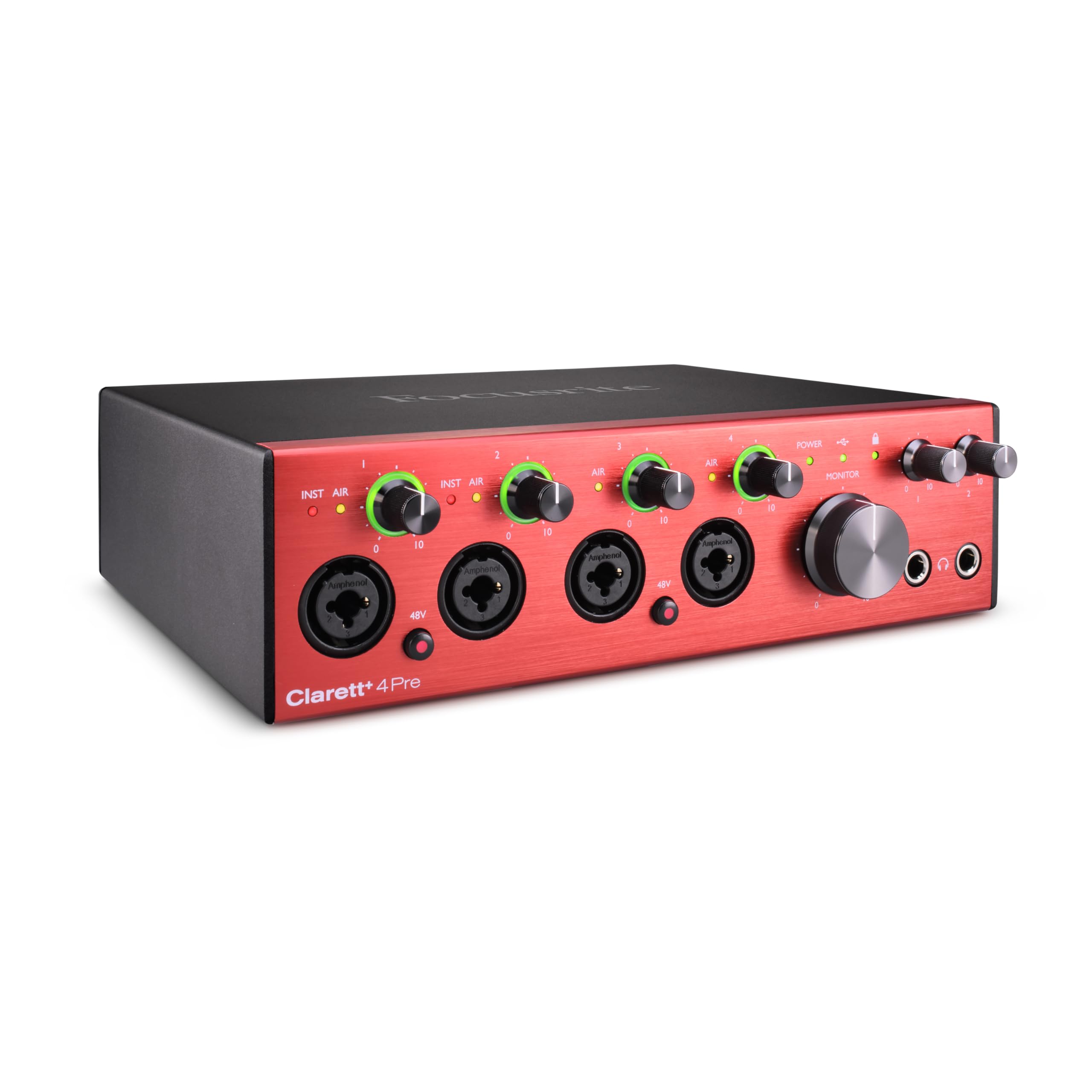
The Clarett+ 4Pre sits above the Scarlett series, and the difference is audible. Its preamps are noticeably quieter and more transparent, offering a reported -127 dBV EIN, which means even at high gain settings, the noise floor stays buried. The Air mode is not a simple EQ boost — it emulates the impedance and high-shelf curve of the classic Focusrite ISA 110, adding clarity and presence to a microphone without making it sound processed.
With four mic preamps, two JFET instrument inputs, and an ADAT expansion port, this interface is built for serious recording sessions. The headphone outputs have enough current for high-impedance studio headphones, and the separate volume controls for monitors and headphones make monitoring flexible. The included Focusrite Control software allows advanced routing and multiple independent mixes.
The Clarett+ requires external power — it is not bus-powered — so it is less portable than compact alternatives. And at this tier, the price reflects a genuine investment in audio quality. But for a home studio that needs multiple microphone inputs with professional-grade conversion, this is a long-term purchase that outperforms typical consumer interfaces.
Why it’s great
- Ultra-low noise preamps with -127 dBV EIN
- Air mode emulates ISA 110 for detailed vocal capture
- Expandable via ADAT, 4 mic inputs
Good to know
- Requires AC power; not bus-powered
- Premium price point — overkill for single-mic podcasters
3. MOTU M4

The MOTU M4 is a precision tool. Where other interfaces try to color the sound with analog simulations, MOTU focuses on delivering the cleanest, most transparent signal path possible. Its preamps are exceptionally quiet, with a very low noise floor and high headroom, making it ideal for recording quiet sources like acoustic guitar or a soft-spoken narrator. The built-in LCD screen shows real-time levels for all four inputs, which aids gain staging immensely.
The M4 supports up to 24-bit/192 kHz conversion, and MOTU’s drivers on both Windows and macOS are considered among the most stable and low-latency in the industry. The dedicated loopback output is a boon for streamers and podcasters who need to route computer audio into their stream without external cables. The hardware direct monitoring knob allows you to blend the dry input and computer playback seamlessly.
One quirk is that the volume knobs have a small dead zone near the bottom of their rotation. The headphone amp is adequate for low-impedance headphones but may not drive high-impedance models to concert levels. These are minor trade-offs in an otherwise impeccable interface for anyone who values signal purity above all else.
Why it’s great
- Ultra-transparent preamps with vanishingly low noise
- LCD displays for each input simplify level setting
- Rock-solid ASIO drivers with very low latency
Good to know
- Volume knobs have a small dead zone at low rotation
- Headphone output is somewhat limited for high-impedance cans
4. Universal Audio Volt 2

The Volt 2 offers a unique feature in its price bracket: a Vintage mode that emulates the UA 610 tube preamp. Engaging this button adds a gentle high-frequency presence boost and subtle harmonic saturation, which can give an otherwise sterile vocal track a sense of analog warmth and body. For spoken word and singing alike, this effect is musical and flattering without being heavy-handed.
Built quality is solid, with a retro aesthetic that includes a large, satisfying monitor knob. The converters handle up to 24-bit/192 kHz, and the preamps provide adequate gain for most condenser and dynamic microphones. The bundled LUNA DAW software is a full-featured recording environment with an analog-style workflow, though it is currently optimized for macOS. On Windows, the Volt 2 still works smoothly with any major DAW.
One limitation is that the USB bus power can be insufficient when using the Vintage mode at high gain with a demanding mic, requiring an external power supply (sold separately) for optimal performance. If you are looking for a quick way to add a vintage sheen to your voice without relying on post-processing plugins, the Volt 2 delivers reliably.
Why it’s great
- Vintage mode adds analog-style warmth and presence to vocals
- Includes full LUNA DAW and UAD plugins bundle
- Sturdy build with classic, tactile design
Good to know
- May require external power for best performance with Vintage mode
- LUNA DAW is less feature-rich on Windows
5. RØDE RØDECaster Duo

The RØDECaster Duo is less a traditional audio interface and more a dedicated production console for podcasters and streamers. It includes two Neutrik combo inputs with RØDE’s Revolution Preamps, which provide a massive 76 dB of gain — enough to get a clean signal from even the most gain-hungry dynamic microphones without a cloudlifter. The integrated APHEX effects suite includes the Aural Exciter and Big Bottom, which can make a voice sound broadcast-ready in seconds.
The 4-inch touchscreen and four motorized faders give a tactile mixing experience that no other interface at this size offers. You can record directly to a microSD card, connect a smartphone via Bluetooth or TRRS, and stream audio directly to your computer. The six SMART pads can trigger sound effects, jingles, or MIDI commands. For a creator who wants one box to manage the entire audio chain, this is an unmatched solution.
On the downside, the software can be buggy, and some users report occasional freezing or driver conflicts. The unit also has a steep learning curve for anyone not comfortable with a mixer-style interface. If you just need a clean channel for a single microphone into a DAW, a simpler interface is better. But if you are running a live show or recording interviews, the RØDECaster Duo speeds up your workflow enormously.
Why it’s great
- 76 dB preamp gain handles even the most demanding mics
- Integrated APHEX processing enhances vocal quality on the fly
- Records to SD card, connects via Bluetooth, stream-ready
Good to know
- Software can be temperamental and has a learning curve
- Overkill for simple single-mic DAW recording
6. M-AUDIO AIR192x4 VSPro

The AIR192x4 VSPro is one of the few packages that includes everything a beginner needs: the interface itself, a Nova condenser microphone, a shock mount, an XLR cable, and HDH40 studio headphones. For someone buying their first recording setup, this eliminates the guesswork and the need to purchase individual components. The interface itself supports up to 24-bit/192 kHz resolution and a claimed round-trip latency of just 2.59 milliseconds.
The preamps are transparent and offer adequate gain for the included condenser mic. The bundle covers the basics of podcasting or home recording, and the included software suite — Ableton Live Lite, MPC Beats, and several virtual instruments — provides a solid starting point for music production. The USB-C connectivity ensures compatibility with modern computers.
The Nova microphone included in the bundle is functional but not exceptional; its sound is acceptable for podcasts and voiceovers but may lack the detail of higher-end dedicated microphones. The interface itself is plastic-bodied, which feels less premium than metal chassis competitors. However, as an all-in-one entry point, this package delivers genuine value for a new creator who wants to start recording immediately.
Why it’s great
- Includes interface, condenser mic, headphones, cables, and shock mount
- Very low round-trip latency of 2.59 ms
- USB-C connectivity and bundled DAW software
Good to know
- Included microphone is entry-level; not for critical vocal recording
- Plastic chassis feels less durable than metal alternatives
7. Shure MVX2U Gen 2

The MVX2U Gen 2 is not a traditional interface with multiple inputs and outputs. It is a specialized XLR-to-USB-C adapter that brings Shure’s onboard digital signal processing directly to any dynamic or condenser microphone. With a compact body smaller than a smartphone, it provides up to 60 dB of clean gain and 48V phantom power, making it possible to connect a professional microphone directly to an iPhone, iPad, or laptop without carrying a bulky standalone interface.
The built-in DSP includes Auto Level Mode, which adjusts gain in real time to maintain consistent volume, a Real-Time Denoiser that reduces background noise, and a Digital Popper Stopper that minimizes plosives. These processing tools are applied before the signal reaches your recording app, meaning the audio entering your DAW or streaming software is already polished. The MOTIV app allows fine-tuning of EQ, compression, and tone presets from a smartphone.
Because it is so small and draws power from the USB-C port, there is no headphone output for zero-latency monitoring. You will need to monitor through your device’s headphone jack, which introduces some delay. It is also a single-input device, so recording two microphones simultaneously is not possible. But for solo remote interviews, field recording, or streamlining an SM58 for a Zoom call, the MVX2U Gen 2 is exceptionally clever.
Why it’s great
- Ultra-portable; turns any XLR mic into a USB-C plug-and-play device
- Onboard DSP with denoiser, auto-level, and pop filter
- 60 dB clean gain; no external booster needed for SM7B
Good to know
- No dedicated headphone output for latency-free monitoring
- Single input only; cannot record two microphones
8. Focusrite Vocaster Two

The Vocaster Two is Focusrite’s dedicated podcasting interface, designed from the ground up for spoken-word production with two hosts. It provides two XLR inputs with over 70 dB of gain, so even low-output dynamic microphones like the RØDE PodMic or Shure SM58 reach healthy levels without an inline preamp. The Auto Gain feature is genuinely useful — press the button, speak at your normal volume, and the interface sets the gain perfectly in a few seconds.
The Enhance button offers four presets that adjust EQ and compression to suit different vocal styles: Warm, Bright, Radio, and Studio. These presets are effective and immediate, saving post-processing time. The Vocaster Two also includes a dedicated Bluetooth input for phone calls, a camera line-out for pairing with a DSLR or mirrorless camera, and a hardware mute button for each channel. The Show Mix feature lets each host create their own headphone mix.
The chassis is plastic, which is a departure from the metal Scarlett series, but it feels rugged enough for portable use. The front-mounted headphone jacks are convenient but protrude noticeably. For a podcaster who records interviews with a co-host or remote guest, the Vocaster Two offers a purpose-built feature set that general-purpose interfaces cannot match.
Why it’s great
- 70+ dB gain handles dynamic mics without external boosters
- Auto Gain and Enhance presets streamline podcast setup
- Bluetooth phone integration and camera output for vlogging
Good to know
- Plastic body can feel lighter than metal competitors
- Front headphone jacks may stick out and be prone to damage
9. Arturia MiniFuse 1

The Arturia MiniFuse 1 is the most compact USB-C powered interface in this roundup, measuring just 5.9 inches wide. Despite its footprint, it delivers 24-bit/192 kHz conversion, a preamp with 48V phantom power, and a built-in USB-A hub that lets you connect a controller or flash drive. The 5-year warranty is among the longest in the industry, reflecting confidence in its build quality.
The preamp is clean and quiet for its price bracket, and the direct monitoring switch allows zero-latency headphone monitoring. The MiniFuse 1 includes a comprehensive software bundle that features Ableton Live Lite, Analog Lab Intro, and Auto-Tune Unlimited, making it a fantastic value for a musician or podcaster starting out. The loopback function is available for capturing computer audio during streams or recordings.
The single combo input limits you to one microphone at a time, and the headphone output is adequate for standard studio headphones but lacks the raw power of larger units. The plastic bottom panel and lightweight frame mean it is best suited for a desk or a travel bag rather than a rack. As an entry-level interface that punches above its weight in included software and warranty, the MiniFuse 1 is a smart pick for the budget-conscious creator.
Why it’s great
- Very compact and USB bus-powered; ideal for mobile use
- 5-year warranty is best-in-class for this price tier
- Includes a USB hub and extensive software bundle
Good to know
- Only one microphone input; no stereo recording of two mics
- Headphone output is limited for high-impedance headphones
FAQ
Do I need an external preamp (cloudlifter) with a budget interface and a dynamic microphone?
What does a higher sample rate (192 kHz vs 48 kHz) actually do for voice recording?
Can I monitor my microphone input without hearing any delay on a USB interface?
Final Thoughts: The Verdict
For most users, the best audio interface for microphone winner is the Solid State Logic SSL 2 MKII because it combines excellent clean preamp gain with a musical analog enhancement circuit that elevates vocal recordings without needing external processing. If you want transparent, uncolored preamps and precise metering for critical recording, grab the MOTU M4. And for a purpose-built podcasting workstation that handles two hosts, remote guests, and live streaming without a computer, nothing beats the RØDE RØDECaster Duo.