
Our readers keep the lights on and the weekend projects moving. As an Amazon Associate, I earn from qualifying purchases.
That stack of old photos, receipts, and documents sitting on your desk isn’t just clutter — it’s a time tax you pay every time you need to find something. The right scanner turns that pile into a searchable digital archive, but the wrong one introduces jams, poor image quality, and software headaches that defeat the entire purpose. An auto feed photo scanner promises speed, but the difference between a decent tool and a great one comes down to how it handles the tricky stuff: glossy prints, flimsy receipts, and mixed document batches.
I’m Rikta — the co-founder and writer behind FitlyFast. My analysis of these nine models focuses on the measurable metrics that actually matter: duplex speed in images per minute, ADF sheet capacity, optical resolution, and the real-world reliability of automatic features like de-skew, blank page removal, and dust detection reported across thousands of user scans.
Whether you are digitizing decades of family photo albums or clearing out an office filing cabinet, understanding the trade-offs between speed, image quality, and software capabilities determines which auto feed photo scanner belongs on your desk.
How To Choose The Best Auto Feed Photo Scanner
Selecting the right auto feed photo scanner comes down to understanding the balance between throughput and care for your media. A scanner built for documents may chew through paper at blazing speeds but mangle a fragile 4×6 print. The choice rests on four factors: the scanner’s feeding mechanism, its image processing software, the type of media you scan most, and the connection ecosystem that fits your workflow.
ADF Capacity and Media Handling Flexibility
The auto document feeder is the heart of any auto feed photo scanner. A 20-sheet feeder works for light home use, but a 100-sheet ADF transforms a scanning session from a chore into a fire-and-forget operation. Look for ultrasonic double-feed detection if you scan mixed document types — this sensor catches overlapping pages before they cause a jam. A direct feed slot for single items like thick photos or plastic cards is a sign of a well-designed scanner that handles both bulk and delicate media equally well.
Optical Resolution and Color Depth
While 600 dpi is the standard sweet spot for document OCR readability, photo scanning benefits from 1200 dpi or higher. At 7200 dpi, specialized film scanners capture grain structure and fine detail that consumer-grade sensors miss. Color depth also matters — 24-bit output handles most photos well, but 48-bit capture gives editing software more headroom to recover shadow details from underexposed prints. Be wary of interpolated resolution claims: optical resolution is the only figure that determines actual image sharpness.
Bundled Software and Workflow Integration
The best hardware is useless if the software fights you. Look for scanners that bundle robust auto-crop, de-skew, and color optimization tools that work without manual intervention. OCR that outputs searchable PDFs is the difference between a photo archive and a searchable database. Some models ship with professional packages like SilverFast SE Plus, which adds infrared dust and scratch removal for film scanning. Cloud integration with services like Dropbox, Google Drive, and Evernote allows scans to land exactly where you need them without intermediate file management steps.
Duplex Scanning Speed and Daily Duty Cycle
Duplex speed is measured in images per minute (ipm), not pages per minute (ppm), because a single pass scans both sides simultaneously. For photo scanning, 30 ipm is comfortable for personal projects, while 90 ipm is appropriate for office environments processing hundreds of pages daily. The daily duty cycle rating — typically between 1,000 and 7,000 sheets — indicates the scanner’s long-term reliability under sustained use. Exceeding the duty cycle regularly may accelerate wear on the feed rollers and sensor assembly.
Connection Ecosystem and Platform Compatibility
USB connectivity remains the most reliable and driver-friendly option, but wireless scanning adds meaningful convenience for multi-device households or shared office spaces. Check that the scanner’s minimum system requirements match your operating system — some models lack native support for the latest macOS or ChromeOS releases. TWAIN and ISIS driver support matters if you integrate the scanner into third-party document management software like Quicken, eClinicalWorks, or custom business applications.
Quick Comparison
On smaller screens, swipe sideways to see the full table.
| Model | Category | Best For | Key Spec | Amazon |
|---|---|---|---|---|
| Epson DS-530X | Document | High-volume office scanning | 45 ppm / 90 ipm duplex | Amazon |
| Epson WorkForce ES-580W | Wireless Document | Wireless cloud-connected scanning | 4.3 in touchscreen | Amazon |
| ScanSnap iX2400 | Document & Photo | One-touch bulk digitization | 100-sheet ADF | Amazon |
| Canon imageFORMULA RS40 | Photo & Document | Dedicated photo scanning | 40 ipm duplex | Amazon |
| ScanSnap iX1300 | Document & Receipt | Compact home office | 30 ppm duplex | Amazon |
| Canon imageFORMULA R30 | Office Document | Plug-and-scan simplicity | 25 ppm duplex | Amazon |
| Doxie Pro | Receipt & Document | Home and small office | 20-sheet ADF | Amazon |
| Plustek OpticFilm 8200i SE | Film & Slide | 35mm film and slide archiving | 7200 dpi optical | Amazon |
| Fujitsu ScanSnap iX500 (Renewed) | Document & Receipt | Legacy reliability at value | 25 ppm duplex | Amazon |
In-Depth Reviews
1. Epson DS-530X
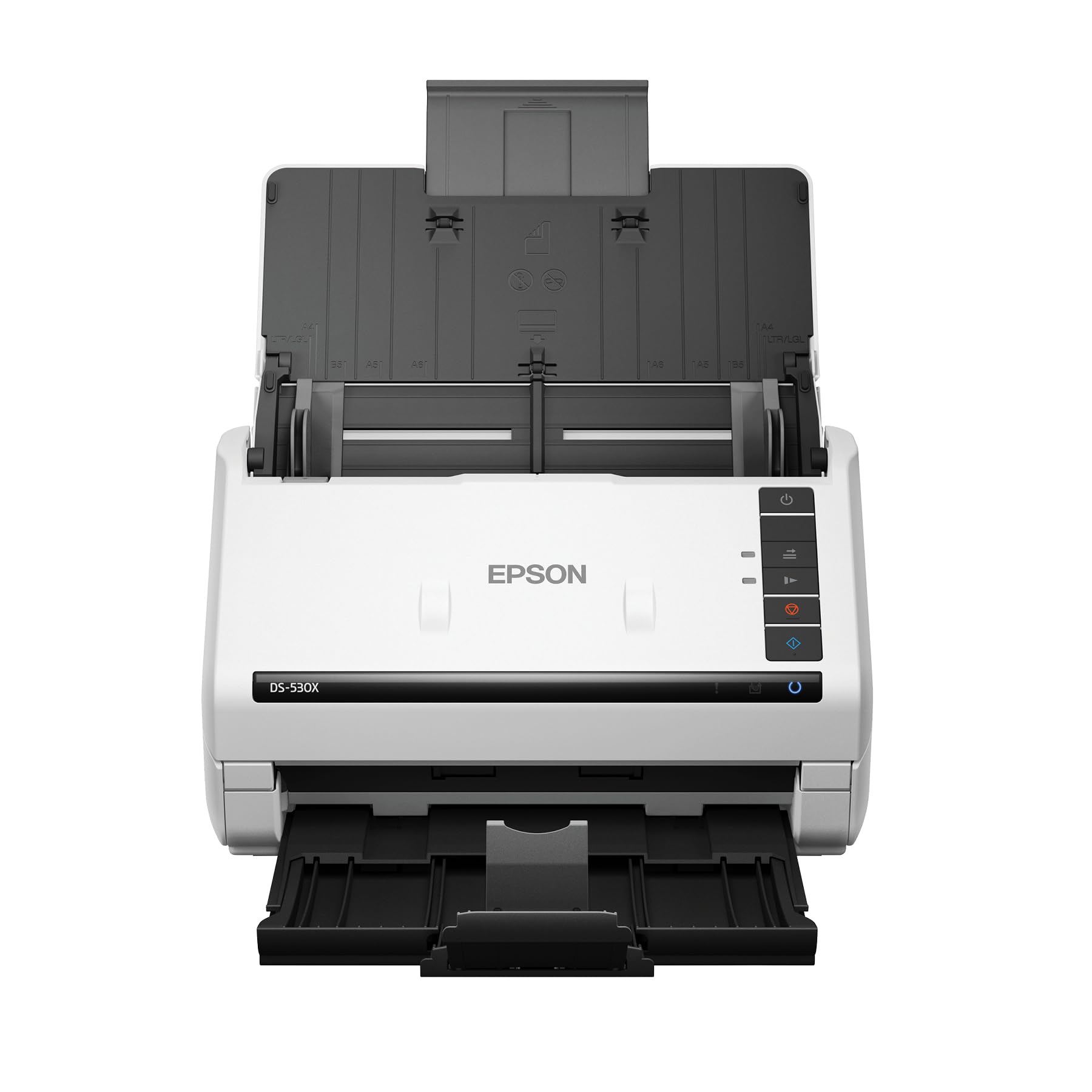
The Epson DS-530X sets the performance ceiling for this list with its 45 ppm duplex speed and 100-sheet ADF, handling a peak daily duty cycle of 7,000 sheets. Its ultrasonic double-feed detection catches overlapping pages before they jam, which matters when you feed mixed batches of thick cardstock and thin receipts. The inclusion of TWAIN and ISIS drivers means this scanner integrates directly into business document management systems without middleware friction.
Optical resolution sits at 600 dpi with 30-bit color depth, sufficient for document OCR and general photo digitization. The scanner handles extra-long pages up to 240 inches and folded 11×17 sheets, making it suitable for architectural drawings or large-format documents. Users report easy setup with Windows 11 and consistent scan quality across thousands of pages without degradation.
For professional environments where scanning is a core daily task, the DS-530X justifies its position through reliability metrics and driver compatibility. Offices that purchase multiple units for each staff member confirm consistent performance. The lack of wireless connectivity is a deliberate trade-off — the wired USB connection ensures stable, uninterrupted throughput for high-volume scanning sessions.
Why it’s great
- Highest duplex speed in class at 45 ppm with single-pass scanning
- Ultrasonic double-feed detection prevents jams on mixed media
- TWAIN and ISIS drivers enable integration with professional document systems
Good to know
- USB-only connectivity limits placement flexibility
- Premium price point targets business budgets
2. Epson WorkForce ES-580W

The Epson ES-580W brings a 4.3-inch touchscreen and wireless connectivity to the scanning workflow, allowing direct saves to USB, email, or cloud services like Dropbox and Google Drive without requiring a connected computer. Its 100-sheet ADF and 35 ppm duplex speed position it between the DS-530X and mid-range options. The CCD sensor delivers 30-bit color depth with auto crop, blank page deletion, and dirt detection for clean output.
Wireless flexibility is the defining advantage here — users can scan directly to a smartphone, tablet, or cloud account, which suits notaries and mobile professionals who need documents available immediately. The touchscreen interface simplifies preset management, with the ability to assign custom subject lines for email presets. Jam clearance is straightforward thanks to staple detection that stops the feed automatically.
The omission of an Ethernet port is a notable gap for wired office networks, though WiFi and mobile direct modes cover most use cases. Users running document management software like eClinicalWorks report smooth TWAIN integration. For a shared office environment where multiple people need access without cabling, the ES-580W eliminates the bottleneck of a single connected workstation.
Why it’s great
- Wireless scanning to cloud, email, and USB without a computer
- Intuitive 4.3-inch touchscreen with customizable presets
- CCD sensor provides superior depth of field for varied media
Good to know
- No Ethernet port for wired network connections
- Software learning curve for advanced OCR workflows
3. ScanSnap iX2400

The ScanSnap iX2400 delivers the same 45 ppm duplex speed as the Epson DS-530X but wraps it in ScanSnap’s signature one-touch simplicity. Press the button and documents are scanned, de-skewed, color-optimized, and automatically organized through the ScanSnap Home software. The 100-sheet ADF handles business cards, receipts, photos, envelopes, and plastic ID cards with minimal user intervention.
Image cleanup happens automatically — the software detects document size and color depth, removes streaks and blank pages, and rotates misaligned feeds. Users report scanning 500 pages in about an hour with consistent duplex output quality. The wired USB connection ensures stable throughput, though unlike some competitors, there is no wireless or Bluetooth option. The software does not support TWAIN or WIA drivers, which may limit third-party integration.
The iX2400 excels in environments where ease of use and speed are the primary concerns. Its 40 ppm real-world scan rate and reliable feeding mechanism make it suitable for digitizing entire filing cabinets. The occasional upside-down scan reported by some users can be addressed through software rotation settings. For pure speed with minimal fuss, this is the most approachable high-volume option.
Why it’s great
- One-touch scanning with automatic image cleanup and organization
- 100-sheet ADF handles diverse media types including envelopes
- Fast 40-45 ppm duplex speed for large batch jobs
Good to know
- USB-only connection with no wireless option
- Lacks TWAIN/WIA driver support for third-party software
4. Canon imageFORMULA RS40

The Canon RS40 is explicitly designed for photo digitization, handling Polaroids, 4×6 prints, and various sized documents up to 40 items per minute in duplex mode. Its auto document feeder accepts stacks of 20-30 photos with few jams, supported by bundled software that includes red-eye correction, digital face smoothing, and image enhancement tools. The RGB LED light source provides consistent illumination for color-accurate captures.
CaptureOnTouch software auto-crops photos and detects which side is the image, though users note that dark photos require manual contrast and brightness adjustment. A reported software bug involving temporary file accumulation on the C: drive requires periodic manual cleanup to prevent crashes during extended sessions. The 600 dpi optical resolution with 1200 dpi interpolated offers sufficient detail for sharing and archiving, though dedicated film scanners outperform it for fine grain reproduction.
The RS40’s strength is its targeted photo scanning workflow — it processes prints faster than a flatbed while avoiding the document-oriented image processing that can over-sharpen or clip highlights. Users scanning 2,000+ photos report reliable feeding with occasional dust streaks that require cleaning about every 10 photos. For photocentric projects where speed per scan matters more than per-page document throughput, this is the most purpose-built option.
Why it’s great
- Dedicated photo scanning with red-eye correction and face smoothing
- Fast 40 ipm duplex for batch photo digitization
- Handles Polaroids, 4×6 prints, and documents of varying sizes
Good to know
- Bundled software has a learning curve and temp file management issue
- Some users report dust streaks requiring frequent sensor cleaning
5. ScanSnap iX1300

The ScanSnap iX1300 packs 30 ppm duplex scanning into a compact chassis that folds into a drawer when not in use, making it the best fit for tight desk spaces. An innovative automatic feed arm and return tray deploy when scanning begins, eliminating the need to unfold a separate output tray. The scanner handles documents, photos, business cards, and plastic cards through its ADF and manual feeder slot.
It connects via USB or Wi-Fi, sending scans directly to Mac, PC, mobile devices, or cloud services. The Quick Menu allows drag-and-drop scanning to favorite apps without driver configuration. Users report scanning over 9,000 photos reliably after another brand failed at 2,000. The app auto-adjusts skewed feeds and handles thick and very small photos effectively.
Some users report jamming issues with the feed mechanism pulling paper at an angle, though this appears less common than in earlier ScanSnap models. The scanner works with Windows, macOS, iOS, Android, and ChromeOS via the mobile app, offering broad operating system support. For a home office that needs occasional photo scanning alongside regular document work without dedicating permanent desk space, the iX1300 is the most space-efficient choice.
Why it’s great
- Ultra-compact design folds away when not in use
- Wireless connectivity with broad OS compatibility
- Reliable photo feed handling for thousands of scans
Good to know
- Some units experience paper feeding angle issues
- Scanner wakes instantly but initial setup requires software download
6. Canon imageFORMULA R30

The Canon R30 distinguishes itself with built-in software that requires no installation — plug in the USB cable and the scanner is recognized as an external drive, ready to scan immediately. This makes it ideal for users who need to digitize documents quickly across multiple computers without installing drivers on each machine. The 60-sheet ADF feeds 25 pages per minute in duplex mode.
Users report scanning over 1,000 pages in a few hours with reliable feeding and no jams. The scanner outputs directly to PDF and handles mixed document batches including invoices, contracts, and business cards. Color depth is 24 bits with 600 dpi optical resolution, sufficient for OCR and document archiving.
A notable limitation is that OCR is not built into the device — it requires an external program to extract searchable text from scanned PDFs. Some users experienced driver reliability issues after operating system updates, requiring reinstallation. The R30 is best suited for users who want a straightforward scanning tool without software complexity and who are comfortable with a two-step OCR workflow.
Why it’s great
- No software installation required — works as plug-and-play
- 60-sheet ADF handles large batches reliably
- Fast duplex scanning at 25 ppm for office documents
Good to know
- OCR requires external software — not built into the device
- Driver issues reported after OS updates on some systems
7. Doxie Pro

The Doxie Pro brings a collapsible 20-sheet ADF with a direct feed slot for thick or delicate items, making it one of the more versatile options for mixed media scanning. Its bundled software integrates directly with Dropbox, Evernote, OneNote, and iCloud without complicated driver installation. Automatic duplex scanning with real-time text recognition, cropping, rotation, and contrast boost produces clean output without manual intervention.
The compact wired footprint measures 12 by 4 by 3 inches and weighs just over 3 pounds, making it easy to store when not in use. Users praise the sturdy plastic build and fast scan speed at 300 dpi, with the ability to handle wrinkled pages and glossy maps, though glossy items may require gamma adjustments through the software. The scanner saves as JPG, PNG, PDF, and OCR PDF formats.
The 20-sheet feeder is adequate for personal projects but slower than the 100-sheet options for bulk work. There is no SD card slot or supports for Chromebook, which limits flexibility. The Doxie Pro fits well for home offices and small business users who prioritize easy software integration and compact storage over raw batch speed, and who value the direct feed slot for handling odd items like folded maps or thick envelopes.
Why it’s great
- Direct feed slot handles thick and delicate media safely
- Software integrates directly with cloud services like Dropbox and Evernote
- Compact and lightweight for easy storage and transport
Good to know
- 20-sheet ADF is modest compared to high-volume competitors
- No Chromebook or SD card support
8. Plustek OpticFilm 8200i SE

The Plustek OpticFilm 8200i SE is a dedicated 35mm film and slide scanner with 7200 dpi optical resolution and 48-bit color depth, making it the only scanner on this list that handles negatives and mounted slides with professional-grade fidelity. Its integrated infrared channel detects dust and scratches on the film surface for automatic defect removal without retouching. The bundled SilverFast SE Plus 9 software adds multi-exposure functionality and 3.6 dynamic range for improved shadow detail.
The scanner operates at 7200 x 7200 dpi, delivering 69 megapixel captures from 35mm frames. The infrared dust removal is approximately 75% effective at catching surface defects, significantly reducing manual cleanup time. Users recommend scanning at 3600 ppi for most film types and reserving 7200 ppi for fine-grain black-and-white negatives where maximum resolution reveals grain structure.
The scanning speed is slower than document scanners — a single 35mm frame at 7200 dpi with full IR dust removal takes about 27 minutes for a set of four slides. The SilverFast software has a steep learning curve, with separate beginner and expert modes. Some users prefer alternatives like VueScan for simpler workflow. The lack of reliable support for software update issues is a noted risk. This scanner is purpose-built for photographers and archivists who need maximum resolution from film and are willing to invest time in mastering specialized software.
Why it’s great
- 7200 dpi optical resolution captures film grain and fine detail
- Infrared dust and scratch removal saves hours of manual retouching
- SilverFast SE Plus 9 bundles professional-grade scanning tools
Good to know
- Slow scanning speed — up to 27 minutes for four slides at highest resolution
- Software has steep learning curve and limited customer support
9. Fujitsu ScanSnap iX500 (Renewed)

The renewed Fujitsu ScanSnap iX500 offers a proven 25 ppm duplex scanner with 50-sheet ADF and 1200 dpi optical resolution — higher than most current models in its price tier. Its CCD sensor provides better depth of field than CIS-based scanners, producing sharper scans of slightly curved or imperfect media. The Wi-Fi connectivity allows wireless scanning to connected computers and mobile devices.
Despite being a renewed product, users consistently report it as a reliable workhorse for tax season document processing and general office use. The duplex scanning handles front and back in a single pass, and the bundled software organizes scans into searchable PDFs. Setup with Mac systems via USB adapter is straightforward, and the unit works well for home office environments.
The primary risk is the renewed condition — some units fail within months, with power issues that are not user-serviceable. The model is no longer sold new, so warranty support is limited to the third-party seller. For budget-conscious buyers who are comfortable with refurbished electronics and understand the reliability trade-off, the iX500 delivers scanning capability that competes with current mid-range models at a significantly lower entry point.
Why it’s great
- 1200 dpi optical resolution exceeds most current mid-range models
- CCD sensor provides superior image quality for curved media
- Proven reliable design with strong user satisfaction for document scanning
Good to know
- Renewed unit reliability varies — some fail within months
- No longer sold new, limiting warranty and support options
FAQ
Can an auto feed photo scanner handle glossy 4×6 prints without scratching them?
What is the minimum resolution I should use for archiving old family photos?
Why does my auto feed scanner sometimes skip blank pages in automatic mode?
Can I scan 35mm film slides with a standard auto feed document scanner?
How often should I clean the rollers and sensors on my auto feed scanner?
Final Thoughts: The Verdict
For most users, the auto feed photo scanner winner is the Epson DS-530X because its 45 ppm duplex speed, 100-sheet ADF, and ultrasonic double-feed detection provide the reliability needed for consistent high-volume scanning across mixed media. If you want wireless flexibility with cloud connectivity, grab the Epson WorkForce ES-580W. And for dedicated film and slide archiving where resolution matters more than speed, nothing beats the Plustek OpticFilm 8200i SE.