
Our readers keep the lights on and the weekend projects moving. As an Amazon Associate, I earn from qualifying purchases.
Typing in a dark room shouldn’t mean squinting or ruining your flow every time you need a number or symbol. A keyboard with built-in illumination solves that exact problem, turning an otherwise frustrating hunt-and-peck session into a smooth, productive experience whether you’re finishing a late-night project, gaming in a low-light setup, or working from a home office that doubles as a bedroom.
I’m Rikta — the co-founder and writer behind FitlyFast. I’ve spent hundreds of hours researching what separates a good backlit keyboard from a frustrating one, analyzing everything from keycap clarity and switch sound to switch durability and light uniformity so you don’t have to.
Whether you prioritize a tactile mechanical feel, a quiet membrane for shared spaces, or a premium build that matches your Apple ecosystem, this guide covers the best backlit keyboard for every typing environment and budget tier.
How To Choose The Best Backlit Keyboard
Choosing a backlit keyboard comes down to understanding three core elements: the switch type, the backlight quality, and the keycap durability. Each decision you make here directly affects how the keyboard feels, sounds, and holds up over time.
Switch Type: Membrane vs. Mechanical
Membrane keyboards use a rubber dome under each key, which produces a softer, quieter feel — great for shared offices or late-night typing where noise is a factor. Mechanical keyboards use individual switches under each key, providing a more tactile or clicky feel with greater durability and faster response times. Mechanical boards are heavier and louder, but they last much longer and are preferred by gamers and heavy typists.
Backlight Type and Brightness Levels
Not all backlights are created equal. Single-color backlights (white or a fixed hue) offer a clean, professional look. RGB backlighting gives you full color customization — up to millions of colors — with effects like breathing, wave, and static patterns. The number of brightness levels matters more than you’d think: a keyboard with only one brightness level might be too dim for a bright room or too bright in a pitch-black room. Three brightness levels is a solid baseline.
Keycap Material and Durability
The keycap material determines whether the printed letters on your keys will fade after months of use. Double-shot injection molded (DSIM) keycaps have lettering that penetrates the whole keycap, so it can never wear off. Pudding keycaps have transparent sides that let light shine through more evenly. Standard printed keycaps — common on cheap boards — rub off over time.
Quick Comparison
On smaller screens, swipe sideways to see the full table.
| Model | Category | Best For | Key Spec | Amazon |
|---|---|---|---|---|
| RK Royal Kludge R98 Pro | Mechanical | Creamy mechanical feel | 98-key with aluminum volume knob | Amazon |
| AULA WIN68 HE | Mechanical | Competitive gaming | 8000Hz polling rate | Amazon |
| HUO JI E-Yooso Z-99 | Mechanical | Customizable typing sound | Gasket mount with 5-layer foam | Amazon |
| Macally Backlit Mac Keyboard | Membrane | MacOS users | 107-key Apple layout | Amazon |
| Corsair K55 CORE | Membrane | Quiet gaming sessions | Ten-zone RGB | Amazon |
| KOPJIPPOM Large Print | Membrane | Visually impaired users | 4x larger print keys | Amazon |
| SEUNKWANG Purple | Membrane | Aesthetic desk setups | Pudding keycaps with white LED | Amazon |
In-Depth Reviews
1. RK ROYAL KLUDGE R98 Pro

The RK R98 Pro delivers a rich, creamy typing sound right out of the box thanks to its gasket mount design and five layers of sound-absorbing foam. The MDA-profile PBT keycaps give your fingers a natural cupping feel that reduces fatigue during long typing sessions, and the pre-lubed linear cream switches ensure buttery-smooth keystrokes with zero scratchiness. The detachable aluminum volume knob is a welcome tactile addition that makes audio control feel premium.
RGB backlighting offers over 20 modes, though users report the key legends appear dimmer than some rival boards—important if you rely heavily on lit legends rather than ambient glow. The 98-key layout preserves the number pad and arrow keys while trimming the overall desktop footprint, making it ideal for anyone who wants a full layout without a behemoth chassis.
The online driver lets you remap keys, create macros, and customize lighting on both Windows and Mac. Hot-swappable switch sockets (compatible with 3-pin and 5-pin) mean you can replace switches later without soldering. This is the board to beat for a premium mechanical typing experience with creamy acoustics.
Why it’s great
- Gasket mount with 5-layer sound dampening for a creamy, thocky typing sound
- Hot-swappable switch support for future upgrades
- Detachable aluminum volume knob adds tactile convenience
Good to know
- Keycap legends can appear dim relative to competing RGB boards
- Software driver setup may require a browser-based interface
2. AULA WIN68 HE

The AULA WIN68 HE uses Hall Effect magnetic switches that deliver an adjustable actuation point from 0.02mm up to 3.44mm — meaning you can set each key to register a press at the slightest tap or only after a deeper press, depending on your preference for speed versus error prevention. The 8000Hz polling rate and 0.3ms latency make this board feel wired directly to the game server, ideal for competitive FPS players who need every millisecond.
Its 60% layout (68 keys) saves about 40% of desk space while retaining arrow keys and essential function keys via FN-layer combos. The RGB backlighting supports 16.8 million colors with 14 preset effects, though the south-facing LEDs mean legends are backlit indirectly rather than shining through the lettering — a common trait on performance-oriented compact boards.
The web-based driver allows customization of fast-trigger, SOCD, DKS, and macro settings without downloading software. The build feels substantial at 686 grams, and the detachable USB-C cable makes transport easy. For gamers seeking HE magnetic switch benefits on a budget, this is a standout choice.
Why it’s great
- Hall Effect magnetic switches with adjustable actuation from 0.02mm to 3.44mm
- 8000Hz polling rate with 0.3ms latency for competitive gaming
- Compact 68-key layout saves significant desk space
Good to know
- South-facing LEDs reduce direct legend illumination
- Web driver may be difficult to locate initially
3. HUO JI E-Yooso Z-99

The HUO JI Z-99 uses a gasket structure combined with five layers of sound-absorbing foam and a silicone dampener pad, which reduces hollow cavity noise by roughly 80% and lowers overall noise by about 40%. The result is a “creamy” sound profile that avoids the high-pitched clack found on many mechanical boards — ideal for shared bedrooms or quiet offices where every keystroke is audible.
The 96% layout (99 keys) shrinks the board to just 15.5 inches wide while keeping the full number pad, arrow cluster, and all navigational keys. Pre-lubed linear switches come pre-installed and feel smooth, but the PCB supports hot-swapping for 3-pin and 5-pin switches, giving you room to experiment with different switch types later. The double-shot PBT keycaps resist fading over years of heavy use.
RGB customization includes 15 backlight effects plus 8 solid color modes, with adjustable speed and brightness. The white chassis and subtle side lighting give it a clean, modern look. Users note the backlight is slightly less intense than some competitors, but the typing feel and sound quality more than compensate.
Why it’s great
- 5-layer sound dampening delivers a creamy, quiet typing note
- Hot-swap PCB supports 3-pin and 5-pin switches for customization
- Double-shot PBT keycaps resist fading and feel matte-textured
Good to know
- Backlight brightness is moderate, not blindingly bright
- Keyboard is somewhat heavy at 1.9 pounds
4. Macally Backlit Mac Keyboard

The Macally Backlit Mac Keyboard speaks fluent Apple. Its 107-key layout includes dedicated Command, Option, and Control keys placed exactly where macOS expects them, plus 16 shortcut keys for Mission Control, Launchpad, brightness, and volume — no remapping needed. The space gray aluminum top panel visually matches the iMac or MacBook aesthetic without introducing a third-party look.
Three backlight brightness levels let you toggle from off (great in a bright office) to full illumination (essential in a dim editing suite). The 5-foot USB-A cable provides generous reach and eliminates Bluetooth pairing or battery anxiety. Key travel feels familiar to anyone used to Apple’s low-profile scissor-switch keyboards — short, stable, and quiet.
It works with any Mac that has a USB-A port (or a USB-C adapter), and also supports Windows PCs and iPads. The all-plastic body feels lighter than the aluminum look suggests, and some users note that the Fn keys don’t send macOS-bound shortcuts to the OS automatically. For pure Mac compatibility with backlighting, this is the most seamless wired option available.
Why it’s great
- Native macOS layout with dedicated Command/Option keys and shortcut bar
- Three backlight brightness levels for adaptable lighting
- No software or drivers needed for full Mac compatibility
Good to know
- Fn keys may not send all macOS shortcut commands automatically
- All-plastic chassis feels lighter than expected
5. Corsair K55 CORE

The Corsair K55 CORE is a membrane gaming keyboard engineered for quiet operation — the rubber dome switches produce a soft, dampened keystroke that won’t echo through a microphone or disturb a sleeping roommate. Despite the membrane construction, it offers snappy 12-key rollover and a 1000Hz polling rate that keeps inputs feeling responsive in fast-paced shooters and MOBAs.
Ten-zone RGB backlighting is fully customizable through Corsair’s iCUE software, though the zones run vertically rather than per-key, which means certain lighting patterns appear less granular. Dedicated media keys for volume, playback, mute, and brightness sit above the function row for convenient one-handed control. The included wrist rest snaps on securely and features a textured surface that prevents slipping during intense sessions.
A spill resistance rating of 300ml means accidental drink splashes won’t brick the board. The cable is non-detachable and the keyboard lacks macro recording keys, but for its price point, the combination of quiet typing, customizable RGB zones, and spill protection makes it a strong option for shared living spaces.
Why it’s great
- Quiet membrane switches suitable for recording and shared rooms
- 300ml spill resistance protects against accidental liquid spills
- Dedicated media keys with volume and brightness controls
Good to know
- RGB zones are vertical, not per-key
- No macro keys or detachable cable
6. KOPJIPPOM Large Print Keyboard

The KOPJIPPOM Large Print Keyboard uses keycap fonts four times larger than standard keyboards, making it a practical choice for users with visual impairments, elderly family members, or anyone who finds themselves frequently squinting at tiny legends. Seven backlight color options (blue, green, red, cyan, purple, yellow, white) plus three brightness levels let you dial in the exact contrast that works best for your eyes.
The full-size 104-key layout includes a dedicated number pad, and the spill-resistant design provides peace of mind for desktop areas near drinks. Setup is pure plug-and-play on Windows (and mostly on macOS, though multimedia keys may not fully map). The foldable stands on the underside offer two typing angles to reduce wrist strain.
The membrane switches are quiet and require a light touch — shallow actuation force means less finger fatigue over extended sessions. Some users wish the keyboard retained backlight settings after unplugging, but the combination of oversized legible print, adjustable RGB, and budget-friendly construction makes this a thoughtful accessibility tool for low-light environments.
Why it’s great
- Keycap fonts 4x larger than standard improves readability
- 7 backlight colors with 3 brightness levels for customized contrast
- Spill-resistant design protects against accidental liquid damage
Good to know
- Backlight settings reset after unplugging
- Mac multimedia key compatibility is limited
7. SEUNKWANG Wired Backlit Keyboard (Purple)
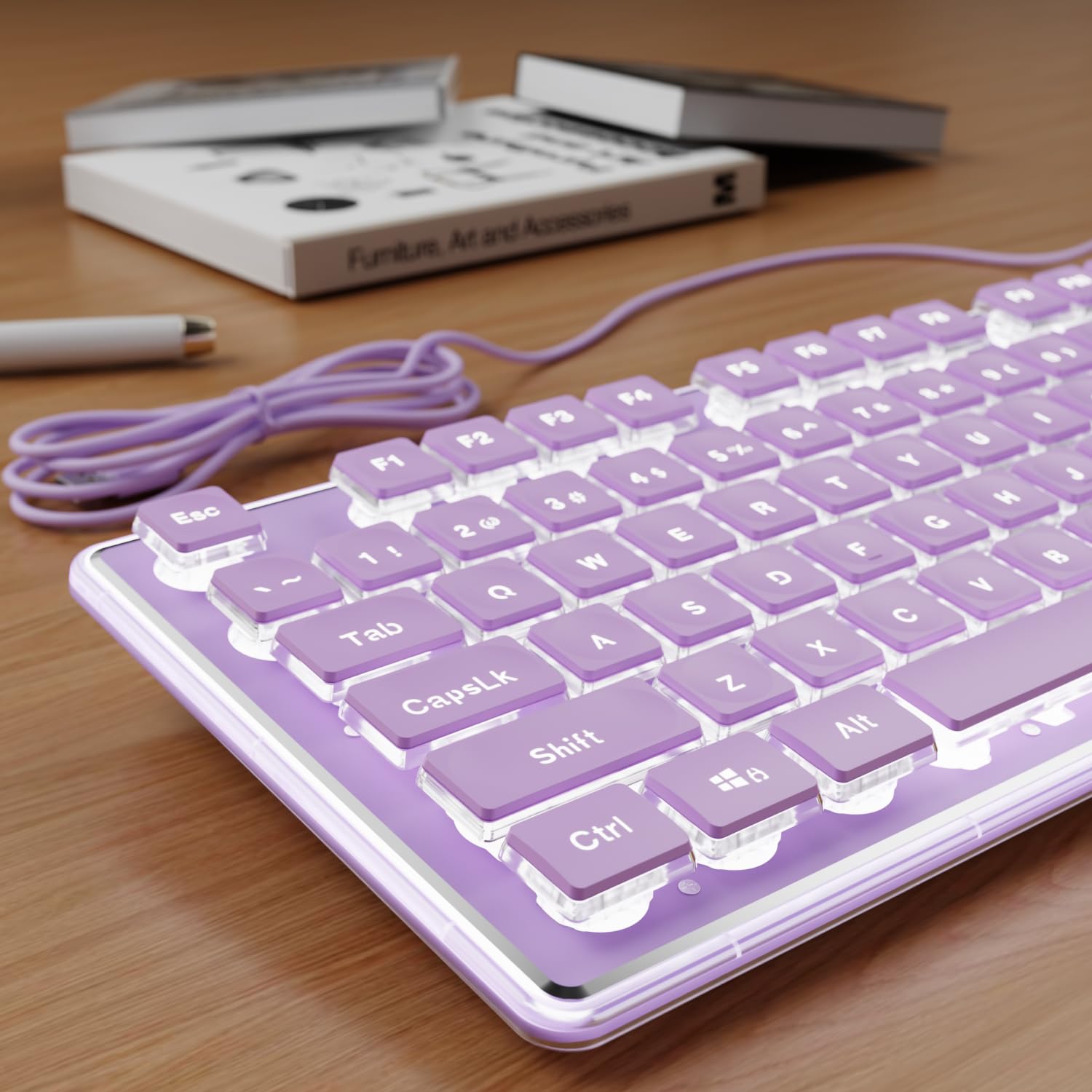
The SEUNKWANG Purple keyboard earns its spot on visual appeal alone — the lavender-colored chassis paired with water-drop pudding keycaps and a white backlight creates a clean, pastel aesthetic that fits perfectly into a curated desk setup or WFH space. The pudding cap design maximizes light transmittance through the sidewalls, producing a soft halo effect around each key rather than just illuminating the legends.
Underneath the pretty exterior, the aluminum alloy top panel provides a rigid, scratch-resistant base that feels more substantial than a standard plastic board. The membrane switches are whisper-quiet — they produce a subtle thud rather than a click — making this keyboard suitable for shared office environments or late-night typing where noise discipline matters.
The 104-key layout includes a number pad, and the single-stage kickstand provides one adjustable typing angle. Compatibility extends to Windows, Linux, and Chrome OS, with basic typing support on Mac. Some users note the white backlight automatically shuts off after a few minutes of inactivity to conserve the LED lifespan, which may require a quick tap to reactivate. For anyone building a color-coordinated desk, this is a standout entry-level option.
Why it’s great
- Pudding keycaps create a uniform halo effect around each key
- Aluminum alloy top panel adds rigidity and premium feel
- Whisper-quiet membrane switches suit shared and late-night environments
Good to know
- White backlight turns off automatically after a few idle minutes
- Basic Mac typing support only; shortcut keys may not map
FAQ
How many brightness levels do I need in a backlit keyboard?
Does a backlit keyboard drain power even when plugged in?
Can I replace the keycaps on a backlit membrane keyboard?
What does the “pudding keycap” term mean?
Is white backlight better than RGB for late-night typing?
Final Thoughts: The Verdict
For most users, the best backlit keyboard is the RK ROYAL KLUDGE R98 Pro because it combines a gasket-mounted creamy typing feel, hot-swappable switches, and excellent RGB customization in a compact 98-key layout. If you’re a competitive gamer who needs the fastest possible response, grab the AULA WIN68 HE for its Hall Effect switches and 8000Hz polling rate. And for a quiet, shared-space-friendly option with customizable zones and spill protection, the Corsair K55 CORE holds its ground as a dependable entry-level gaming companion.