
Our readers keep the lights on and the weekend projects moving. As an Amazon Associate, I earn from qualifying purchases.
Stepping into music production or performance often starts with a single question: which controller translates your ideas into sound without getting in the way? The right one pairs responsive keys, reliable pads, and software that gets you creating immediately rather than wrestling with setup menus.
I’m Rikta — the co-founder and writer behind FitlyFast. I’ve spent countless hours analyzing the specs, workflows, and real user experiences across dozens of compact controllers to identify which models truly serve a producer’s first steps without causing early frustration.
Whether you need a portable Bluetooth unit for sketching ideas on the go or a deeper workstation with faders and a full-size display, this guide cuts through the noise to help you confidently choose your best beginner midi controller.
How To Choose The Best Beginner MIDI Controller
Not all compact controllers serve a beginner equally. Some prioritize portability over key feel, while others load you with software that demands a powerful computer. Focus on these three areas to avoid buying a controller you will outgrow in months.
Key Feel, Size, and Action
Mini keys save desk space but demand precise finger control — ideal for beat-making and sketching. Semi-weighted keys offer resistance closer to a traditional piano, helping you build proper technique. Velocity sensitivity determines how your playing dynamics translate to software instruments, so test whether the lightest touch registers cleanly.
Pad Responsiveness and Control Count
Drum pads with velocity and pressure sensitivity let you finger-drum, trigger samples, or launch clips. Eight pads is the current entry-level standard; anything fewer limits your workflow. Rotary knobs and faders give you hands-on mixing without mouse clicks — look for at least eight assignable controls if you plan to tweak synth parameters or effect sends.
Software Bundle and DAW Compatibility
The included software often determines your immediate production experience. Ableton Live Lite appears on many bundles and provides a solid recording and loop-based environment. Analog Lab from Arturia gives you thousands of synth presets. Confirm that your chosen DAW (Logic, FL Studio, Cubase) has a pre-mapped script for the controller — manual mapping kills the beginner-friendly promise.
Quick Comparison
On smaller screens, swipe sideways to see the full table.
| Model | Category | Best For | Key Spec | Amazon |
|---|---|---|---|---|
| Akai MPK Mini IV | 25-Key | All-round production & beat-making | 8 MPC pads, 360° knobs, USB-C | Amazon |
| Arturia MiniLab 3 | 25-Key | Software-first workflow & Analog Lab V | 8 pads, 8 knobs, 1 fader, USB-C | Amazon |
| Novation Launchkey Mini 25 MK4 | 25-Key | Ableton Live & arpeggiated creativity | 16 FSR pads, polyphonic aftertouch | Amazon |
| Arturia KeyLab Essential mk3 | 49-Key | Full keyboard range & deep DAW control | 9 faders, 9 encoders, 2.5″ LCD | Amazon |
| Akai Professional APC Key 25 MK2 | 25-Key | Ableton Live clip launching & loops | 40 RGB pads (5×8 grid) | Amazon |
| M-VAVE SMK-25 | 25-Key | Wireless Bluetooth portability | 16hr battery, 2000mAh built-in | Amazon |
| Pioneer DJ DDJ-REV1 | DJ Controller | Serato DJ scratching & mixing | 2-deck, large jog wheels, mic input | Amazon |
In‑Depth Reviews
1. Akai Professional MPK Mini IV

The MPK Mini IV earns its spot at the top because it addresses every pain point a new producer faces: responsive keys, iconic MPC drum pads with RGB feedback, and eight 360° knobs that avoid the dead-zone problem of cheaper encoders. The full-color screen and push/turn encoder let you browse presets without touching your computer, keeping your creative flow intact.
Akai packs a formidable software bundle — Ableton Live Lite 12, plus a virtual instrument collection from AIR, Akai Pro, and Moog that includes over 1,000 pro-grade sounds. The built-in arpeggiator with Pattern, Freeze, and Mutate functions, along with Chord and Scale modes, turns simple ideas into polished sketches faster than entry-level competitors. The USB-C connectivity and full-size MIDI Out ensure it integrates with modern laptops and older hardware alike.
Some users note the mini keys feel slightly smaller than those on the Arturia MiniLab 3, which may frustrate players with larger hands during extended piano-style passages. The menu system also has a learning curve for deep editing. For the price, the balance of hardware quality, software value, and creative tools makes this the clear starting point for most buyers.
Why it’s great
- Excellent MPC pads with velocity and aftertouch for finger drumming
- USB-C and full MIDI Out for future-proof connectivity
- Powerful arpeggiator and chord/scale modes for instant creativity
Good to know
- Mini keys feel smaller than some rival 25-key controllers
- Menu navigation for advanced editing is not intuitive at first
2. Arturia MiniLab 3

Arturia’s MiniLab 3 builds on its predecessor with a mini display, a single fader, and an eco-design made from over 50% recycled materials. The keybed offers a noticeably tactile response for a mini-key controller — slightly firmer than the MPK Mini IV, which helps during melodic passages. The eight multi-color drum pads are velocity-sensitive but lack the rubbery bounce of Akai’s MPC pads.
The standout here is the software ecosystem. Analog Lab V gives you thousands of synth presets spanning vintage and modern sounds, and the controller comes pre-mapped for deep integration with Ableton Live Lite. The USB-C port and 5-pin MIDI Out connect to both computers and external synths without adapters. The included arpeggiator and chord mode expand your harmonic options without manual mapping.
iPad users should be aware that the knobs and fader do not auto-map with Logic or GarageBand on iOS — you must assign them manually. The single fader feels limited compared to controllers with multiple faders, and the pads are adequate rather than exceptional. For producers who prioritize software value and synth exploration, this is a compelling mid-range choice.
Why it’s great
- Includes Analog Lab V with thousands of pro-grade synth presets
- Responsive mini-key keybed with good feel for the class
- USB-C plus 5-pin MIDI Out for broad compatibility
Good to know
- Single fader limits hands-on mixing compared to multi-fader units
- Knobs and pads do not auto-map on iPad with Logic/GarageBand
3. Novation Launchkey Mini 25 MK4
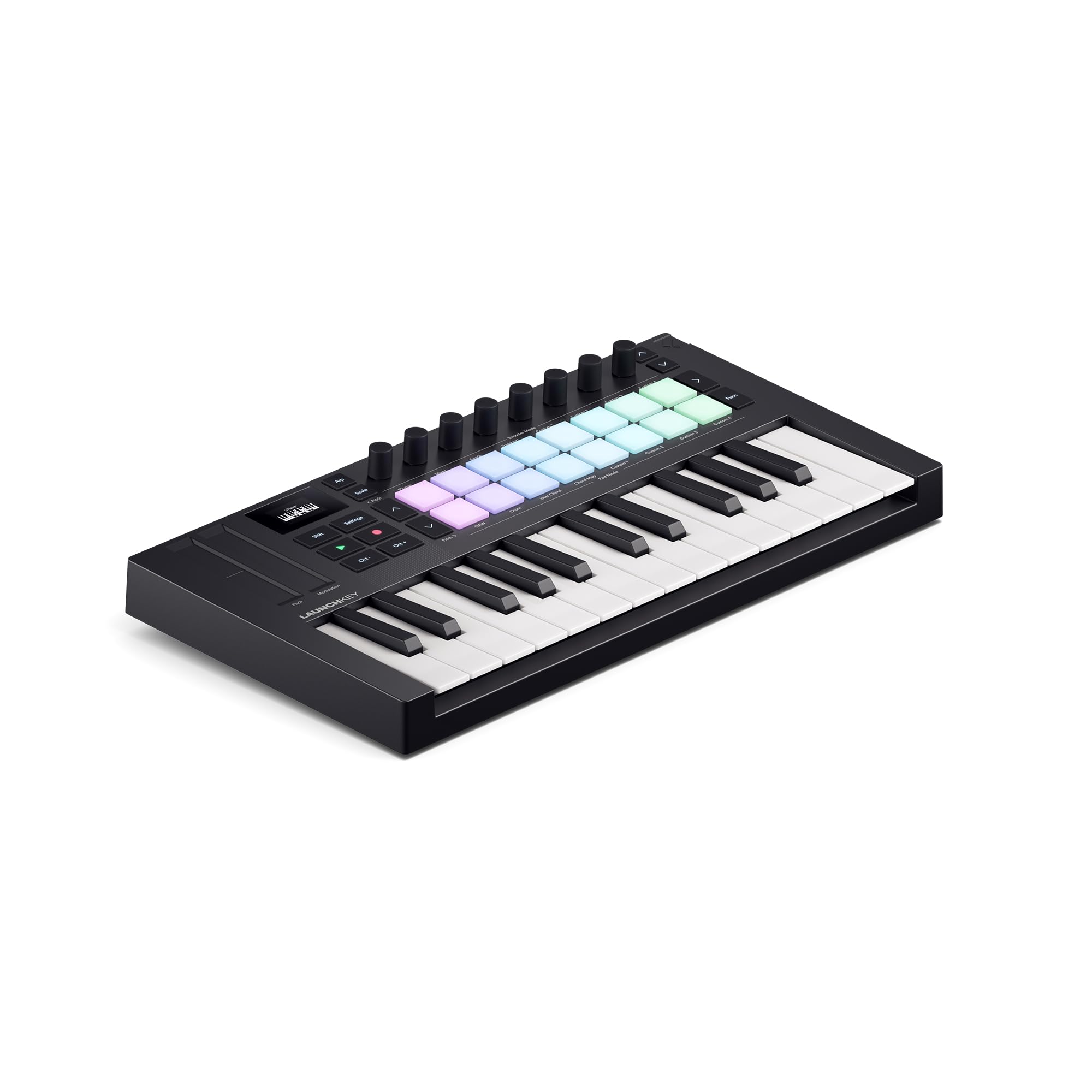
The Launchkey Mini MK4 is designed explicitly for Ableton Live users who want deep clip-launching and real-time performance control. Its 16 FSR (Force Sensing Resistor) pads are a leap forward — they respond to velocity and pressure with polyphonic aftertouch, letting you modulate individual drum hits or chord voicings with finger pressure. The pads double as step sequencers, chord triggers, and clip launchers, making this the most versatile pad implementation in its class.
Scale Mode prevents wrong notes, Chord Mode triggers full chords from single keys, and the arpeggiator includes mutate functions for evolving patterns. The included software bundle — Ableton Live Lite, Cubase LE, Novation Play, and sounds from GForce, Klevgrand, and Native Instruments — covers the full production pipeline. NKS support provides hands-on control of Native Instruments software immediately.
The USB connection uses a 3.5mm MIDI adapter for external gear, which adds a minor cable hassle compared to a dedicated 5-pin port. Out-of-box DAW integration works best with Ableton, Logic, and Cubase; users of niche DAWs like Reason 13 report glitchy knob/fader response after manual mapping. For Ableton-centric producers, this is the most fluid creative tool at this price point.
Why it’s great
- 16 FSR pads with polyphonic aftertouch for expressive drumming and chords
- Scale, Chord, and arpeggiator modes eliminate wrong notes
- Seamless Ableton Live integration with NKS support
Good to know
- Requires a 3.5mm adapter for standard MIDI connections
- Manual mapping with non-popular DAWs can be glitchy
4. Arturia KeyLab Essential mk3

Stepping up to 49 keys changes the game for players who need two-handed chord work or bass-and-melody layering. The KeyLab Essential mk3 delivers a full-size keybed that rivals the feel of much more expensive controllers — springy and responsive without being overly heavy. The 2.5-inch LCD screen with contextual buttons provides real-time feedback on parameters, eliminating guesswork during performances.
Arturia loads this controller with an exceptional software package: Analog Lab V (with 2,000 presets), UVI Model D piano, Native Instruments The Gentleman, plus subscriptions to Loopcloud and Melodics. The nine faders and nine encoders, combined with RGB-backlit velocity-sensitive pads, give you hands-on command over your DAW’s mixer and instrument parameters. Custom scripts provide deep integration with Ableton Live, Logic Pro X, and FL Studio.
The fake wooden side panels, while cosmetic, feel slightly cheap on an otherwise premium unit. Some users find the initial software installation process daunting — it requires multiple accounts and downloads before you can play. For a beginner serious about learning piano-style playing and production simultaneously, this is the best bridge between entry-level and professional gear.
Why it’s great
- Full-size 49-key bed with excellent feel for piano technique
- Large LCD screen plus nine faders and nine encoders for deep control
- Bundled software value exceeds in standalone prices
Good to know
- Fake wood side panels reduce the premium aesthetic
- Software installation requires multiple accounts and downloads
5. Akai APC Key 25 MK2
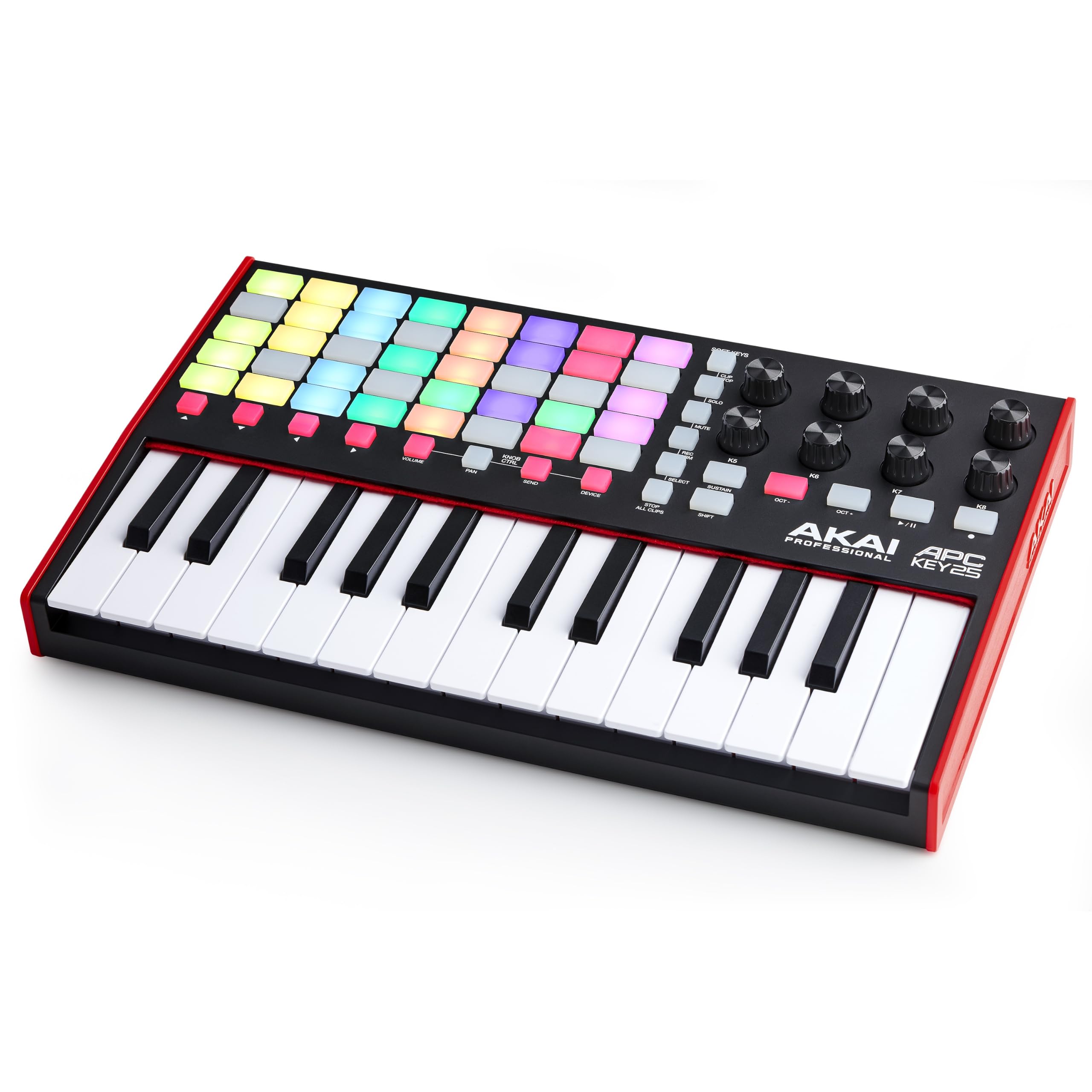
Akai’s APC Key 25 MK2 is a specialized tool for Ableton Live users who prioritize clip launching over traditional keyboard playing. The 5×8 RGB pad matrix — 40 pads total — gives you visual feedback on clip states, making live arrangement and loop triggering intuitive. The 25 mini keys are velocity-sensitive and adequate for basslines and simple melodies, though they are not the focus of this design.
The eight assignable rotary knobs control volume, pan, sends, and effects, with a Device mode that maps directly to Ableton macros. The four directional arrow buttons let you navigate large clip sets without touching your mouse. Including Ableton Live Lite plus Hybrid 3, Mini Grand, and Velvet virtual instruments provides a complete starter production environment.
This controller is less versatile than the MPK Mini IV for general production — the mini keys lack the playability for extended piano passages, and there is no arpeggiator or chord mode. Users on Ableton Live 10 report needing a custom script for full functionality. For electronic musicians and loop-based performers who live inside Ableton, the pad matrix is unmatched at this price.
Why it’s great
- 5×8 RGB pad grid for instant clip launching and visual feedback
- Pre-mapped for Ableton Live with Device mode for macro control
- Includes Ableton Live Lite and three high-quality virtual instruments
Good to know
- Mini keys are secondary to pads — not ideal for piano playing
- Requires a custom script for full functionality with Ableton Live 10
6. M-VAVE SMK-25

The M-VAVE SMK-25 stands alone in this lineup as the only true Bluetooth wireless controller with a built-in 2000mAh battery rated for 16 hours of use. That portability is a game-changer for producers who work in cafes, hotel rooms, or collaborative sessions where wires get in the way. The 25 mini keys are velocity-sensitive and average for the class, but the eight RGB backlit drum pads are responsive with velocity and aftertouch support.
Two capacitive touch strips handle pitch bend and modulation, replacing traditional wheels. While these ribbons take practice to control precisely, they free up panel space for the eight endless encoders that feel precise and smooth. The companion MidiSuite app (available via CubeSuite on iOS and Android) unlocks full reconfigurability of every pad, knob, button, and preset.
The manual is poorly written, and the brand’s long-term software support is uncertain — several users report difficulty finding the editor software for macOS. The keybed is average, with a slightly spongy feel compared to Arturia or Novation offerings. For mobile producers who prioritize cable-free sketching over premium key feel, this is a unique and valuable entry-level option.
Why it’s great
- True Bluetooth wireless with 16-hour battery for untethered creativity
- 8 velocity-sensitive pads with aftertouch and 8 endless encoders
- Capacitive touch strips for pitch/mod in a compact footprint
Good to know
- Keybed feels spongier than leading competitors
- Software editor is hard to find and brand support may be limited
7. Pioneer DJ DDJ-REV1

The DDJ-REV1 is a dedicated DJ controller, not a keyboard-based MIDI controller, but it earns a place here for beginners whose primary goal is beat-matching and scratching rather than melody production. Its layout mimics Pioneer’s professional DJM-S mixer and PLX turntables, giving you an authentic club-style workflow from day one. The large jog wheels include a Tracking Scratch feature that makes learning scratch techniques more forgiving.
Serato DJ Lite comes included and provides a clear path to upgrading to Serato DJ Pro as your skills advance. The Scratch Bank pad mode loads pre-loaded scratch samples onto the performance pads, and a microphone input lets you add vocals to your mix without an external mixer. The two-deck design is sufficient for standard DJ sets, and the integration with streaming services via Serato expands your music library instantly.
This controller is not for producers who need to play melodies or trigger software instruments — it is purely a DJ tool. The jog wheels are smaller than full-size turntables, making intricate backspinning and long scratches a challenge for experienced vinyl DJs. There is no analog pass-through for external mixers. For a beginner aiming to learn DJ fundamentals on industry-standard layout, this is the natural starting point.
Why it’s great
- Authentic Pioneer DJ layout for learning professional workflows
- Tracking Scratch feature eases the learning curve for scratching
- Includes Serato DJ Lite with upgrade path and mic input
Good to know
- Jog wheels are smaller than full-size turntables for advanced scratching
- No analog mixer pass-through for external gear integration
FAQ
How many keys do I need as a beginner?
Do I need drum pads on a MIDI controller?
Can I use a MIDI controller with my iPad or phone?
What is the difference between mini keys and full-size keys?
Is the included software really worth it?
Final Thoughts: The Verdict
For most users, the best beginner midi controller winner is the Akai MPK Mini IV because it combines responsive MPC pads, USB-C connectivity, a powerful arpeggiator, and a software bundle that gets you producing immediately without upgrading. If you want deep Ableton Live integration and the most expressive pads in its class, grab the Novation Launchkey Mini 25 MK4. And for mobile producers who need wireless Bluetooth freedom, nothing beats the M-VAVE SMK-25 with its 16-hour battery and compact footprint.