
Our readers keep the lights on and the weekend projects moving. As an Amazon Associate, I earn from qualifying purchases.
Managing a home office, small business, or just the family pantry often comes down to one tedious task: labeling. Hand-writing tags is slow, and printing from a standard office machine wastes time cutting sheets. A dedicated Bluetooth label maker solves this by connecting directly to your phone for fast, on-demand printing without the mess of ink or toner.
I’m Rikta — the co-founder and writer behind FitlyFast. My analysis covers connectivity stability, app ecosystem depth for template flexibility, and the print clarity that makes a label truly useful versus just readable.
After evaluating seven models based on print resolution, tape compatibility, and mobile-app features, I’ve identified the best bluetooth label maker that balances professional output with everyday convenience.
How To Choose The Best Bluetooth Label Maker
A good label maker is more than a convenience—it’s a system that saves hours of repetitive work. The key lies in matching print technology, media support, and software control to your specific labeling tasks.
Print Technology: Thermal vs. Thermal Transfer
All the models here use direct thermal printing, which means they apply heat to specially coated paper to create the image. This removes the need for ink, toner, or ribbons, cutting long-term costs significantly. The label paper itself is the only consumable you’ll need to buy. Thermal transfer printers use a ribbon and can print on a wider variety of materials, but for general home, office, and small business use, direct thermal is simpler and more affordable.
Label Width and Tape Ecosystem
Label makers support different tape widths, typically ranging from 12mm (0.47 inches) for tiny file-folder and cable tags up to 50mm (2 inches) or 108mm (4.25 inches) for shipping labels. Matching the print width to your most common task is essential—buying a narrow machine for shipping labels will frustrate you, and buying a wide machine for pantry jars wastes tape and space. Also, some brands use proprietary tape cartridges that lock you into their supply chain, while others use standard thermal rolls. Consider the ongoing cost and availability of replacement labels carefully.
App Features and Template Library
The companion mobile app is the real command center for any Bluetooth label maker. Look for an app that offers more than basic font selection. A strong library of pre-made templates for common tasks (shipping, pantry, cable labels, file folders) can save design time. Support for barcodes, QR codes, tables, icons, and data import from spreadsheets (CSV) separates a toy from a productivity tool. Make sure the app is regularly updated and works reliably on your phone’s operating system—iOS and Android compatibility is standard, but PC and Mac connectivity via Bluetooth or USB can vary.
Quick Comparison
On smaller screens, swipe sideways to see the full table.
| Model | Category | Best For | Key Spec | Amazon |
|---|---|---|---|---|
| POLONO PM220S | Portable | Home & Office Organization | 203 DPI / BPA-Free | Amazon |
| NIIMBOT B1 | Portable | Crafting & Personal Labels | 203 DPI / 1,500+ Symbols | Amazon |
| Mvgges 4×6 | Shipping | Small Biz Fulfillment | 160mm/s Print Speed | Amazon |
| Gloryang 4×6 | Shipping | Wireless Multi-Device | 100 ppm Print Speed | Amazon |
| Brother N25BTV3 | Desktop | Creative & Detailed Labels | 12mm Tape Width / 3 Samples | Amazon |
| MUNBYN RW403B | Shipping | High-Capacity Professional | 970K Label Lifespan / DAC Chip | Amazon |
| Brother PT-D460BT | Desktop | Business & File Systems | TZe Tape / Spreadsheet Import | Amazon |
In‑Depth Reviews
1. MUNBYN RW403B Bluetooth Thermal Label Printer

The MUNBYN RW403B is built for the demanding workflow of a small business fulfillment center. Its DAC (Dynamic Algorithm Control) chip auto-calibrates to eliminate label misalignment, so you don’t waste time repositioning a shipping label on a package. The print engine is rated for up to 970,000 labels, which is roughly six times the lifespan of typical budget thermal printers, making this a long-term investment.
Bluetooth connectivity pairs quickly with iOS and Android via the ‘Munbyn Print’ app, which houses over 3,500 design elements and 2,000 ready-made templates. For desktop users, the ‘Munbyn Editor’ in Chrome handles USB and wireless connections seamlessly. The printer runs at a whisper-quiet 60 dB, barely audible in a home office setting.
Label width support from 1.57 to 4.25 inches covers standard shipping labels down to smaller packing slip tags. The included test labels let you fine-tune alignment before committing to a full roll. Some users noted that the initial driver setup on a Mac required following the web instructions carefully, but once configured, the connection remains stable.
Why it’s great
- Auto-calibrating DAC chip reduces label waste.
- Near-zero jam rate offers reliable operation.
- Quiet enough for shared workspaces.
Good to know
- Setup on Mac may require manual driver download.
- Label roller stand not included.
2. POLONO PM220S Label Maker

The POLONO PM220S is the definition of a balanced, user-friendly Bluetooth label maker. Its compact body fits in a jacket pocket, yet it prints on labels up to 54mm (2.12 inches) wide. The 203 DPI thermal print head delivers crisp text and simple graphics without ink, and the BPA-free paper ensures safe handling for kitchen or pantry labeling.
An intuitive LED screen on the device itself shows battery level, Bluetooth connection status, and paper shortage alerts—a helpful feature that eliminates guesswork. The companion “Labelnize” app includes 90+ fonts and 450+ material presets, letting you design labels for price tags, clothing, folders, or even event decorations. The app supports QR codes and barcodes, adding versatility for small business use.
Setup is straightforward: download the app, turn on Bluetooth 4.0, and the printer connects in about five seconds. The included 50x30mm tape roll lets you start labeling immediately. A few users noted that print density isn’t as dark as some more expensive models, but for home and basic office labeling, the output is perfectly legible and serviceable.
Why it’s great
- Clean, compact design with helpful status screen.
- Supports labels up to 2.12 inches wide.
- BPA-free thermal paper is family safe.
Good to know
- Print contrast is lighter than some premium models.
- Requires specific POLONO labels for best results.
3. NIIMBOT B1 Label Maker

The NIIMBOT B1 is a favorite among crafters and homemakers because of its deep template library and strong design flexibility. The app packs more than 1,500 symbols, over 100 borders, and multi-language font support, making it easy to create custom wedding favor tags, pantry labels, or teacher name tags without starting from scratch each time.
At just 293 grams, the B1 is truly pocketable. The built-in 1500 mAh battery offers up to 100 days of standby time, so you can grab it for quick labeling sessions without hunting for a charge cable. It prints up to 50mm (2 inches) wide, and the available label rolls include waterproof, oilproof, and tear-resistant options for labeling jars, bottles, or outdoor storage.
The key trade-off is the tape ecosystem: the B1 only works with NIIMBOT brand thermal paper. Off-brand rolls may cause misalignment or poor print quality. The app also offers some premium templates behind a paywall, though the free library is expansive enough for most projects. Setup is simple on both iOS and Android via Bluetooth.
Why it’s great
- Huge library of symbols, borders, and fonts.
- Long battery life for portable use.
- Waterproof label options are available.
Good to know
- Only works with NIIMBOT brand paper.
- Some app content is behind a VIP paywall.
4. Mvgges 4×6 Thermal Label Printer
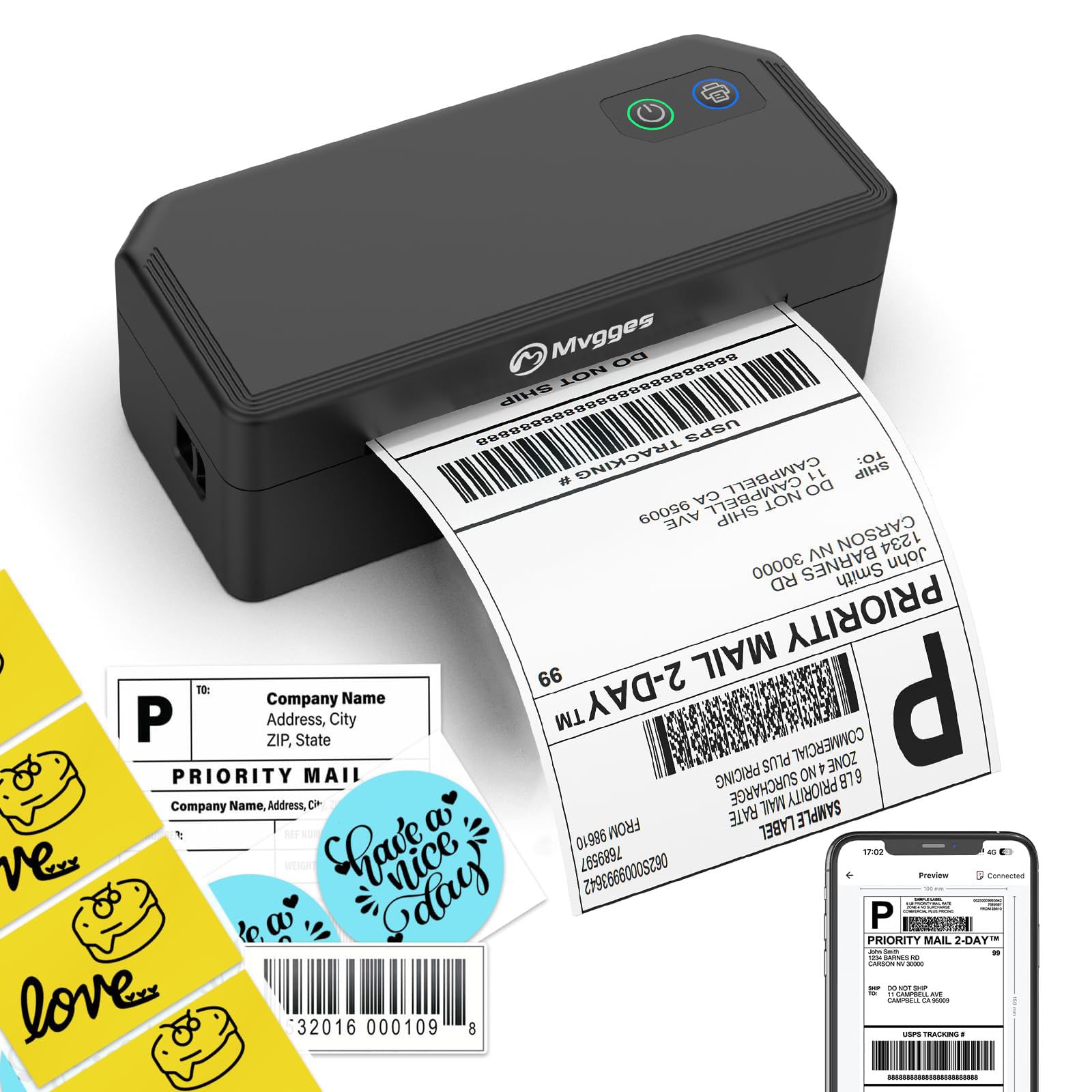
The Mvgges label printer is squarely focused on the e-commerce seller who needs to process orders quickly. It prints up to 72 4×6 shipping labels per minute at 160mm/s, which shaves serious time off a high-volume packing routine. The 203 DPI resolution ensures barcodes and QR codes remain scannable by carriers like USPS, UPS, and FedEx.
Connectivity is hybrid: Bluetooth works with iOS and Android phones via the “Flashlabel Pro” app, while a USB cable handles Windows, Mac, and Chrome OS. This flexibility is essential if you use a phone for quick prints on the warehouse floor and a desktop for bulk label generation. The printer auto-senses the label length, reducing paper waste during long runs.
The included test labels and setup guide make initial configuration smooth. Some users reported that the documentation undersells the wireless capability—the printer works wirelessly from a Windows machine if you install the drivers from the website. The phone app is functional but not as polished as the dedicated apps from Brother or POLONO.
Why it’s great
- Fast printing speed for high-order volume.
- Supports multiple platforms via USB and Bluetooth.
- Auto-adjusts label position to reduce waste.
Good to know
- Phone app interface is basic.
- Wi-Fi connection is not supported.
5. Brother P-Touch PT-N25BTV3
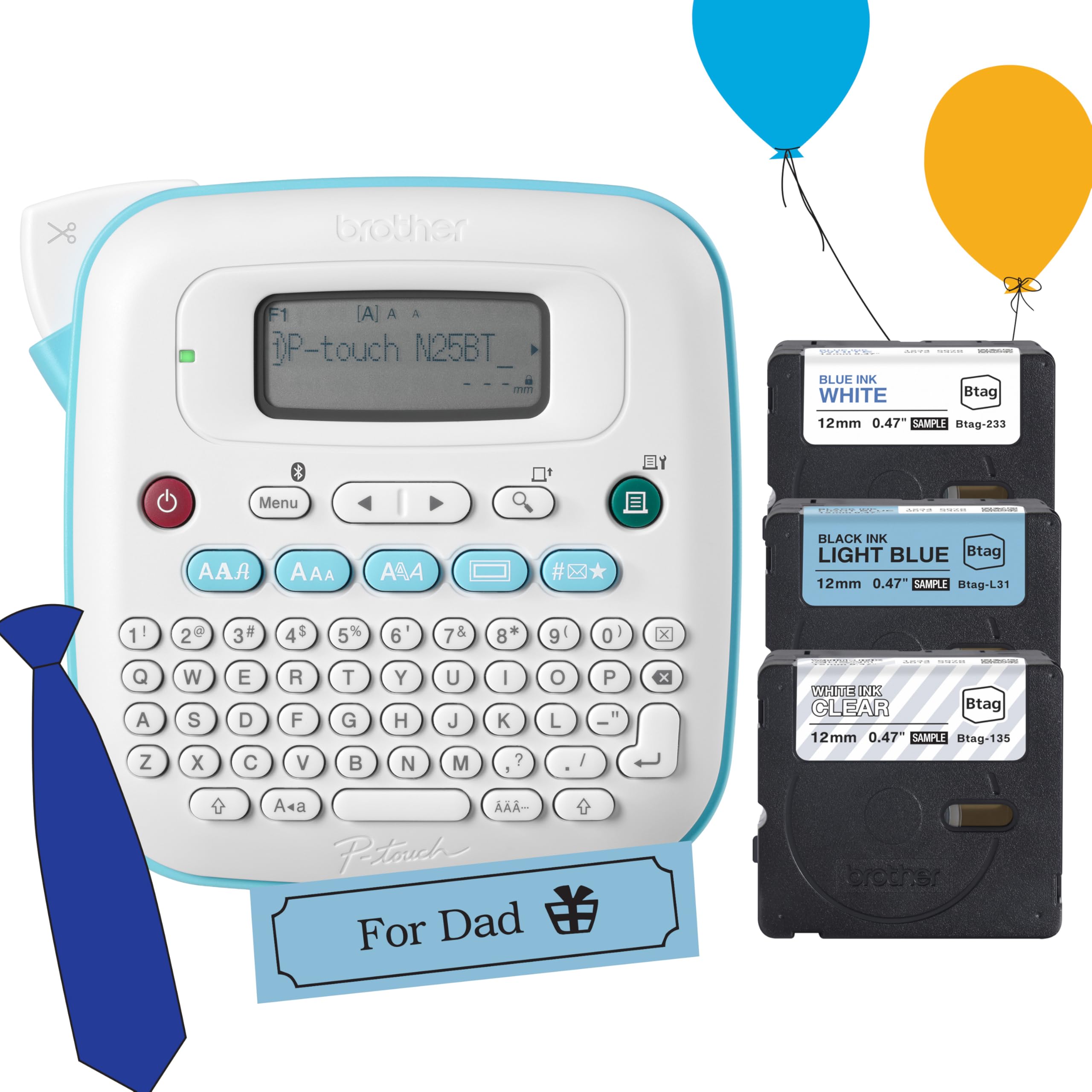
Brother’s PT-N25BTV3 is a well-built desktop label maker designed for neat, durable labels that can be removed cleanly. It uses Brother’s proprietary Btag tape (12mm wide), which has a split, easy-peel backing and is formulated to come off surfaces without leaving sticky residue. This makes it ideal for temporary labeling on rental returns, borrowed tools, or frequently rotated pantry containers.
The Bluetooth connectivity links to the free Design&Print2 app, which offers more design freedom than the machine’s built-in options. The app includes extra templates, icons, and font combinations. The device itself has a 16-character LCD screen for previewing labels, a built-in cutter, and memory to save 10 frequently used labels for fast reprinting. It runs on 6 AA batteries (not included) for portability, so you’ll want the optional AC adapter for desk use.
The bundle includes three sample Btag tapes in different colors, letting you experiment before buying full-length rolls. Users note a learning curve with the initial Bluetooth pairing and app setup compared to simpler NFC-based label makers, but the print quality and tape durability are excellent once configured.
Why it’s great
- Damage-free label removal from surfaces.
- Includes three sample tapes for variety.
- Compact desktop footprint with built-in cutter.
Good to know
- Requires AA batteries (not included) for portable use.
- Limited to 12mm label width.
6. Gloryang 4×6 Thermal Label Printer

The Gloryang label printer brings a space-savvy design to the mid-range shipping printer category. Its footprint is noticeably smaller than typical 4×6 thermal printers, making it a good fit for cluttered desks or co-working spaces. Despite the compact size, it handles labels from 1.57 up to 4.1 inches, covering both small product labels and full-size shipping tags.
Bluetooth pairing works across iOS, Android, macOS, and Windows, and the free app includes automatic label alignment once you select the paper size. The print speed of up to 100 labels per minute keeps packing runs efficient. The thermal printing is ink-free and maintenance-light—just load the paper roll and print. Several users highlight the stable Bluetooth connection that doesn’t drop mid-print, a common annoyance with lower-cost alternatives.
Setup takes just a few minutes, and the printer includes a starter roll of labels so you can begin printing immediately. The box also includes a USB cable and power adapter. The only caveat is that the Gloryang app, while functional, lacks the deep template library found in the NIIMBOT or MUNBYN apps.
Why it’s great
- Compact design saves valuable desk space.
- Stable Bluetooth connection across devices.
- No ink or toner required for operation.
Good to know
- Template library in app is modest.
- Max label width is 4.1 inches, slightly less than standard 4×6.
7. Brother P-Touch PT-D460BT

The Brother PT-D460BT is the most advanced label maker on this list, built for users who need systematic organization rather than occasional labeling. Its headline feature is spreadsheet integration—you can import data from Excel or CSV files directly into the labeling workflow, which is a game-changer for creating file folder labels, asset tags, or inventory ID stickers in bulk without manual data entry.
It supports Brother’s extensive TZe tape line, which includes 17 color varieties in paper, laminated, and specialty materials up to 24mm (about 3/4 inch) wide. The TZe tapes are known for their durability against moisture, sunlight, and abrasion, making them suitable for labeling tools, server racks, or outdoor equipment. The built-in backlit LCD screen and full QWERTY keyboard allow you to create labels without a phone, though the Bluetooth app adds template-based design and font options.
Setup can be a bit involved—some users report that connecting the PT-D460BT over Bluetooth or Wi-Fi requires following Brother’s registration and driver download process carefully. Once configured, it prints up to 20 labels per minute with consistent quality. The initial investment is higher than simpler models, but the combination of bulk data handling, professional-grade tape, and durable construction justifies it for serious office use.
Why it’s great
- CSV/Excel import for batch label printing.
- Broad TZe tape ecosystem with durable materials.
- Standalone operation with onboard keyboard.
Good to know
- Initial Bluetooth pairing can be fussy.
- Higher upfront cost than most competitors.
FAQ
How does direct thermal printing work without ink?
Can I use any brand of thermal label paper in my printer?
Will my labels fade over time?
Final Thoughts: The Verdict
For most users, the best bluetooth label maker winner is the MUNBYN RW403B because it combines a durable high-capacity build, an auto-calibrating DAC chip for alignment, and a rich app template library that serves both shipping and organization needs. If you want a compact everyday unit for home and office labeling, grab the POLONO PM220S. And for professional bulk file or asset management, nothing beats the Brother P-Touch PT-D460BT with its spreadsheet import and durable TZe tape system.