
Our readers keep the lights on and the weekend projects moving. As an Amazon Associate, I earn from qualifying purchases.
Specs are compiled from manufacturer listings and verified buyer reviews and can change over time — please confirm the key details on the product page before buying.
Trying to ditch the number pad on a budget almost always means picking between a keyboard that feels good but clatters like a typewriter, or one that is quiet but squishy. That frustrating choice is why most people stick with a cheap membrane keyboard for years. This guide skips the noise and the mush by focusing on nine tenkeyless (TKL — a keyboard without the number pad) boards that each deliver a real mechanical typing experience without costing a fortune.
I’m Rikta — the founder and writer behind FitlyFast. This guide is built by comparing the manufacturers’ published specifications and the patterns across verified customer reviews, so you get each pick’s real strengths and trade-offs instead of marketing spin.
if you need a clicky board for gaming or a creamy-smooth switch for late-night typing, these options cover the full spectrum of what a solid budget tenkeyless keyboard can offer at prices that won’t make you wince.
Our Picks at a Glance

How To Choose The Best Budget Tenkeyless Keyboard
Choosing a tenkeyless keyboard at a budget price is about knowing what you can compromise on and what you should not. The first thing to understand is that “budget” does not have to mean cheap feeling. Many of the best options use the same Cherry MX-style switches (the mechanical switch mechanism under each keycap that registers a press) and solid construction found in expensive boards.
Switch Type Is Everything
Your entire daily experience depends on the switch under each key. Linear switches (like Red switches) are smooth straight down and up — great for fast gaming where you double-tap constantly. Tactile switches (like Brown switches) give a small bump in the middle so you feel the press — ideal for typing. Clicky switches add that bump plus a loud click sound for satisfying feedback, though they can be loud in shared spaces.
Build Quality and Layout
A tenkeyless (TKL) layout removes the number pad, saving about 30% of desk space. This is the core benefit — your mouse sits closer to your body, reducing shoulder strain during gaming or work. Look for a metal top plate or aluminum frame, which adds heft so the keyboard does not slide around during intense use. Budget boards often use plastic cases, but a steel or aluminum plate inside can still give that solid feel.
Hot-Swappable vs Soldered
Hot-swappable switches let you pull out a switch and replace it with a different type without any soldering. This is a huge feature for a budget keyboard because it allows you to experiment with different feels over time. If you plan to keep the board for years, hot-swappable is a feature worth prioritizing. Soldered boards are perfectly reliable but locked into whatever switch they came with.
Quick Comparison
| Model | Best For | Switch Type | Keycaps | Connectivity | Amazon |
|---|---|---|---|---|---|
| Redragon K552★ Best Overall | Entry Level Value | Linear Red | ABS Double-Shot | Wired USB | Amazon |
| Ajazz AK820Silent Thock | Silent Typing & Feel | Linear (Pre-lubed) | PBT Double-Shot | Wired USB-C | Amazon |
| Logitech K835Office Essential | Brand Reliability | Linear Red | ABS | Wired USB-A | Amazon |
| G.SKILL KM360 | Cherry Switch Purity | Linear Cherry MX Red | ABS Dual-Injection | Wired USB-C (Detachable) | Amazon |
| Razer BlackWidow V3 | Gamer RGB Ecosystem | Clicky Razer Green | ABS | Wired USB | Amazon |
| RK Royal Kludge Sink87G | Wireless Simplicity | Linear | ABS | 2.4GHz / Wired USB | Amazon |
| Keychron C1 | Hot-Swap Starter | Tactile Gateron G Pro Brown | ABS Double-Shot | Wired USB-C (Detachable) | Amazon |
| Keychron K8 | Bluetooth Multi-Device | Tactile Super Brown | ABS OEM-Profile | Bluetooth 5.1 / USB-C | Amazon |
| AULA F87 Pro | Premium Feel, Budget Price | Linear LEOBOG Pre-lubed | Side-Printed PBT | BT 5.0 / 2.4GHz / USB-C | Amazon |
In‑Depth Reviews
1. Redragon K552 Mechanical Gaming Keyboard
A real mechanical keyboard with a metal top plate that costs less than a dinner out — and One owner reports a 15+ WPM typing speed boost after switching..
This is the board that defined the budget mechanical segment. It uses linear Red switches that are smooth — no bump, no click — which makes them good for fast gaming presses and for quiet offices, though the bottom-out sound and the spring vibration do echo a bit in the plastic case. The thing that wins people over is the build: a metal top plate makes this feel far heavier and more premium than its price suggests, and the anti-slip feet keep it planted on the desk during frantic gaming sessions.
Buyers report the typing feedback is noticeably superior to a chiclet-style laptop keyboard, and one software engineer noted their typing speed increased by 15+ WPM after switching. The 87-key tenkeyless layout leaves plenty of room for mouse movement. The rainbow LED backlighting with 6 dynamic modes adds some visual flair, though note that this version does not support software customization — brightness is controlled via keyboard shortcuts.
The most-discussed trade-off is the noise. The K552 is loud — the switch clicks, keycap bottom-outs, and the hollow case all amplify the sound. Several owners have modded the board by adding foam and removing the base, Owners mention a 65–75% noise reduction after adding foam., but from the start this is not a quiet keyboard. The keys also run slightly small, and there is no included wrist rest.
Redragon budget warrior
- Metal top plate gives a premium, heavy feel — stays put
- True mechanical action with full anti-ghosting and N-key rollover on all 87 keys
- Plug and play on Windows, macOS, Linux with no drivers needed
Switches feel scratchy
- Very loud switch and case noise — not ideal for shared spaces like an open office
- Rainbow LED is fixed patterns only — no per-key software customization
Budget pick: you want the most proven, affordable entry into mechanical typing and do not mind some audible clatter for the sake of that crisp feedback.
Typists beware: your desk is in a shared room or you need very quiet keystrokes.
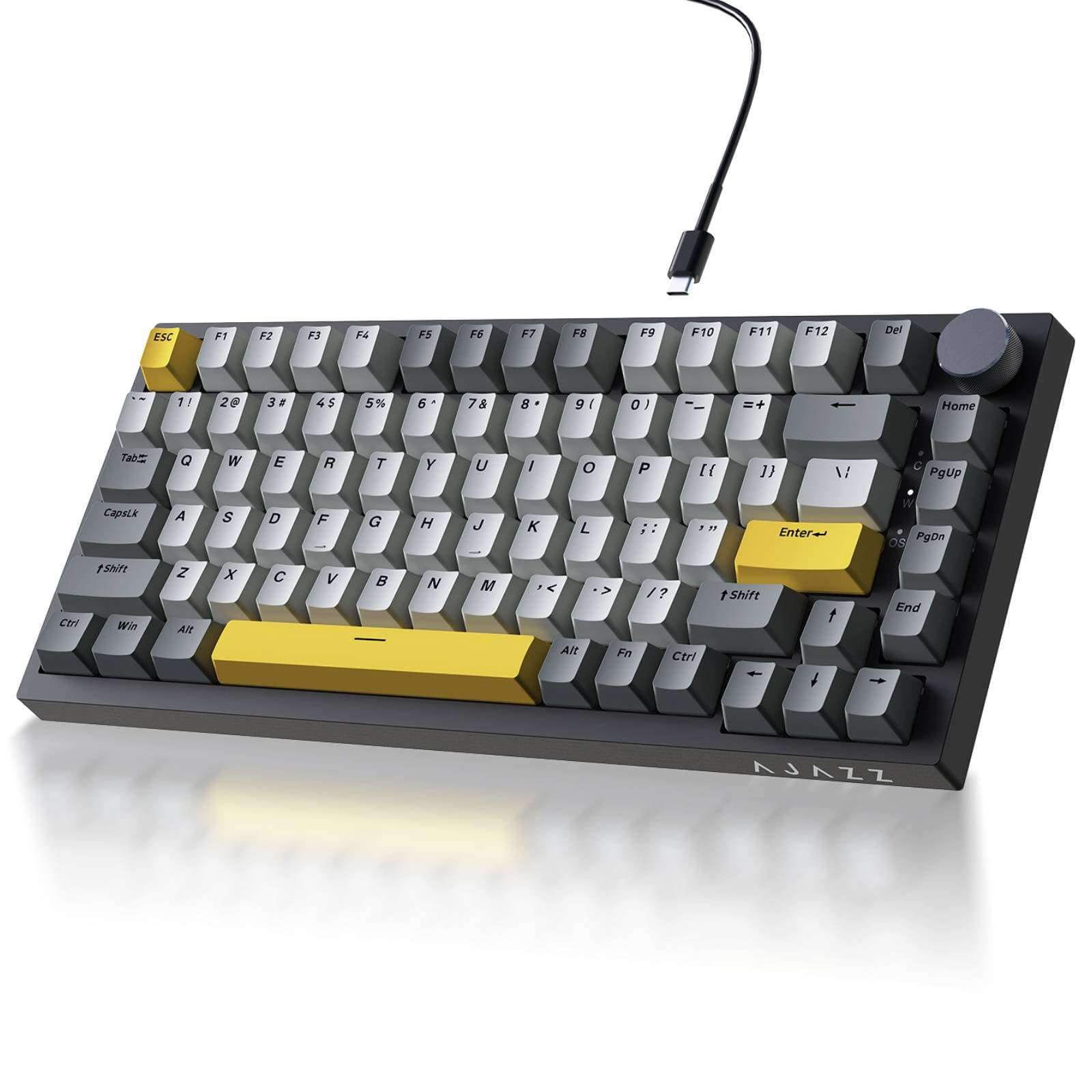
2. Ajazz AK820 TKL 75% Hot Swappable Mechanical Keyboard
A muffled, bubble-wrap sound that owners say is inaudible when wearing headphones — much quieter than the Redragon K552’s clatter.
The Ajazz AK820 delivers a sound that owners consistently describe as like bubble wrap — soft, muffled, and satisfying without being intrusive. Customers note the switches are “inaudible with headphones,” which makes this an standout option for anyone who shares a room or streams voice content. The secret is the gasket mount structure (the keyboard plate floats on soft foam layers instead of being screwed rigidly into the case): it uses Poron sandwich cotton and high-density foam, eliminating that hollow echo that plagues many budget boards.
The 75% layout (82 keys) saves 30% more desk space than a full TKL while still keeping function keys and arrow keys. The pre-lubed linear switches (switches with factory-applied lubricant for smoother movement) are smooth from the factory, and the hot-swappable PCB (circuit board) accepts both 3-pin and 5-pin switches, so you can change the entire feel down the road without soldering. The south-facing RGB lighting shines through the PBT double-shot keycaps (dense plastic keycaps where the letter is molded into the plastic, so it cannot wear off), which resist the greasy shine that cheap ABS keycaps (lighter plastic that goes shiny over time) develop after long use.
Quality and sound quality are the two most-praised aspects, with over 40 owners each calling them out positively. The all-plastic build has a satisfying weight to it despite the material. The only common caution is that this is strictly a wired board — no wireless option — but for most people the stable USB-C connection is a benefit rather than a drawback.
Ajazz hot-swap value
- Gasket mount and foam layers produce a creamy, deep thocky sound — probably the quietest on this list
- Factory pre-lubed linear switches feel smooth and crisp right from the start
- Hot-swappable PCB supports 3-pin and 5-pin switches for easy future upgrades
Software lacks polish
- No wireless mode — this is a wired-only USB-C board
- Plastic case rather than metal, though the heft still feels solid
Customizer’s choice: anyone who types or games in a shared space and wants the most satisfying quiet mechanical experience available at this price.
Software fuss: your setup requires a clean, hidden wireless connection.
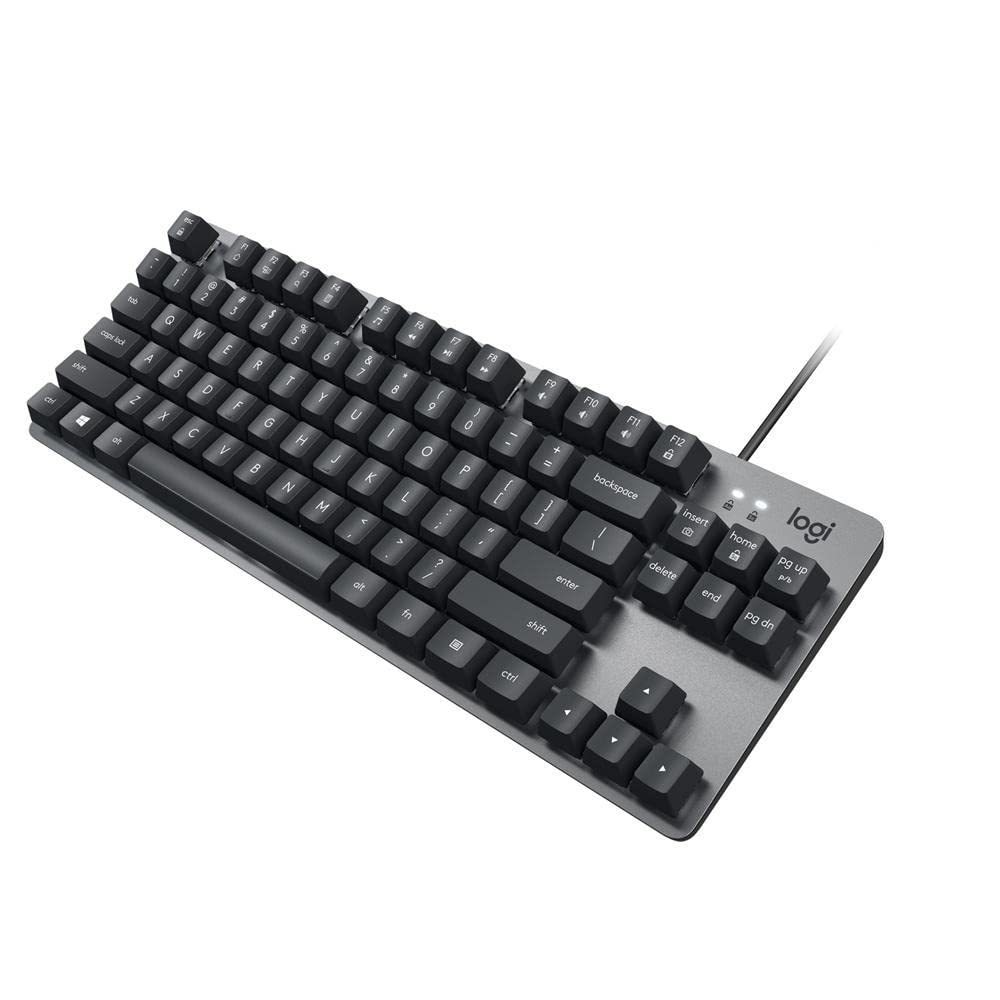
3. Logitech K835 TKL Wired Mechanical Keyboard
A slim, anodized aluminum frame and no RGB — this is a professional-looking work keyboard from a brand you already know.
Logitech brings its brand reliability to the tenkeyless space with the K835. The anodized aluminum frame is the standout spec — it gives the keyboard a premium feel and enough weight to prevent sliding, while the slim profile and adjustable tilt brackets create a comfortable typing angle. The linear Red switches are quiet enough for an office setting, and the mechanical switch mechanism is The switches are rated for 50 million clicks. (the manufacturer-rated lifespan).
The 12 dual-function keys at the top row give quick access to media controls and shortcuts, which speeds up daily workflow. The 5-foot USB cable is braided and durable. The design is deliberately understated — no RGB here, which makes it ideal for a professional workspace where flashy lighting would be distracting.
The recurring note from long-term owners is that the characters on the keycaps are printed using a sticker-like method. This raises a concern about the lettering fading over time compared to double-shot injection molding (where the legend is molded into the plastic rather than printed on top). The layout is ANSI US-international, which allows accented characters for typing in languages like Portuguese but does sacrifice the dedicated question mark key to an ALT+W combination.
Durable daily: you want a professional-looking, aluminum-framed board from among the most reliable peripheral brands, with no gamer aesthetic.
Dark room no: you need dual-shot keycaps that will never fade, or if you want per-key RGB lighting.
4. G.SKILL USB KM360 Professional Tenkeyless Mechanical Keyboard
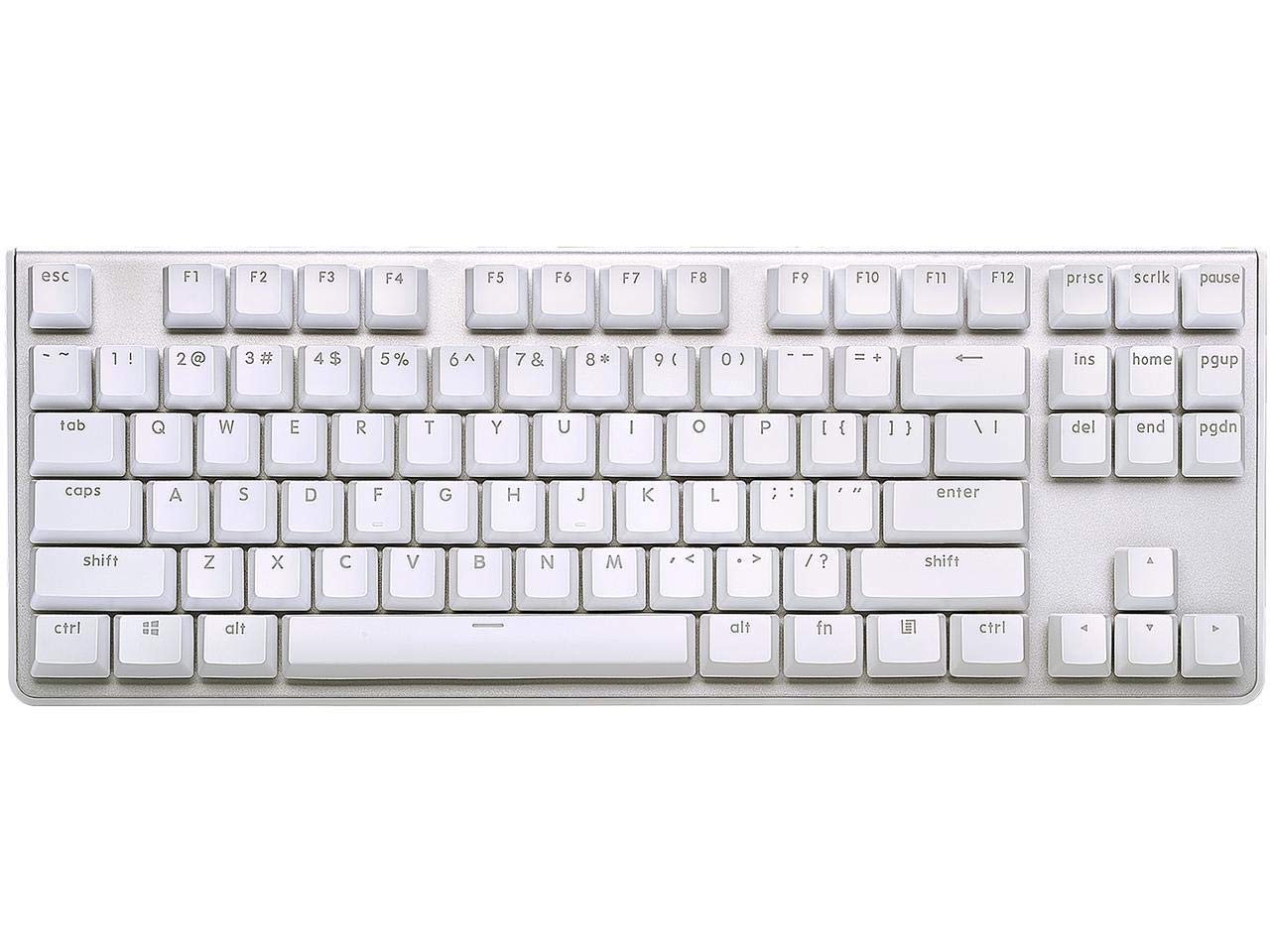
Genuine Cherry MX Red switches — the gold standard — in a clean white chassis that one owner says has lasted six years strong.
The KM360 stands apart from nearly every other budget board by using authentic Cherry MX Red switches — not a clone. Cherry switches are the gold standard for reliability and feel, and here they give a smooth, linear press with no tactile bump. The result is a board that feels precise for gaming (especially FPS (first-person shooter) titles) and comfortable for long typing sessions. The solid aluminum top plate and floating key design make cleaning easy.
The detachable USB Type-C cable is a nice premium touch at this price — it makes the keyboard genuinely portable, and if the cable ever breaks you just replace it instead of the whole board. The white LED backlight is single-color with adjustable brightness, though multiple owners note that even the lowest setting can be too bright and cause glare on white desk surfaces.
Quality and value for money are the top two praised aspects, with 50 and 39 mentions respectively. One owner has used this keyboard for six years and reports it is still holding strong. The ABS dual-injection keycaps resist wear better than printed caps, but the font style on them is widely described as ugly. The stabilizers (the balancing bars under long keys like the spacebar and Shift keys) on the larger keys have a bit of rattle that some owners fix with a little lube.
Minimalist pick: having genuine Cherry MX switches matters to you, and you want a clean, portable tenkeyless board with a detachable USB-C cable.
Fixed cable: you need per-key RGB lighting, or you prefer a darker, gamer-oriented aesthetic.
5. Razer BlackWidow V3 Tenkeyless Mechanical Gaming Keyboard (Renewed)

The clicky, Chroma-lit gaming board from Razer in a TKL size — but this one is a renewed model, not new.
The BlackWidow V3 uses Razer’s own Green switches, which deliver a satisfying clicky sound with an actuation force of 50 G (the pressure needed to press a key). This is a keyboard built for gaming first: the tactile feedback lets you feel each press distinctly, which helps with double-tapping and accurate key releases in fast games. The military-grade metal top plate adds durability without adding unnecessary bulk.
The Razer Chroma RGB lighting is the headline feature here — 16.8 million colors can be synced with hundreds of supported games and Philips Hue smart lights. The compact 87-key form factor frees up desk space, and the USB passthrough on the back is a small but welcome convenience for plugging in a mouse or headset dongle. The Razer Hypershift software allows full remapping of every key, including complex macro sequences.
The renewed (refurbished) status is the main caveat. Several owners note the keyboard arrived in like-new condition and has worked perfectly, but the variance in packaging and wear between individual units is higher than buying new. The switches are rated for 80 million clicks., so the mechanical longevity remains strong even on a renewed unit. The cable is non-detachable, which limits portability — unlike the G.SKILL KM360’s detachable USB-C, here you are stuck with a fixed wire.
Gamer’s choice: a gamer who wants Razer’s full Chroma ecosystem and that signature clicky switch feel without paying the full retail price.
Synapse lock: this is a renewed/refurbished product — the condition of the packaging and any minor wear will vary between units.
6. RK Royal Kludge Sink87G RGB Wireless Mechanical Keyboard

A wireless TKL that uses a tiny USB dongle for lag-free 2.4GHz connection — no wire clutter, no Bluetooth pairing fuss.
The RK Royal Kludge Sink87G offers a clean wireless solution that works with a simple nano USB receiver (a small plug that stays in your computer). You can also use it wired via USB-C, though the wireless mode via the dongle is the primary draw. The 2.4GHz connection (a wireless standard with lower latency than Bluetooth) is reliable with no noticeable lag, making it viable for gaming. The 87-key TKL layout is compact, and the board has a heavy, sturdy build that prevents sliding.
The per-key RGB lighting with 16.8 million colors and 20 lighting effect modes is controlled by on-board shortcuts, and the software allows deeper customization when wired. The keycaps are standard Cherry MX-compatible, so swapping them out for a set of pudding keycaps (keycaps with translucent sides that let more RGB light shine through) is a popular upgrade that makes the lighting pop more. The battery lasts for days with moderate use, and the lights automatically turn off after a period of inactivity to save power.
The mechanical switches produce soft, satisfying clicks that are quieter than a typical clicky board. The main functional limitation is that the keyboard cannot operate via the USB cable alone; it requires the wireless dongle to work. The wireless range is also relatively short compared to Bluetooth devices.
Wireless value: someone who wants a clean wireless desk setup with reliable 2.4GHz performance and per-key RGB at a very accessible price.
Charge often: the USB cable charges the battery but does not function as a wired data connection — you always need the dongle paired.
7. Keychron C1 Hot-swappable Wired Mechanical Keyboard
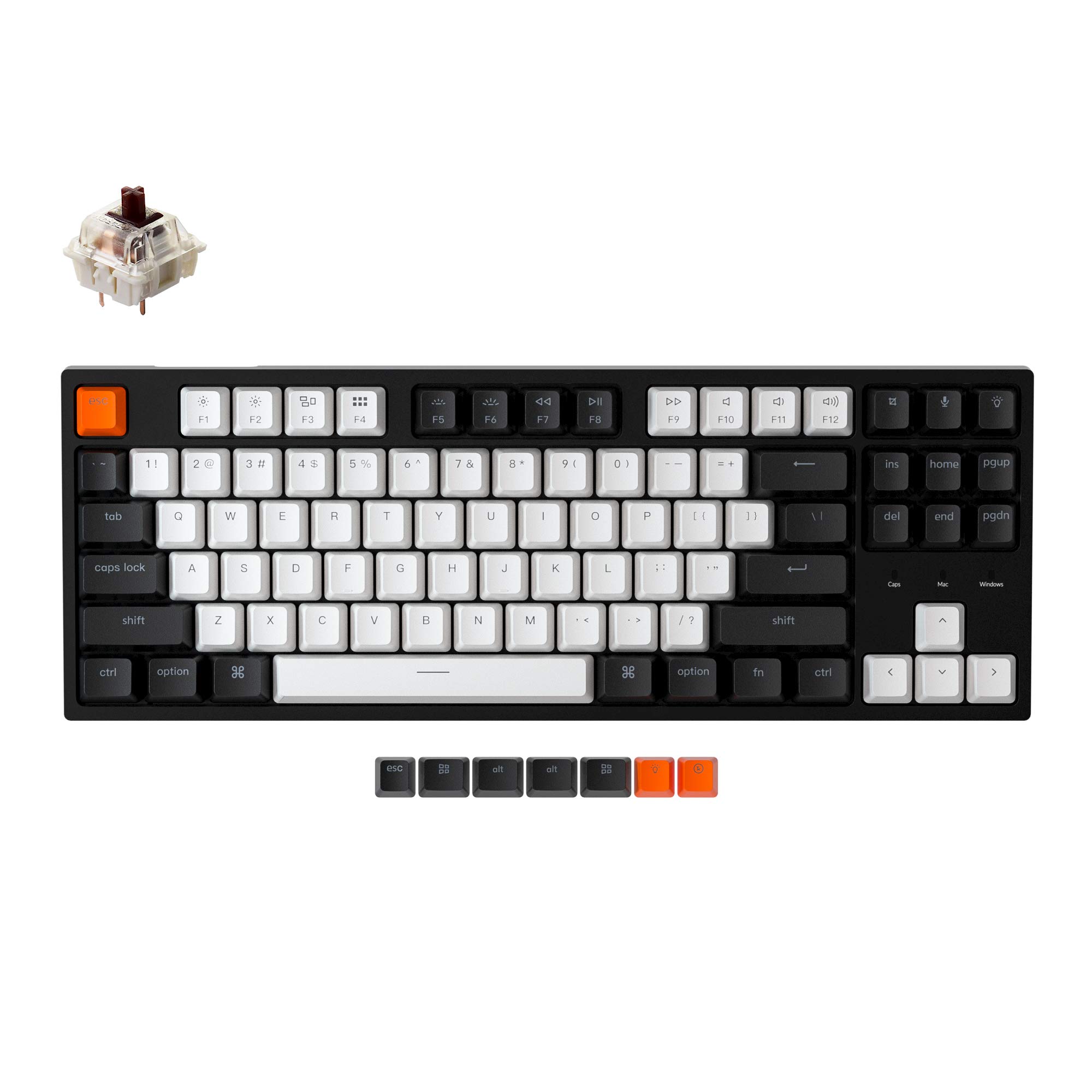
Hot-swappable from the factory and one owner says it feels better than a Leopold (a premium keyboard brand) — that is high praise for a budget board.
Keychron built its reputation on high-quality Mac-and-Windows keyboards, and the C1 brings that DNA to a budget price. The hot-swappable PCB accepts both 3-pin and 5-pin switches, so you can experiment with different switch types over time without any soldering. The pre-installed Gateron G Pro Brown switches provide a tactile bump (a small bump that tells your finger the key activated) that is noticeable but not aggressive, and the factory lubing is excellent — one owner describes the switches as “buttery smooth.”
The white LED backlight offers different effects (flashing, breathing, static) controlled by onboard shortcuts, and the double-shot ABS keycaps let the light shine through the legends cleanly. The included extra keycaps for both Mac and Windows layouts are a thoughtful touch — the switch at the top toggles between the two operating systems, with a blue LED indicating the current mode. The 2-level adjustable feet and inclined bottom frame improve typing ergonomics over a flat board.
One owner directly compares this board to a Leopold and says the C1 is “better” for the price. The only material drawback is the ABS keycaps, which are less durable than PBT and will develop a shiny appearance over time with heavy use. Some owners also note the brown switches are slightly louder than expected for a tactile switch.
Wired reliable: you want a hot-swappable board that works perfectly for both Mac and Windows and delivers a premium typing feel from the start.
RGB sparse: you want PBT keycaps that will never develop shine — plan to budget for a keycap upgrade down the line.
8. Keychron K8 Tenkeyless Wireless Mechanical Keyboard

Switches between your desktop, tablet, and laptop with a button press — the 4000 mAh battery (which is large for a keyboard) lasts up to 200 hours without the backlight.
The Keychron K8 is the wireless brother to the C1, adding Bluetooth 5.1 connectivity that allows smooth switching between up to three devices. The 4000 mAh battery is one of the largest in any mechanical keyboard at this price, The 4000 mAh battery provides up to 200 hours of use with the backlight off.. The tactile Super Brown switches have 2.0 mm pre-travel (how far the key moves before it activates) and 55 gf actuation force (the pressure to press the key down), providing the satisfying bump that typists love.
The two-level adjustable feet and the inclined bottom frame improve ergonomic position for long sessions. The 87-key layout keeps all essential navigation keys (Home, End, Page Up) intact, making it suitable for both programming and productivity work. The white backlight is bright and adjustable, and the included keycaps work for both Mac and Windows layouts from the start.
Sound quality and typing feel are the two most-praised aspects, with 90 and 53 mentions respectively. The brown switches are described as “crisp and easy to press,” and owners note the keyboard is “quite quiet” for recording or shared spaces. The mixed feedback comes from Bluetooth connectivity — some users report pairing issues or a limited range of under 3 feet, though others find it consistent. The media keys are not grouped together, and the lighting key on the top row cannot be reprogrammed, leading to accidental presses.
Wireless pro: someone who switches between a desktop, tablet, and laptop regularly and wants a single mechanical keyboard to handle all three smoothly.
Bulky frame: Bluetooth range can be short for some units, and the non-reprogrammable lighting key can be a minor annoyance during typing.
9. AULA F87 Pro Wireless Mechanical Keyboard
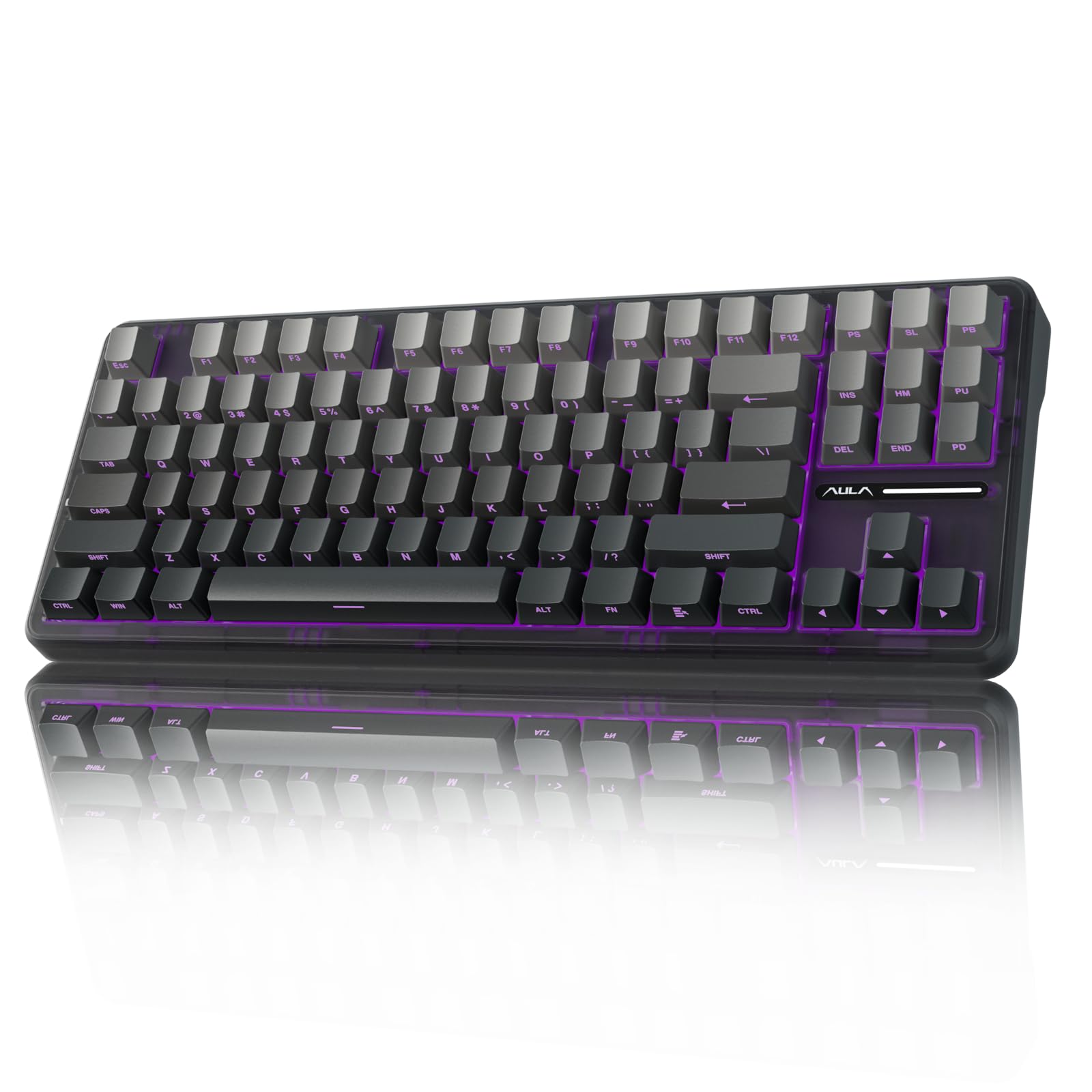
Three connection modes, side-printed PBT keycaps that never wear off, and a build so solid A drop from 3.3 feet pops the switches out; they snap back in. — you snap them back in.
The AULA F87 Pro is the surprise heavy hitter of this lineup. It offers tri-mode connection — Bluetooth 5.0, 2.4GHz wireless, and USB-C wired — all for a price that undercuts most single-mode competitors. The hot-swappable PCB accepts 3-pin or 5-pin switches, and the pre-lubed LEOBOG space gold linear switches are factory-lubed for a buttery-smooth feel that owners describe as more premium than the price suggests.
The side-printed PBT keycaps are a standout feature at this price point. The legends are on the side face of the keycap, so the lettering never wears off from fingertip friction. The double-shot injection molding ensures the dye stays sharp, and the PBT material resists the greasy shine that cheap ABS keycaps develop. The 4000 mAh battery provides long-lasting wireless use, and the 16.8 million RGB lighting with 16 preset effects adds atmosphere without being overwhelming.
Build quality is the top praised aspect, with 27 positive mentions. The keyboard has survived drops from about 3.3 feet. — the hot-swappable switches pop out and can be snapped right back in, which is a clever safety feature. The driver software enables key macro programming and customizable RGB effects. The main criticism is that the RGB color switching logic is confusing, and the software is described as “buggy” and dated in its interface.
Ultra lightweight: the value-conscious enthusiast who wants the full modern feature set — tri-mode wireless, hot-swap, and durable PBT keycaps — without spending over.
Cheap plastic: the customization software is clunky, and the RGB controls take some getting used to.
Understanding the Specs
Switch Types: Linear vs Tactile vs Clicky
The switch is the mechanism under each keycap that registers your press. Linear switches (like Red switches) move straight up and down with no bump or click — they are smooth and fast, great for double-tapping in games. Tactile switches (like Brown switches) have a small bump in the middle of the press that tells your finger the key activated — this helps with typing accuracy. Clicky switches add a loud click sound on top of the bump. For a budget board, the switch type is the single biggest factor in how the keyboard feels.
Hot-Swappable vs Soldered Switches
A hot-swappable PCB (printed circuit board — the circuit board inside the keyboard) lets you pull out any switch with a small tool and replace it with a different type — no soldering required. This is a huge advantage on a budget board because you can start with the included switches and later upgrade to a smoother or quieter switch without buying a whole new keyboard. Soldered boards are fixed: the switches are permanent, so you are locked into whatever feel the manufacturer chose.
PBT vs ABS Keycaps
The keycap material determines how the keyboard feels and looks over time. PBT (polybutylene terephthalate — a dense plastic) keycaps are denser and resist the shiny, greasy appearance that develops from hundreds of hours of finger contact. They also sound deeper when you type. ABS (acrylonitrile butadiene styrene — a softer plastic) keycaps are softer and cheaper, and they will develop a worn shine over months of use. Double-shot injection molding — where the legend is molded into the plastic rather than printed on top — is the most durable legend type in both materials.
Gasket Mount Design
A gasket mount means the keyboard plate is sandwiched between layers of soft silicone or foam rather than screwed rigidly into the case. This allows the plate to flex slightly with each keystroke, absorbing vibration and creating a deeper, more uniform sound. It also reduces the hollow echo that cheap mechanical keyboards produce. Budget boards with gasket mounts are relatively rare, making them a standout feature when present.
FAQ
What does tenkeyless mean?
Are budget tenkeyless keyboards good for gaming?
Which switch type is best for an office environment?
Can I change the switches on a budget TKL keyboard later?
What is the difference between 2.4GHz wireless and Bluetooth?
How long does a wireless TKL keyboard battery last?
Are PBT keycaps worth the extra cost?
Will a tenkeyless keyboard work with a Mac?
Why do my keystrokes sometimes not register on a mechanical keyboard?
Final Thoughts: The Verdict
If you want one dependable pick, the budget tenkeyless keyboard winner is the Redragon K552 because it is the most proven mechanical entry point — thousands of owners, a metal top plate, and a price that makes trying a mechanical keyboard a no-brainer risk. If you want near-silent typing with a creamy sound profile, grab the Ajazz AK820. And for the full modern feature set including tri-mode wireless and PBT keycaps without breaking, the AULA F87 Pro is the one to reach for.
{“@context”: “https://schema.org”, “@graph”: [{“@type”: “ItemList”, “name”: “9 Best Budget Tenkeyless Keyboard”, “url”: “https://fitlyfast.com/best-budget-tenkeyless-keyboard/”, “numberOfItems”: 9, “itemListElement”: [{“@type”: “ListItem”, “position”: 1, “name”: “Redragon K552 Mechanical Gaming Keyboard”, “url”: “https://fitlyfast.com/best-budget-tenkeyless-keyboard/#product-1”}, {“@type”: “ListItem”, “position”: 2, “name”: “Ajazz AK820 TKL 75% Hot Swappable Mechanical Keyboard”, “url”: “https://fitlyfast.com/best-budget-tenkeyless-keyboard/#product-2”}, {“@type”: “ListItem”, “position”: 3, “name”: “Logitech K835 TKL Wired Mechanical Keyboard”, “url”: “https://fitlyfast.com/best-budget-tenkeyless-keyboard/#product-3”}, {“@type”: “ListItem”, “position”: 4, “name”: “G.SKILL USB KM360 Professional Tenkeyless Mechanical Keyboard”, “url”: “https://fitlyfast.com/best-budget-tenkeyless-keyboard/#product-4”}, {“@type”: “ListItem”, “position”: 5, “name”: “Razer BlackWidow V3 Tenkeyless Mechanical Gaming Keyboard (Renewed)”, “url”: “https://fitlyfast.com/best-budget-tenkeyless-keyboard/#product-5”}, {“@type”: “ListItem”, “position”: 6, “name”: “RK Royal Kludge Sink87G RGB Wireless Mechanical Keyboard”, “url”: “https://fitlyfast.com/best-budget-tenkeyless-keyboard/#product-6”}, {“@type”: “ListItem”, “position”: 7, “name”: “Keychron C1 Hot-swappable Wired Mechanical Keyboard”, “url”: “https://fitlyfast.com/best-budget-tenkeyless-keyboard/#product-7”}, {“@type”: “ListItem”, “position”: 8, “name”: “Keychron K8 Tenkeyless Wireless Mechanical Keyboard”, “url”: “https://fitlyfast.com/best-budget-tenkeyless-keyboard/#product-8”}, {“@type”: “ListItem”, “position”: 9, “name”: “AULA F87 Pro Wireless Mechanical Keyboard”, “url”: “https://fitlyfast.com/best-budget-tenkeyless-keyboard/#product-9”}]}, {“@type”: “Product”, “position”: 1, “name”: “Redragon K552 Mechanical Gaming Keyboard”, “image”: “https://m.media-amazon.com/images/I/71FSIp+tDNL.jpg”, “brand”: {“@type”: “Brand”, “name”: “Redragon”}, “url”: “https://www.amazon.com/dp/B016MAK38U/?tag=fitlyfast00-20”, “offers”: {“@type”: “Offer”, “url”: “https://www.amazon.com/dp/B016MAK38U/?tag=fitlyfast00-20”}}, {“@type”: “Product”, “position”: 2, “name”: “Ajazz AK820 TKL 75% Hot Swappable Mechanical Keyboard”, “image”: “https://m.media-amazon.com/images/I/612fnwTcoDL.jpg”, “brand”: {“@type”: “Brand”, “name”: “Ajazz”}, “url”: “https://www.amazon.com/dp/B0CL25T459/?tag=fitlyfast00-20”, “offers”: {“@type”: “Offer”, “url”: “https://www.amazon.com/dp/B0CL25T459/?tag=fitlyfast00-20”}}, {“@type”: “Product”, “position”: 3, “name”: “Logitech K835 TKL Wired Mechanical Keyboard”, “image”: “https://m.media-amazon.com/images/I/510CFOrvjjL.jpg”, “brand”: {“@type”: “Brand”, “name”: “Logitech”}, “url”: “https://www.amazon.com/dp/B08V1MHJSW/?tag=fitlyfast00-20”, “offers”: {“@type”: “Offer”, “url”: “https://www.amazon.com/dp/B08V1MHJSW/?tag=fitlyfast00-20”}}, {“@type”: “Product”, “position”: 4, “name”: “G.SKILL USB KM360 Professional Tenkeyless Mechanical Keyboard”, “image”: “https://m.media-amazon.com/images/I/614KVwq3zML.jpg”, “brand”: {“@type”: “Brand”, “name”: “G.SKILL”}, “url”: “https://www.amazon.com/dp/B07X4ZBM8J/?tag=fitlyfast00-20”, “offers”: {“@type”: “Offer”, “url”: “https://www.amazon.com/dp/B07X4ZBM8J/?tag=fitlyfast00-20”}}, {“@type”: “Product”, “position”: 5, “name”: “Razer BlackWidow V3 Tenkeyless Mechanical Gaming Keyboard (Renewed)”, “image”: “https://m.media-amazon.com/images/I/51Fv7KI16HL.jpg”, “brand”: {“@type”: “Brand”, “name”: “Razer”}, “url”: “https://www.amazon.com/dp/B08KDKTSLC/?tag=fitlyfast00-20”, “offers”: {“@type”: “Offer”, “url”: “https://www.amazon.com/dp/B08KDKTSLC/?tag=fitlyfast00-20”}}, {“@type”: “Product”, “position”: 6, “name”: “RK Royal Kludge Sink87G RGB Wireless Mechanical Keyboard”, “image”: “https://m.media-amazon.com/images/I/61ftuC2GpXL.jpg”, “brand”: {“@type”: “Brand”, “name”: “RK”}, “url”: “https://www.amazon.com/dp/B08GX7WLCF/?tag=fitlyfast00-20”, “offers”: {“@type”: “Offer”, “url”: “https://www.amazon.com/dp/B08GX7WLCF/?tag=fitlyfast00-20”}}, {“@type”: “Product”, “position”: 7, “name”: “Keychron C1 Hot-swappable Wired Mechanical Keyboard”, “image”: “https://m.media-amazon.com/images/I/71slA7rhY9L.jpg”, “brand”: {“@type”: “Brand”, “name”: “Keychron”}, “url”: “https://www.amazon.com/dp/B08CNBL4Z4/?tag=fitlyfast00-20”, “offers”: {“@type”: “Offer”, “url”: “https://www.amazon.com/dp/B08CNBL4Z4/?tag=fitlyfast00-20”}}, {“@type”: “Product”, “position”: 8, “name”: “Keychron K8 Tenkeyless Wireless Mechanical Keyboard”, “image”: “https://img5.m.media-amazon.com/images/I/61OS8Ptfl2L.jpg”, “brand”: {“@type”: “Brand”, “name”: “Keychron”}, “url”: “https://www.amazon.com/dp/B08B5WHYTT/?tag=fitlyfast00-20”, “offers”: {“@type”: “Offer”, “url”: “https://www.amazon.com/dp/B08B5WHYTT/?tag=fitlyfast00-20”}}, {“@type”: “Product”, “position”: 9, “name”: “AULA F87 Pro Wireless Mechanical Keyboard”, “image”: “https://m.media-amazon.com/images/I/61ERdtQkM3L.jpg”, “brand”: {“@type”: “Brand”, “name”: “AULA”}, “url”: “https://www.amazon.com/dp/B0D2TQL24M/?tag=fitlyfast00-20”, “offers”: {“@type”: “Offer”, “url”: “https://www.amazon.com/dp/B0D2TQL24M/?tag=fitlyfast00-20”}}, {“@type”: “FAQPage”, “mainEntity”: [{“@type”: “Question”, “name”: “What does tenkeyless mean?”, “acceptedAnswer”: {“@type”: “Answer”, “text”: “Tenkeyless (TKL) means the keyboard has no separate number pad on the right side. This frees up about 30% more desk space, allowing your mouse to sit closer to your body. It is the most popular layout for gamers and anyone with a smaller desk.”}}, {“@type”: “Question”, “name”: “Are budget tenkeyless keyboards good for gaming?”, “acceptedAnswer”: {“@type”: “Answer”, “text”: “Yes, most budget TKL boards use mechanical switches that provide fast response times. Look for full anti-ghosting (technology that prevents missed keystrokes when multiple keys are pressed at once) and N-key rollover (which lets every single key register independently, even under simultaneous presses). The Ajazz AK820 and Redragon K552 both handle competitive gaming well.”}}, {“@type”: “Question”, “name”: “Which switch type is best for an office environment?”, “acceptedAnswer”: {“@type”: “Answer”, “text”: “Linear or tactile switches are quieter than clicky switches. The Ajazz AK820 with its pre-lubed linear switches and foam-dampened gasket mount is the quietest option on this list. If you type in a shared space, avoid clicky switches like the Razer Green or standard Cherry MX Blue.”}}, {“@type”: “Question”, “name”: “Can I change the switches on a budget TKL keyboard later?”, “acceptedAnswer”: {“@type”: “Answer”, “text”: “Only if the keyboard is hot-swappable. Models like the Ajazz AK820, Keychron C1, and AULA F87 Pro have hot-swappable PCBs that accept 3-pin and 5-pin switches. If you buy a soldered board like the Logitech K835 or G.SKILL KM360, the switches are permanent.”}}, {“@type”: “Question”, “name”: “What is the difference between 2.4GHz wireless and Bluetooth?”, “acceptedAnswer”: {“@type”: “Answer”, “text”: “2.4GHz wireless uses a small USB dongle and offers a more stable, lower-latency connection than Bluetooth. It is better for gaming. Bluetooth connects without needing a dongle and can switch between multiple devices, but can have slight input delay and occasional dropouts depending on signal interference.”}}, {“@type”: “Question”, “name”: “How long does a wireless TKL keyboard battery last?”, “acceptedAnswer”: {“@type”: “Answer”, “text”: “Battery life varies based on backlight usage and connection type. The Keychron K8 with its 4000 mAh battery The 4000 mAh battery lasts up to 200 hours with the backlight off.. With RGB on, expect a few days of heavy use. Most wireless boards charge via USB-C and can be used while charging.”}}, {“@type”: “Question”, “name”: “Are PBT keycaps worth the extra cost?”, “acceptedAnswer”: {“@type”: “Answer”, “text”: “Yes, if you plan to keep the keyboard for years. PBT keycaps resist the greasy shine that ABS keycaps develop over time. The AULA F87 Pro includes PBT keycaps at a budget price. If you buy a board with ABS keycaps, you can always upgrade the keycaps later for around -30.”}}, {“@type”: “Question”, “name”: “Will a tenkeyless keyboard work with a Mac?”, “acceptedAnswer”: {“@type”: “Answer”, “text”: “Most wired and wireless TKL keyboards work with Mac, but some are tune for Windows. The Keychron C1 and K8 are specifically designed for both Mac and Windows — they include extra keycaps for each system and a switch to toggle the modifier keys. The Redragon K552 also works on macOS from the start.”}}, {“@type”: “Question”, “name”: “Why do my keystrokes sometimes not register on a mechanical keyboard?”, “acceptedAnswer”: {“@type”: “Answer”, “text”: “This could be a lack of N-key rollover (NKRO), which allows every single key to register independently under simultaneous presses. Budget boards without NKRO may miss inputs during fast gaming. All the keyboards in this guide support either full NKRO or 6-key rollover, which covers most use cases.”}}]}]}