
Our readers keep the lights on and the weekend projects moving. As an Amazon Associate, I earn from qualifying purchases.
Specs are compiled from manufacturer listings and verified buyer reviews and can change over time — please confirm the key details on the product page before buying.
Your keyboard is the one tool you touch all day, every day. Pick the wrong one and you get tired wrists, noisy distractions, or a tangle of cables that slows you down. Choose the right one and it disappears under your hands — quiet, comfortable, and paired instantly so you focus on the work, not the hardware.
I’m Rikta — the founder and writer behind FitlyFast. This guide is built by comparing the manufacturers’ published specifications and the patterns across verified customer reviews, so you get each pick’s real strengths and trade-offs instead of marketing spin.
A full number pad for spreadsheets, a silent membrane (a rubber-dome layer) for an open-plan office, or a mechanical switch (individual spring under each key) for satisfying feedback — this roundup of the best business keyboard options covers every real-world desk scenario.
Our Picks at a Glance



How To Choose The Best Business Keyboard
The right business keyboard depends on three things: how it feels under your fingers, how quiet it is for your coworkers, and how it connects to your devices. Here is what matters most.
Switch Type: Mechanical vs. Membrane
Mechanical keyboards use individual switches under each key, giving you a distinct tactile bump or click and a long lifespan (often 50 million keystrokes). They feel precise but can be noisy. Membrane keyboards use a rubber dome layer — quieter and cheaper, but with a mushier feel that some typists dislike. For an office, silent mechanical switches (like Cherry MX Silent Red) offer the best of both worlds: durability without the clatter.
Layout and Ergonomics
Full-size keyboards include a numeric keypad that is essential for data entry, accounting, or finance work. Compact layouts (without the number pad) save desk space but slow down number-heavy tasks. An ergonomic wave shape or a cushioned palm rest reduces wrist strain during long days — something the review data confirms is the top priority for many buyers.
Connectivity and Multi-Device Support
Wired keyboards offer zero-lag and no batteries to replace, making them the most reliable for a fixed desk. Wireless keyboards use either a 2.4GHz USB receiver (stable, plug-and-play) or Bluetooth (good for switching between a laptop, tablet, and phone). If you work across multiple devices, a keyboard that switches with one tap saves serious time.
Quick Comparison
| Model | Best For | Switch Type | Connectivity | Layout | Amazon |
|---|---|---|---|---|---|
| Apple Magic Keyboard w/ Touch ID★ Best Overall | Mac ecosystem users | Scissor | Bluetooth | Full (with Numpad) | Amazon |
| Logitech Wave Keys + LiftBest Value Combo | Ergonomic all-in-one | Membrane | Bluetooth / Logi Bolt | Compact (Wave) | Amazon |
| Logitech K950 SlimSleek Multi-Device | Sleek multi-device work | Membrane | Bluetooth / Logi Bolt | Full | Amazon |
| SABLUTE MA41 Combo | Budget office comfort | Membrane | 2.4GHz Wireless | Full (Wave) | Amazon |
| RECCAZR Ergonomic Combo | Value ergonomic set | Membrane | 2.4GHz Wireless | Full (Wave) | Amazon |
| Keychron C2 | Wired mechanical value | Mechanical (Brown) | Wired USB-C | Full (104 keys) | Amazon |
| Microsoft Wired 200 | Simple, durable workhorse | Membrane | Wired USB | Full (104 keys) | Amazon |
| Cherry KC 200 MX | Silent mechanical office | Mechanical (Silent Red) | Wired USB-A | Full (108 keys) | Amazon |
| Apple Magic Keyboard (White) | Apple multi-device typing | Scissor | Bluetooth | Full (with Numpad) | Amazon |
In‑Depth Reviews
1. Apple Magic Keyboard with Touch ID and Numeric Keypad
Our pick — over 4.5★ from 700+ verified ratings; the strongest balance of quality and price.
Touch ID (a fingerprint scanner) logs you into your Mac instantly — no password typing.
Touch ID is the standout feature here — you open up your Mac, approve purchases, and switch user accounts with a single finger scan, and reviewers report it works every time without a hitch. The full-size layout includes a numeric keypad ideal for spreadsheets and finance work, plus document navigation controls and full-size arrow keys that make scrolling fast. At 1.37 pounds, versus the SABLUTE MA41 combo at 2.3 pounds, making it easy to slide into a bag for a mobile desk setup.
The typing feel matches a MacBook Pro — smooth, responsive, and quiet, with just enough key travel to stay comfortable for all-day sessions. The rechargeable battery is a highlight: buyers report it lasts about a month or more between charges, with one owner noting they charged only once in two to three months. The catch is the lack of backlighting, which some find challenging for low-light editing, and the premium price that owners freely admit feels steep but worth it for the flawless Apple ecosystem integration.
Build quality is the most-discussed positive, with 79 mentions praising its solid metal construction and sleek appearance. Pairing is instant with any Mac, iPad, or iPhone, and the Bluetooth connection stays rock-solid even across a dual-monitor docking station setup.
Touch ID convenience
- Touch ID is fast and secure for daily logins
- Battery lasts a month or more between charges
- Premium build quality with a thin, sturdy metal frame
- Full numeric keypad and document navigation keys
Numeric pad bulk
- No backlighting for low-light work
- Premium price that feels steep despite the quality
- Only works fully with Mac and Apple devices
best for Mac users: You live in the Apple ecosystem and want a keyboard that pairs instantly, charges for weeks, and gives you one-touch secure logins with Touch ID.
skip if compact: You need backlighting for a dark office or you run a Windows PC — this keyboard is built for Mac only.
2. Logitech Wave Keys Keyboard & Lift Mouse Ergonomic Combo
Reduces wrist strain thanks to its certified ergonomic shape.
If wrist pain or hand fatigue has crept into your workday, this combo from Logitech is designed as a direct answer. The keyboard’s wavy shape supports a natural hand, wrist, and forearm alignment, while the cushioned memory foam palm rest provides all-day comfort that owners consistently praise for reducing pressure. The Lift vertical mouse takes things further with a 57-degree vertical angle that promotes a more natural forearm posture — a genuine relief for anyone dealing with repetitive strain.
Typing is tactile and discreet thanks to the plunger key switches, and buyers describe the sound as quiet without being mushy. The keyboard connects via Bluetooth Low Energy or the Logi Bolt USB receiver, and switching between devices is smooth with Easy-Switch technology. One practical note: the keyboard is slightly smaller than a full-width model, which some with larger hands find a bit cramped, but the compact footprint saves desk space. The mouse lacks grip ridges on the side, so lifting it can feel a little slick, but the overall quality and ergonomic certification from leading ergonomists make this a top-tier pick for health-conscious workers.
Ergonomic wave design: Ergonomic design is the second-most praised aspect (34 mentions), and the quiet operation (12 mentions) makes it a good neighbor in shared offices. The single-dongle connectivity for both keyboard and mouse is a clutter-free bonus.
best for comfort: Anyone who spends 8+ hours typing and wants a certified ergonomic setup that actively reduces wrist and hand strain.
skip if gaming: You have larger hands — the compact keyboard and mouse size may feel too small for comfortable all-day use.
3. Logitech Signature Slim K950 Wireless Keyboard
Switching between your PC, tablet, and phone with one tap.
The K950 nails the balance between a clean desk aesthetic and serious productivity. Its full-size layout includes a numeric keypad, and the laptop-style scissor keys feel familiar and responsive — owners often compare it directly to a MacBook Pro keyboard. Switching between three devices is easy: one tap to move from your Windows PC to a Mac to an iPad, which is a genuine time-saver for anyone juggling multiple screens.
Build quality gets consistent praise (47 mentions), with the keyboard feeling thin yet weighty and premium on the desk. It connects via Bluetooth or Logi Bolt USB receiver, works on Windows, macOS, ChromeOS, Linux, iPadOS, iOS, and Android, and uses standard AAA batteries rather than a rechargeable pack. That means battery life is excellent — owners mention a month or more of use — but the volume keys sit near the backspace, and some find they hit them by accident during fast typing. The keyboard is advertised as quiet, but a few owners note a subtle click when typing quickly, so it is not completely silent.
best for travel: You switch between a PC, Mac, and tablet every day and want one keyboard that handles all three with a single tap.
skip if typing: You need absolute silence in a shared office — the keys produce a slight click at speed that some coworkers may notice.
4. Cherry KC 200 MX Wired Mechanical Office Keyboard

Silent enough for a cubicle yet precise — a rare combo for a mechanical keyboard.
Most mechanical keyboards are too loud for an open office, but the Cherry KC 200 MX solves that with genuine CHERRY MX2A Silent Red switches. These are linear switches (no click) with a smooth, quiet keystroke that owners describe as deathly quiet — a rare feat for a mechanical board. The aluminum top plate gives it a premium, solid feel that resists flex, and the laser-etched keycaps stay legible for years without fading.
It is a wired USB-A keyboard, which means zero latency and no batteries to worry about, but also no wireless freedom. The full 108-key layout includes a numeric keypad, dedicated volume controls, a calculator key, and tasteful white status LEDs for Caps Lock and Num Lock. Build quality is praised across 51 reviews, and the typing feel gets high marks for being responsive without being heavy. The main trade-off is the lack of backlighting and wireless options — at this premium price point, some owners wish for at least a backlit version.
best for office: Professionals who want the precision and durability of a mechanical switch but need to keep the noise down in a shared workspace.
skip if quiet: You want a wireless keyboard or backlit keys for working in low light — this is strictly wired and unlit.
5. Keychron C2 Full Size Wired Mechanical Keyboard

Tactile feedback you can feel (no click) thanks to pre-installed Brown switches rated for 50 million keystrokes — ideal for hybrid Mac/Windows desks.
Keychron built a reputation on making mechanical keyboards that work beautifully with Mac without sacrificing Windows compatibility, and the C2 is a pure example. It comes with pre-installed Keychron Brown switches — tactile with a gentle bump but no loud click — that deliver a satisfying typing feel with a lifespan of up to 50 million keystrokes. The 104-key full-size layout includes a numeric keypad, and the retro-inspired color scheme with beige keycaps looks sharp in any office.
Setup is simple: plug in the USB-C braided cable and you are typing. The wired connection means zero input lag, making it equally at home for heavy data entry or light gaming. The inclined bottom frame with two adjustable feet (6 and 9 degrees) helps you find a comfortable angle. Quality is the most-praised aspect (92 mentions), and owners note the solid weight keeps it from sliding around. It lacks backlighting, but the blue LED indicators on Caps Lock and other keys are a nice touch. The included keycap puller and extra keycaps for both Mac and Windows layouts add genuine value.
best for typing: You want a reliable wired mechanical keyboard with a classic look that works on both Mac and Windows right from the start.
skip if portable: You need backlighting or a wireless connection — this is a no-frills, plug-and-play wired board.
6. SABLUTE MA41 Wireless Keyboard and Mouse Combo
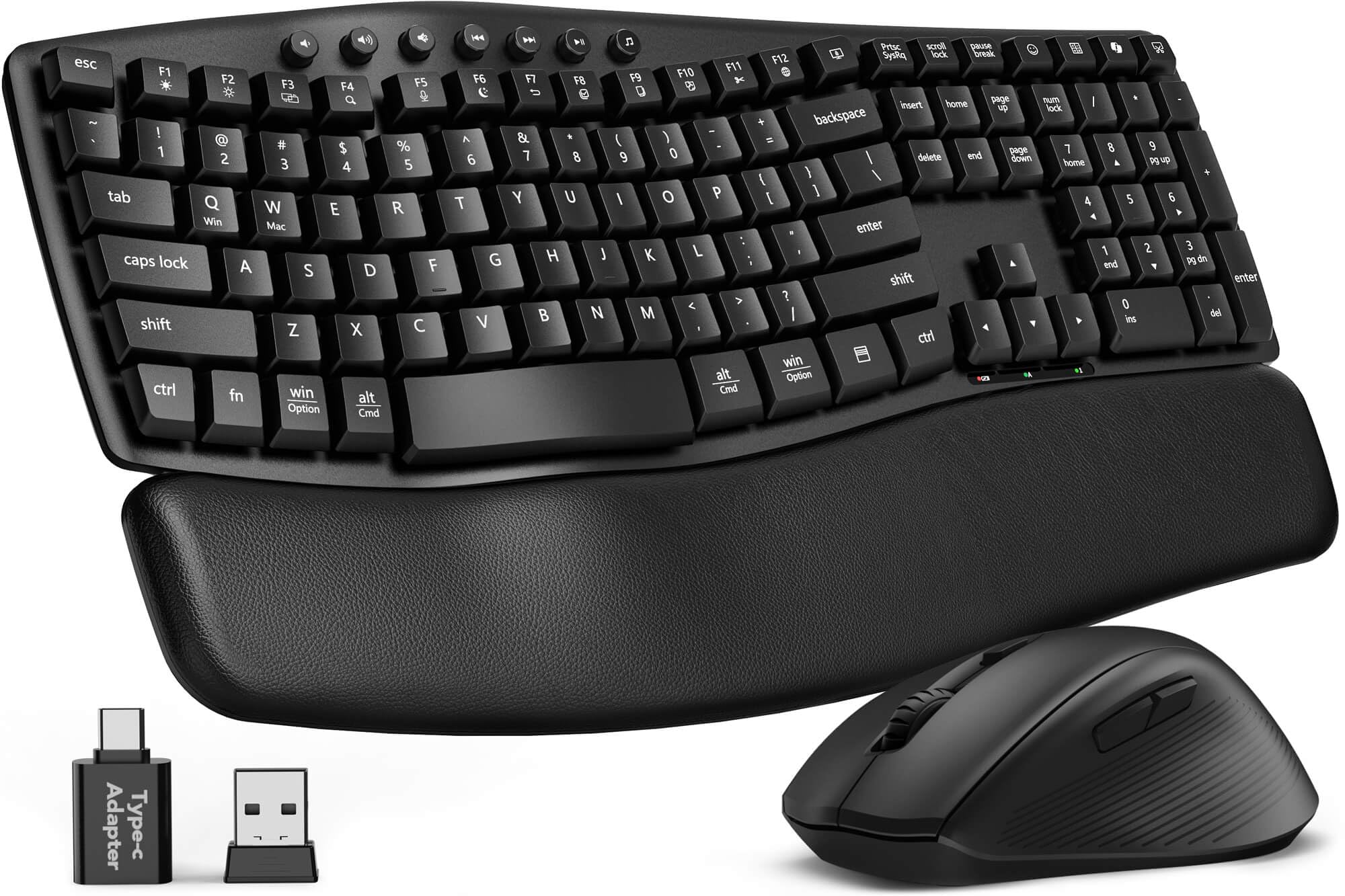
A cushioned leather palm rest and 30dB noise level (around as quiet as a whisper) make this a budget-friendly comfort pick.
The SABLUTE MA41 punches far above its price tier with a cushioned leather palm rest that customers note reduces wrist strain more comfortably than many pricier brands. The ergonomic wave design with two adjustable tilt angles encourages a natural typing posture, and the 30dB quiet typing means the keyboard is genuinely silent — owners describe it as “almost silent” and note it creates a calmer workspace. At 2.3 pounds, versus 1.37 pounds for the Apple Magic Keyboard, but that heft gives it a planted feel on the desk.
The single 2.4GHz receiver handles both keyboard and mouse, saving a USB port, and the range reaches up to 33 feet. The mouse has an optical sensor with adjustable DPI (dots per inch, which controls cursor speed — faster DPI means the cursor moves farther with less hand movement), and the combo supports Windows, macOS, ChromeOS, Linux, and Android. The keyboard is spill-resistant with bottom drain holes for accident protection. Quality is the top praised aspect (52 mentions), and the quiet operation follows closely (43 mentions). The biggest caveat is reliability — some reviewers point out the keyboard stopping working after a few weeks, though the 2-year replacement warranty covers that risk.
best for value: Budget-conscious teams or home offices wanting a quiet, comfortable wireless set with a cushioned wrist rest and long battery life (6–12 months on 2 AAAs).
skip if quality: A small number of units have connectivity issues early on — the 2-year warranty is there if you need it.
7. RECCAZR Ergonomic Wireless Keyboard and Mouse Combo
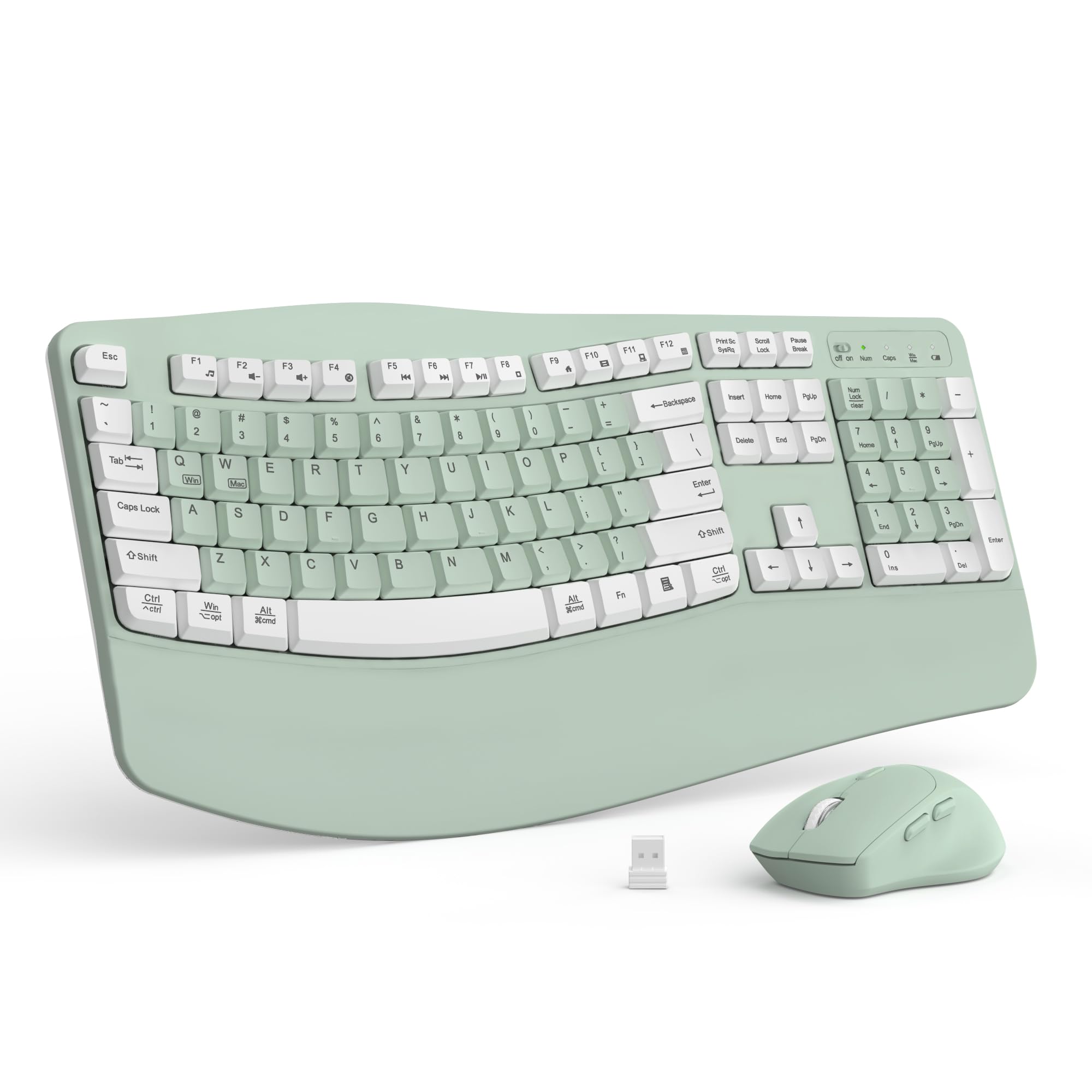
Comfort and quietness at a price that beats the Logitech Wave Keys combo — reviewers praise comfort (59 mentions) and quiet operation (59 mentions).
The RECCAZR combo takes the same wave-key ergonomic concept as the SABLUTE MA41 and delivers it at a similar budget price point. The scientific wave layout supports natural finger placement, and the cushioned wrist rest with a foldable stand reduces wrist pressure during long sessions. Owners consistently praise the comfort (59 mentions) and the quiet operation (59 mentions), calling the keys smooth and responsive without being loud.
Connectivity is via a single 2.4GHz nano receiver with a 33-foot range, and the mouse offers three adjustable DPI levels (dots per inch, controlling cursor speed) for cursor speed control. The keyboard is spill-resistant with bottom drain holes — a practical feature for a desk where coffee is always nearby. The setup is truly plug-and-play: insert the receiver, and both devices work immediately with Windows, macOS, and other operating systems. The avocado green color option adds a touch of personality to an otherwise standard office look. Quality is the standout aspect (132 mentions, the highest count in this roundup), but reliability is mixed — some shoppers say the mouse failing after a few days, so the one-year warranty is worth noting.
best for wrist pain: You want an affordable ergonomic keyboard and mouse set that is quiet, comfortable, and sets up in seconds.
skip if standard: You need absolute reliability from the mouse — a small number of units have a mouse failure issue early on.
8. Apple Magic Keyboard with Numeric Keypad (White)

The same premium full-size feel as the Touch ID version but without the fingerprint scanner — and a lower price.
For Apple users who do not need Touch ID, this white Magic Keyboard delivers the same premium typing experience and full numeric keypad at a lower price than its Touch ID sibling. It pairs quickly with any Bluetooth-enabled Mac (macOS 10.12.4 or later), iPad (iPadOS 13.4 or later), or iPhone/iPod touch (iOS 10.3 or later), and the internal rechargeable battery is legendary — owners consistently report charging once every two to three months, with one owner saying the battery “lasts forever.”
The scissor-switch keys provide a comfortable, precise feel that matches the built-in MacBook keyboard, and the extended layout includes document navigation controls and full-size arrow keys. Quality is the top praised aspect (43 mentions), and reliability (37 mentions) follows closely. The white finish has a clean, minimalist look that matches Apple’s design language, though a few owners note concern about staining over time. The main downside is the older Lightning connector for charging instead of USB-C — a minor inconvenience in 2025, but the cable is included. The value-for-money rating is mixed, with some feeling it is expensive for what is essentially a keyboard without Touch ID.
best for design: Apple users who want a high-quality full-size keyboard with incredible battery life and the ability to switch between Mac, iPad, and iPhone.
skip if secure: You prefer the convenience of Touch ID for secure logins or you want a USB-C charging port on your keyboard.
9. Microsoft Wired Keyboard 200 for Business

A 104-key layout with a 6-foot USB cable that buyers report survives years of daily abuse — 220 mentions for functionality.
Sometimes you need a keyboard that is simple, durable, and costs next to nothing — the Microsoft Wired Keyboard 200 is exactly that. It is a full 104-key layout with a 10-key number pad, quiet responsive keys, and a 6-foot USB cable that reaches most tower PCs. The functionality is the most-praised aspect (220 mentions), and the build quality (193 mentions) earns high marks for surviving years of daily abuse — owners mention using it for 3+ years without failure.
The keys have a slight texture that helps reduce typing errors, and the adjustable feet let you choose between flat and improve positions. It is not a quiet keyboard — the clickity-clack sound may annoy coworkers in a silent office — and the rubber feet are notoriously poor, sliding on smooth desks. Some customers note key legends fading after 8-10 months, which is a common trade-off at this price point. For a dedicated desk where you just need to type without worrying about batteries, connectivity, or breakage, this is the most honest workhorse on the list.
best for budget: You want a no-nonsense, ultra-reliable wired keyboard that costs very little and will last for years of heavy typing.
skip if mechanical: You need a quiet keyboard for a shared office or you want a premium typing feel — this one is basic but bulletproof.
Understanding the Specs
Switch Type: Mechanical vs. Membrane
The switch type determines how a keypress feels and sounds. Mechanical switches use an individual spring and contact under each key — they last much longer (typically 50 million keystrokes) and provide a distinct tactile bump or click that many typists prefer for accuracy. They are generally louder. Membrane keyboards press a rubber dome onto a circuit board — they are cheaper and quieter, but the feel is mushier with less feedback. For a business setting, silent mechanical switches (like Cherry Silent Red) offer fast, durable typing without the noise.
Connectivity: Wired vs. Wireless
A wired keyboard connects via USB cable — zero input lag, no batteries to replace, and always reliable, which makes it the safest choice for a fixed desk where the cable is not an issue. Wireless options use either a 2.4GHz USB receiver (stable, plug-and-play, one receiver can handle both keyboard and mouse) or Bluetooth (good for switching between a laptop, tablet, and phone without dongles). Bluetooth introduces a tiny amount of latency, though it is negligible for typing. If you switch between multiple devices all day, a multi-device Bluetooth keyboard with one-tap switching saves real time.
Ergonomics: Wrist Rest and Wave Design
A cushioned wrist rest (often memory foam or leather) supports your palms and reduces pressure on the wrist tendons during long typing sessions — a feature that consistently ranks as a top priority in owner reviews. A wave or curved keyboard layout angles the keys to follow the natural arcs of your fingers, reducing stretching and forearm strain. These features make a real difference for anyone typing 6-8 hours daily, and the data shows that owners who buy ergonomic keyboards report noticeably less hand and wrist fatigue.
Key Rollover and Anti-Ghosting
N-key rollover means every key press is registered independently, even when multiple keys are held down at once — useful for fast typists who brush keys while reaching for another. Anti-ghosting prevents the keyboard from registering a keypress you did not make when several keys are pressed simultaneously. These features are more common on mechanical keyboards and matter most if you type very fast or occasionally game during breaks.
FAQ
Should I get a mechanical or membrane keyboard for office work?
Is a full-size keyboard with a number pad necessary for business?
Can I use a Mac keyboard with a Windows PC?
How long does a wireless business keyboard battery last?
What is the quietest type of keyboard for an open office?
Can I connect a business keyboard to multiple devices at once?
How important is a wrist rest on a business keyboard?
Does a wired keyboard have less lag than a wireless one?
What does spill-resistant mean on a keyboard?
Final Thoughts: The Verdict
Across the board, the business keyboard winner is the Apple Magic Keyboard with Touch ID and Numeric Keypad because it delivers a premium typing feel, weeks of battery life, and the class-leading convenience of fingerprint authentication for Mac users. If you prioritize ergonomic relief and a cushioned wrist rest, grab the Logitech Wave Keys and Lift Mouse Combo. And for a silent mechanical experience that keeps your office quiet, the Cherry KC 200 MX is the one to reach for.
How We Picked
We do not accept paid placement. Every pick is matched to a real buyer and a real use-case; we do not hands-on test units.
Sources & Methodology
Specifications: manufacturer listings and product documentation. Review insights: verified customer reviews, as of July 2026. Pricing: not shown on this page (it changes often); check the current price via the retailer link.
As an Amazon Associate, FitlyFast earns from qualifying purchases. This does not affect which products we feature.